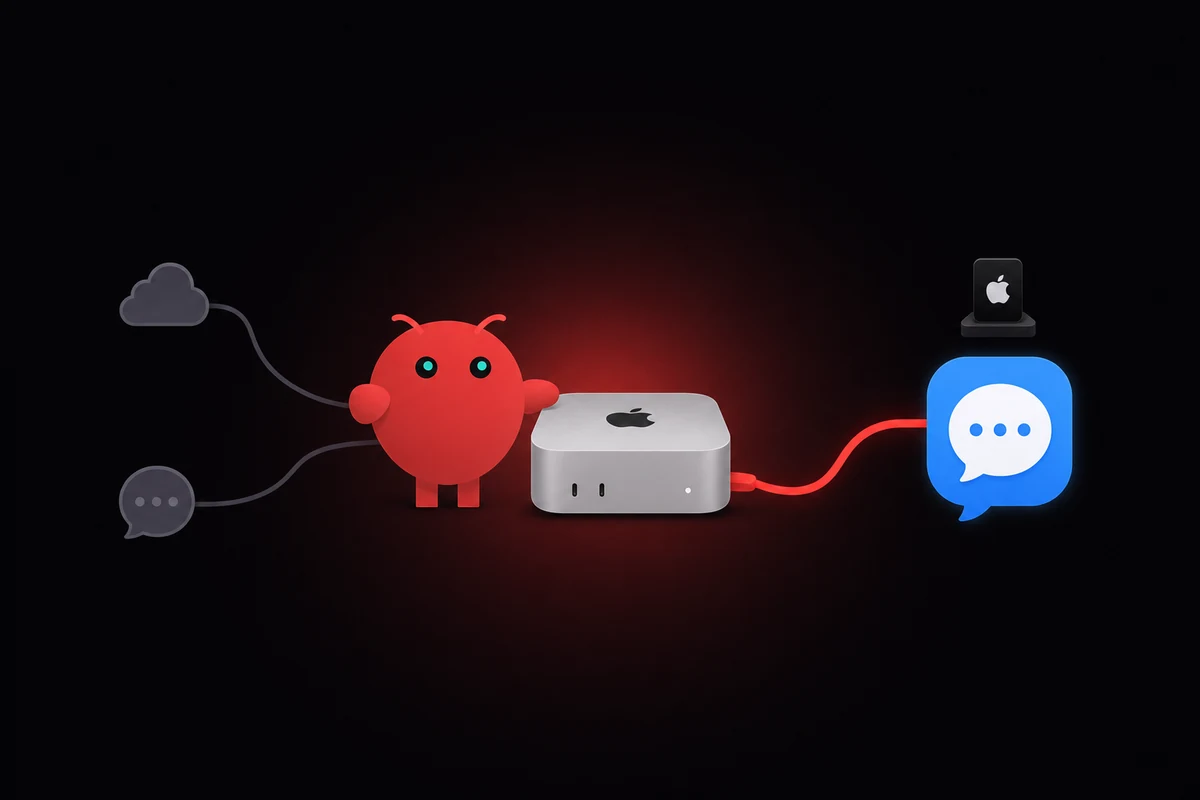
TL;DR: Run OpenClaw on a Mac and connect to iMessage with the imsg CLI, currently v0.8.1, installed from Homebrew via the steipete tap. Grant Full Disk Access to BOTH Terminal and the OpenClaw process, then point cliPath at the imsg binary in the Apple Silicon Homebrew prefix. All officially supported paths need a signed-in Mac running macOS 14 or later.
The imsg CLI is the only official path. It reads ~/Library/Messages/chat.db directly and exposes iMessage over JSON-RPC so OpenClaw can read and write. The OpenClaw iMessage setup runs about twenty minutes once Full Disk Access sticks.
You install imsg via Homebrew, verify with imsg chats --limit 1, then set cliPath in the iMessage channel block. A signed-in Apple ID on the Mac is the floor. An M1 Mac Mini is enough; you don't need the latest hardware. The OpenClaw setup basics cover the agent side if you're new here.
OpenClaw iMessage permissions are the part nobody documents. macOS forgets Full Disk Access after a reboot on headless Mac Minis, and the gateway throws permissionDenied (code 23) while manual imsg chats keeps working. The fix is to remove both processes from Privacy & Security, restart, and re-add them.
Below: the full install, the recovery flow for when FDA does not stick, the day-to-day limits (chunking, media caps, debounce), and a short note on when BlueBubbles or Claw Messenger become the right call instead.
A friend lent me a Mac Mini from his closet earlier this spring to test this. By week two the gateway was answering messages. By week three it had stopped, twice, both times after macOS pushed a security update and quietly dropped my Full Disk Access grants. The fix below is the one that finally stuck.
Install imsg and grant Full Disk Access (the part that breaks)
If you have a Mac signed into the right Apple ID, you're 80% there. Install imsg, hand Full Disk Access to the right two processes, and OpenClaw has a working iMessage bridge in about twenty minutes. Skip either step and the channel does nothing. OpenClaw shells out to this CLI on every read and every send.
Install via Homebrew and verify the binary
Hardware floor is an M1 Mac Mini. From the operators I traded notes with while debugging mine, older Apple Silicon boxes handle the imsg workload without breaking a sweat. CPU is never the bottleneck. macOS permissions are, and that surface is identical on every M-series chip.
Skip the "buy an M4 because you need it" framing. Pick whatever Mac you already have or can borrow, as long as it's signed into iMessage. If you do want to think through M1 Mac Mini hardware sizing for the agent side, that's a separate decision.
Install:
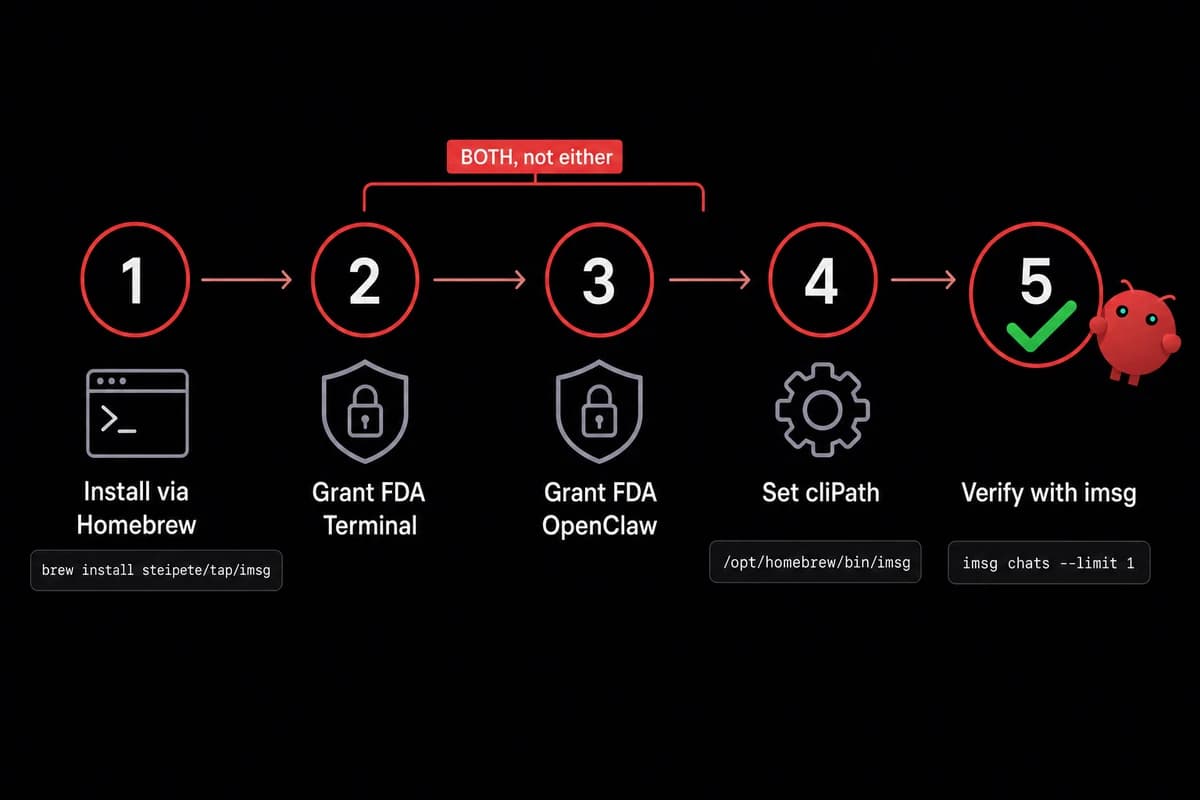
brew install steipete/tap/imsg
Current is v0.8.1 as of 2026-05. Verify with one of the most useful commands you'll run during setup:
imsg chats --limit 1
If you see one row of mock JSON describing your most recent chat, the binary is reading chat.db correctly. If you see permissionDenied, the next subsection is where you live for a while.
Grant Full Disk Access to BOTH processes (this is what breaks)
Open System Settings, then Privacy & Security, then Full Disk Access. macOS will show you a list of apps it has already seen requesting full-disk reads. You need two entries checked here:
- The terminal or shell that launches OpenClaw (most commonly Terminal.app, sometimes iTerm, occasionally a launchd plist that points at your shell)
- The OpenClaw binary itself, wherever Homebrew put it
Granting only one is the canonical failure. I spent the better part of a weekend on this, added imsg to the list, restarted, then watched the gateway log permissionDenied (code 23) while my manual imsg chats test sailed through.
The diagnosis took embarrassingly long to land. macOS scopes the permission per-process, so imsg needs both Terminal AND the OpenClaw process to have FDA. The terminal that runs imsg manually is a different process from the OpenClaw gateway that calls imsg on a schedule.
Both are reading chat.db. Both need to be on the list.
After you add the second entry, quit and relaunch OpenClaw. Don't just restart the gateway. The TCC service caches what was granted to a given PID, and a soft restart sometimes reuses a stale cache. Quit, then relaunch.
Point OpenClaw at the imsg binary
OpenClaw's iMessage channel block has one required field that breaks every install where the value is wrong: cliPath. On Apple Silicon, the path is /opt/homebrew/bin/imsg. On Intel Macs, /usr/local/bin/imsg. If you're not sure which one you have, just run:
which imsg
and use whatever it returns. Paste that string into cliPath exactly. No trailing slash, no quoting, no env-var expansion that might resolve to a different value when the gateway shells out to it. The path should be a literal absolute path the OpenClaw process can exec directly.
I burned an hour on this one. I'd installed imsg into a custom Homebrew prefix months earlier for an unrelated project, and which imsg pointed at a different binary than the one I'd just brewed. The fix took thirty seconds once I noticed. Finding the misalignment took forty.
Connect the iMessage channel in OpenClaw config
With imsg working at the shell, the bridge to OpenClaw lives in one config block. The dashboard handles pairing, but the channel block is what wires the binary to the gateway and decides who's allowed to talk to your bot.
The minimal channel block looks like this:
channels:
  imessage:
    name: imessage
    cliPath: /opt/homebrew/bin/imsg
    dmPolicy: allowlist
    allowFrom:
      - "+15551234567"
      - "+447700900123"
name is what the routing layer uses. cliPath is what we just set. dmPolicy and allowFrom are access control. Set them before you connect any number that other people use to text you, because the default permissive policy means anyone who guesses your Apple ID gets a free chat with your agent.
Pair, verify, and watch the first message land
In the OpenClaw dashboard, open the iMessage channel and click Pair. A 6-digit code appears with a one-hour expiry. On the Mac, OpenClaw uses that code to register imsg as the iMessage backend for the channel.
If you miss the window (and you will, at least once, because the code lands during a meeting), re-issue and try again. No state is broken, the gateway just keeps polling for a valid handshake.
After the handshake completes, send yourself an iMessage from another device. Watch the gateway log it. If you see the message JSON in the OpenClaw log feed, the bridge is working. If you don't, jump to the troubleshooting H2 below.
The routing identity OpenClaw assigns each conversation is acp://imessage/<chat-guid>, which is what ACP-aware skills key off when they need to address back into the right thread. You won't see this surface in normal use, but it's there if you want to write skills that fan out across multiple iMessage threads.
If the channel is bridging into a Linux gateway over SSH or Tailscale, the cliPath still points at the Mac-side imsg binary. The JSON output mode is what makes that hand-off work cleanly. The full topology lives in the alternatives H2 below.
When iMessage on OpenClaw breaks (and what fixes it)
Most iMessage-on-OpenClaw failures come down to macOS doing macOS things. Full Disk Access grants don't always survive a reboot. Manual imsg chats keeps working because the terminal still has its grant; the OpenClaw process loses its grant silently and throws permissionDenied (code 23) on every chat.db read. The fix is a five-step ritual.

The FDA-doesn't-stick fix (5 steps)
Here's the procedure that has worked every time I've hit this across a few months of running the bridge:
- Open System Settings, then Privacy & Security, then Full Disk Access
- Remove imsg from the list (the minus button under the table)
- Remove Terminal (or whatever shell the gateway runs under) from the list
- Restart the Mac
- Re-add both entries, then quit and relaunch OpenClaw
Odd as it sounds, removing the entries and adding them back is what gets macOS to refresh its TCC bookkeeping. Just toggling the checkbox off and on doesn't work. The minus-and-restart cycle does. I don't have a clean root-cause story. I have a few months of "this is what fixes it."
Decoded, permissionDenied (code 23) says "the calling process is not allowed to read this protected location." TCC scopes that location at the per-process level, which is why the manual terminal and the gateway behave differently even though both invoke the same imsg binary.
Permissions belong to the calling process, not to the binary. That's why granting FDA only to imsg isn't enough. The gateway is the one making the call. The gateway needs the grant.
Don't reboot the Mac Mini without a reason. Every restart risks re-triggering the FDA forget. If you must reboot for a software update, expect to redo the five-step ritual after. Headless Mac Minis are the worst offenders. There's no logged-in GUI session to keep the TCC service warm, and I assume that matters, but I'm guessing.
The other failure modes are less painful:
- Pairing code expired. The 6-digit code is good for one hour. After that, re-issue via the dashboard. No state has to be cleaned up.
- Split-send DM debounce. Incoming messages get debounced at roughly 2500 ms before they're handed to the agent. If someone sends "what" then "are" then "we doing today" in rapid succession, you'll see one merged message. The merge is by design; it stops the agent from triggering three answers to one half-finished thought.
- Catchup on gateway downtime. When the gateway comes back from a restart, it backfills the last 50 rows from
chat.dbor the last 120 minutes of messages, whichever is shorter. Anything older than that is gone from the catchup window. The reader who needs perfect history should be looking at archival exports, not message replay.
Limits you'll hit (chunks, media, thread context)
A few hard limits sit inside the iMessage channel that don't get documented anywhere obvious.
| Limit | Default value | What happens when you hit it | Workaround |
|---|---|---|---|
| Outbound message chunking | 4000 characters | Long agent replies split into multiple iMessages | Lower the chunk size in config if 4000 is too much; raise it for fewer splits |
| Media attachment size | 16 MB | Attachments above the cap fail to send | Compress before send, or route attachments through a sharing skill |
| Split-send debounce | ~2500 ms | Rapid-fire incoming messages merge into one | Tune debounce per channel if your senders are slow typists |
| Catchup window | 120 min or last 50 rows | Older missed messages aren't replayed | Treat the bridge as live-only; don't rely on perfect history |
| Pairing code expiry | 1 hour | Pairing fails silently after the window | Re-issue from the dashboard |
Day-to-day limits in the OpenClaw iMessage channel, all tunable in the channel config.
One limitation worth calling out by name: thread context. GitHub Issue #10872 is open as an enhancement and tracks the fact that the imsg JSON output (v0.4.0 and after) doesn't expose reply-context fields from chat.db. The reply data exists in the underlying SQLite. The CLI doesn't surface it.
So when someone replies inline to an older message in an iMessage thread, the agent sees the reply but not what it's replying to. If you need rich threading, Telegram or Discord are more capable today. For most one-on-one bot conversations, the missing reply context doesn't matter.
Babysitting Privacy & Security every Monday morning gets old fast. OpenclawVPS runs the managed Mac Mini path so the reboot ritual stops being your problem. Done in 47 seconds, three-day money-back. Plans start at $19/month.
If imsg doesn't fit you: BlueBubbles and Claw Messenger
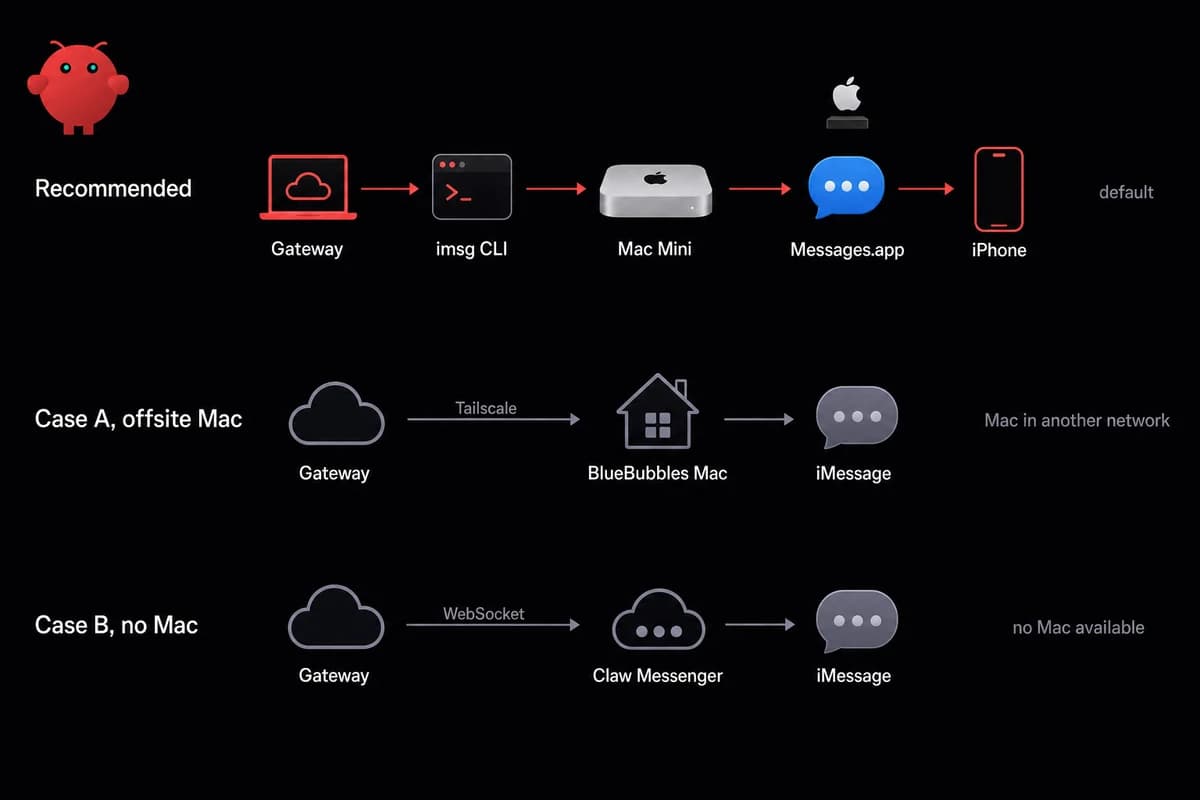
Two cases push you off the imsg path. Your Mac lives in a different network than the gateway, or you don't have a Mac at all. BlueBubbles handles the first case as a self-hosted Mac-side service. Claw Messenger handles the second as a third-party hosted relay. Default is imsg; the others fit specific situations.
Case A: offsite Mac with BlueBubbles
Run BlueBubbles on the Mac side and it pushes incoming messages over webhooks to your gateway. Reach for it when the Mac lives in a different network than the OpenClaw process.
One operator I traded notes with keeps his Mac Mini at his parents' house in another country, with the gateway in a cloud VPS and a Tailscale tunnel between them. That arrangement only works because BlueBubbles abstracts the Mac-on-the-other-side-of-the-internet problem.
Tailscale is the tunnel I'd reach for first. ngrok works, but Tailscale stays up across the Mac's sleep/wake cycle and across IP changes on either end. The friend whose Mac Mini I borrowed had been using ngrok and his bot would silently die for ten minutes every time his ISP rotated his home IP.
Honesty note on BlueBubbles: in 2026 several write-ups flag it as legacy. The broader signal is that it still works but isn't where the work is going.
If you have it running and stable, no reason to migrate today. If you're starting from scratch in 2026 and the offsite-Mac story is your driver, it works. Long-term, expect to migrate off.
Case B: no Mac with Claw Messenger (and the trade-offs)
The hosted-relay option works like this: an OpenClaw plugin connects to Claw Messenger over an authenticated WebSocket, and the relay handles the iMessage side from inside Apple's infrastructure. Setup runs about five minutes from sign-up to receiving messages, per the vendor.
It's the only option that answers the "does OpenClaw require a Mac for iMessage" question with a real "no." Two caveats keep me from recommending it as the default.
First, Apple's ToS for iMessage doesn't bless hosted-relay services. Apple monitors how many new contacts and messages an account is sending and flags accounts that look like they're being used at scale.
The flag-rate at meaningful volume is high enough to make you nervous. You can run a personal-volume bot through Claw Messenger and likely be fine for years. You cannot run a 50-client agency bot and expect the same.
Second, your messages route through someone else's server. For the privacy-first audience OpenClaw attracts, that's a hard no. Most of the trust argument for iMessage over Telegram comes down to one thing: people trust Apple more than they trust a relay vendor they've never heard of.
If the lawyers or journalists or Apple-trusters in your life are the people you're building for, Claw Messenger isn't the answer. There's a longer treatment of self-hosted vs hosted-relay security trade-offs if you want to think it through end-to-end.
imsg ends up the path because everything else has been ruled out. GitHub Issue #44406 ("iMessage relay integration, solving the macOS-only bottleneck") was closed by the OpenClaw maintainers as "not planned." They chose not to ship a first-party Mac-free relay.
So the Mac-free story is third-party only, and the third party is Claw Messenger. BlueBubbles is drifting toward legacy. The Apple-supported iMessage interface is Messages.app reading chat.db, which is what imsg wraps. Everything else is a workaround for the absence of a public iMessage API.
| Path | Mac required | Setup time | Maintained by | Best for | Risk |
|---|---|---|---|---|---|
imsg CLI | Yes (any Mac, signed in) | ~20 min | OpenClaw + steipete (active) | The default for everyone | FDA forgets across reboot |
| BlueBubbles | Yes (offsite OK) | ~45 min | Community (slowing) | Mac in one network, gateway in another | Flagged as legacy by 2026 |
| Claw Messenger | No | ~5 min | Third-party vendor | No-Mac setups, low volume | Apple flags hosted-relay accounts |
imsg by default. BlueBubbles when the Mac lives offsite. Claw Messenger when there is no Mac at all.
How I run OpenClaw on Apple hardware
imsg on a Mac is the path, and the OpenClaw Mac Mini iMessage path stays cleaner when somebody else handles the Apple-hardware-on-the-internet problem. OpenclawVPS doesn't ship a managed iMessage bridge directly. What we sell that's relevant here is the Mac Mini M4 plan running OpenClaw, the Apple hardware imsg needs, plus the reboot-and-FDA babysitting handled on our side.
Linux gateway operators can keep their existing stack and tunnel to a managed Mac Mini for the iMessage tail. Plans start at $19/month for the Linux side and $99/month for the Mac Mini M4, three-day money-back on either. If your iMessage answer turns out to be "use a different channel," the OpenclawVPS WhatsApp setup guide and the Telegram bridge setup are the natural next reads.


