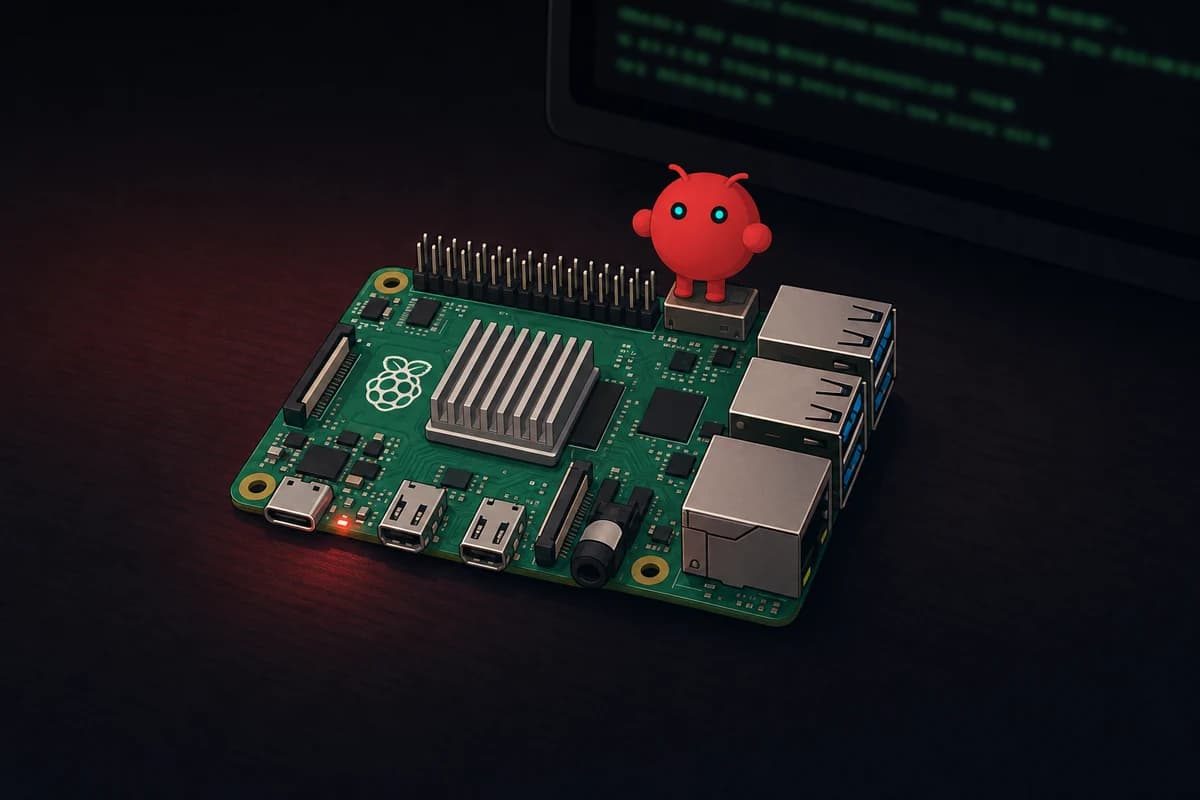
The setup is three boards plus a decision. On a Raspberry Pi 5 with 8GB RAM, the official 27W USB-C power supply, and an NVMe boot drive, you flash Raspberry Pi OS 64-bit and run curl -fsSL https://openclaw.ai/install.sh | bash.
The wizard then walks you through it. Pick your LLM provider (Anthropic Claude or OpenAI), pair a Telegram bot, and skip the skills marketplace until you have read the Koi Security audit. The dashboard opens at 127.0.0.1:18789 over an SSH tunnel.
The Pi is the host. It is not the brain. Your model calls terminate in Anthropic, OpenAI, or a separate GPU box on your network. Pi silicon delivers 2-8 tokens per second on local LLMs through Ollama, fine for tinkering, useless for parallel workloads.
Cost runs about $2-5 a month in electricity, plus tokens. That token bill hits $50-180 per agent on Opus 4.7 if you leave heartbeats on default.
Pi 4 with 4GB still works for hobby use. Pi Zero 2 W runs PicoClaw instead. A January 2026 OpenClaw security patch closed a one-click remote-code-execution bug in the email channel. Skip it and run on your daily driver, and you hand a stranger a free path into your home network.
Three days into my first install, the same setup that felt like a perfect "secondary machine" got banished from anywhere near my laptop. The email channel turned out to be social-engineerable in a way I had not thought through.
What OpenClaw on a Raspberry Pi actually gives you
Running OpenClaw on a Raspberry Pi gives you the agent process, not the model. The Pi runs the OpenClaw scheduler, MCP servers, message channels, and the dashboard at port 18789. Every model call leaves the Pi and lands somewhere else: Anthropic, OpenAI, or a beefier box on your LAN.
Local-only inference is possible on a Pi 5 with Ollama, but it is not pleasant. Benchmarks land around 2-8 tokens per second on the Broadcom BCM2712 silicon. Fine for testing a workflow over a coffee. Miserable if you have an actual chat going.
I tried serving two agents off one Pi 5 with a quantized 7B model and got responses that took 90 seconds each, in series. A real GPU box on the same LAN fixes this.
So why use a Pi? The orchestration parts are what need to be cheap, isolated, and always-on. The Pi sips about 5W and boots from a card you can reformat without losing anything important. Leaving one plugged in for a year costs less than running a single H100 for an afternoon. An old Android phone via Termux clears the same bar for even less money, with the battery doubling as the UPS.
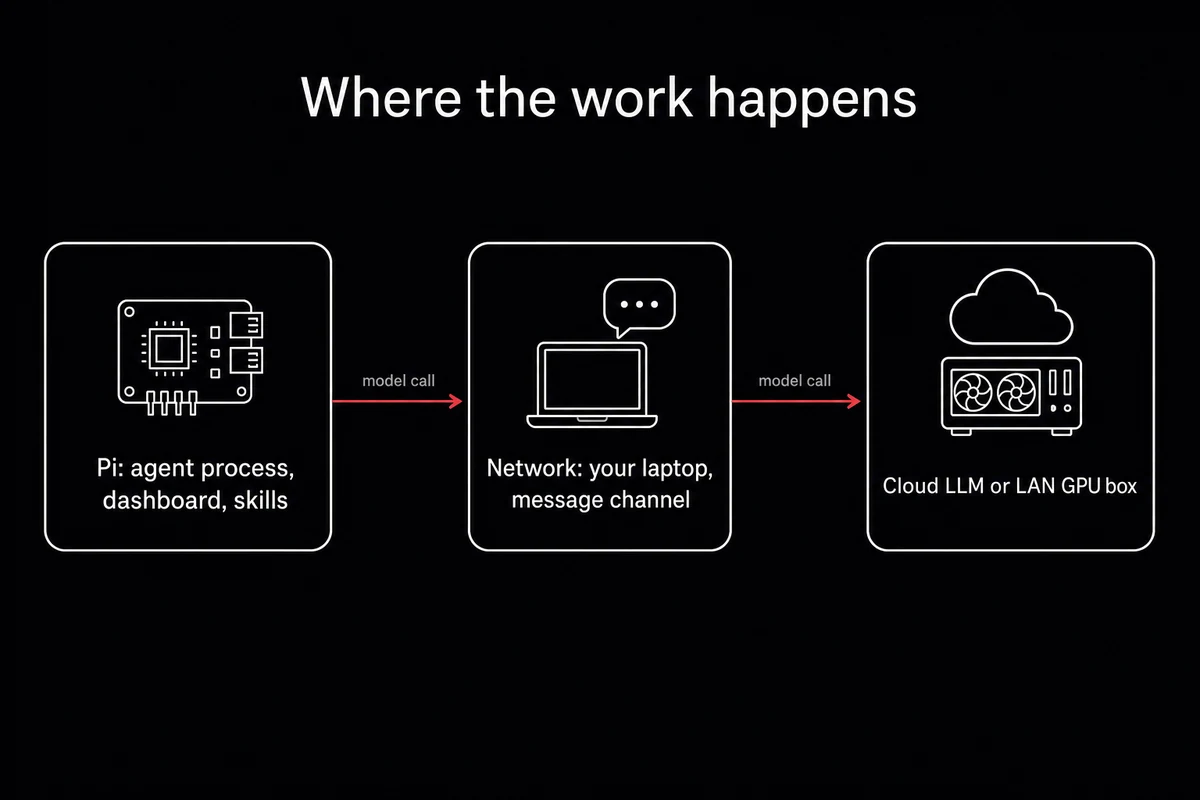
If you came in expecting what OpenClaw actually is to be a single binary that runs both pieces, this split is the part to recalibrate around first.
Hardware: what to actually buy for OpenClaw on Raspberry Pi 5
Here is the hardware to actually buy: a Raspberry Pi 5 with 8GB RAM, an NVMe drive, and the official 27W USB-C power supply. Pi 4 with 4GB still works if you already have one in a drawer.
Pi Zero 2 W runs PicoClaw, not OpenClaw, and the difference matters. Skip any Pi older than the 4 unless you only need PicoClaw's lights-and-sensors loop.
The Pi 5 8GB board sits around $80 new. Pi 5 16GB jumped from about $120 to $200 in February 2026 when the OpenClaw demand spike hit. If you are buying right now, the 8GB version covers everything in this article comfortably.
The other line items add up faster than expected. The official 27W PSU (5.1V, 5A USB-C) is mandatory; earlier supplies fail under load. A heatsink with a small fan keeps the SoC out of throttle.
NVMe over an M.2 HAT beats an SD card so badly on read latency that I would call SD a temporary measure, not a real install path.
What goes on the receipt:
- Pi 5 board (8GB unless you have a specific 16GB workload)
- Official 27W USB-C PSU
- NVMe SSD (256GB is plenty) plus the M.2 HAT, or a 128GB SD card if you are testing
- Case with active cooling
| Board | Best for | Board cost (USD) | OpenClaw fit |
|---|---|---|---|
| Pi 5 8GB | Most setups, the practical default | ~$80 | Full OpenClaw, headroom for skills and channels |
| Pi 5 16GB | Heavy multi-agent or local-LLM tinkering | ~$200 (post-shortage) | Full OpenClaw, comfortable parallel runs |
| Pi 4 4GB | If you already own one | ~$55 | Full OpenClaw, hobby-grade only, slower |
| Pi Zero 2 W | Lights, sensors, microcontroller-class jobs | ~$15 | PicoClaw only, not OpenClaw |
Table: Pi board options for OpenClaw. What to buy and what to skip.
The 2GB RAM minimum in the official docs is technically supported. In practice, swap thrashing on a long conversation will make you regret that line item.
How to install OpenClaw on a Raspberry Pi (15-minute path)
This OpenClaw Raspberry Pi setup takes about 15 minutes if you know what you are doing and roughly an hour the first time. The actual install script runs in 2-4 minutes over WiFi. The rest is OS flashing, SSH setup, and the wizard.
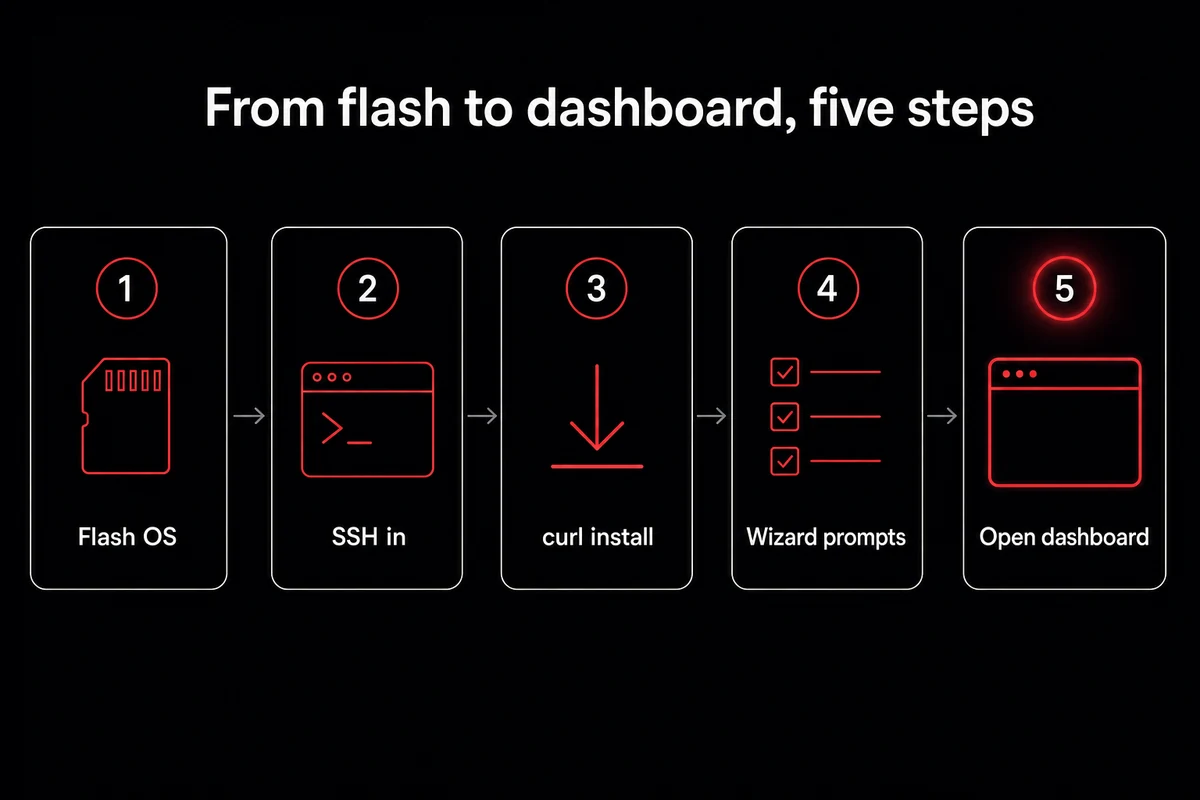
The order I follow:
- Flash Raspberry Pi OS 64-bit using Raspberry Pi Imager. Pick Lite for headless, Desktop if you want Pi Connect screen sharing later. Either works.
- In Imager's pre-config, set the hostname, enable SSH, paste your SSH public key, and fill in WiFi credentials. Skip this step and you will spend 10 minutes hunting for the IP on first boot.
- SSH in (
ssh pi@your-hostname.local), thensudo apt update && sudo apt upgrade -y. Install Node.js 22 LTS via the NodeSource script. Some newer guides specify Node 24, but Node 22 has the fewest install issues right now. - Run the one-liner:
curl -fsSL https://openclaw.ai/install.sh | bash. Install runs about 2-4 minutes over WiFi, longer if your mirror is slow. - The wizard kicks in. It asks for a model provider (Anthropic Claude OAuth is the easiest path; the token has format
sk-ant-oat01-...and stays valid one year). It asks for a messaging channel (pick Telegram, follow the BotFather prompts). It asks about web search (Brave Search is free for low volume). It asks about skills. Skip skills. - Open the dashboard via an SSH tunnel:
ssh -L 18789:127.0.0.1:18789 user@pi.local. Visithttp://127.0.0.1:18789in a browser. The gateway token shows up in the SSH session; paste it in the login form.
If you would rather pair a different chat surface, the WhatsApp pairing path covers the QR flow and Gmail OAuth walks the Cloud Console clicks. Picking GPT or any non-Claude provider is fine here too. The OAuth path is just shorter for first-time installs.
If the install fails halfway
It will. Three of my last five Pi installs hit a permission error on the npm step, and one had a Node version conflict because the apt repo lagged behind NodeSource. Recovery is mechanical:
- Permission errors during npm: re-run with a user-level npm prefix, or remove the partial install with
~/.openclaw/uninstall.shand start over. - Node version conflict: purge any existing Node (
sudo apt purge nodejs), reinstall via NodeSource specifically, then re-run the curl one-liner. - Wizard hangs on the OAuth callback: kill the install, run
openclaw loginfrom the CLI directly, paste the token manually.
I have rebuilt this setup four or five times by now. Budget an hour for the first install, not 15 minutes.
Skip the permission-error gauntlet. OpenclawVPS provisions a dedicated VPS with the same OpenClaw stack preinstalled and the gateway already exposed over HTTPS. Done in 47 seconds, no NVMe HAT to seat, no Node version conflicts. Plans start at $19/month.
Cost: what you actually spend per month
The honest monthly cost of running OpenClaw on a Raspberry Pi is hardware plus electricity plus tokens. Hardware is a one-time $80-200. Electricity is $2-5 at 5W average draw and US household rates. Tokens are the unbounded line item, and the one nobody puts in their tutorial.
Default heartbeats are the trap. OpenClaw wakes up every 30 minutes, sends the entire context (around 10,700 tokens of system prompt plus workspace plus conversation history), and asks itself if anything is urgent. Forty-eight checks a day. At Opus 4.7 input pricing of $5 per million tokens, that runs roughly $6 a day, or about $180 a month per agent.
I learned this the embarrassing way. I left two agents on a Pi 5 over a long weekend with Opus on default settings and came back to a $42 charge. Talking to other operators, $50-100 a month on a Pi 4 before quitting is not unusual.
| Cost line | Monthly amount | What drives it | How to cut it |
|---|---|---|---|
| Hardware | ~$10-20 amortized | One-time spend over 12 months | Buy used, or skip the 16GB SKU |
| Electricity | $2-5 | 5W average × 24/7 × $0.13/kWh | Run on a power strip with a timer for non-critical hours |
| Tokens (cloud, default) | $50-180 per agent | Heartbeats every 30 min on Opus 4.7 | Switch to scheduled cron, route to Sonnet or Haiku |
| Tokens (local Ollama) | $0 in API spend | Zero outbound calls | Accept 2-8 tok/s and quality drop |
Table: Real monthly cost of running OpenClaw on a Pi.
The mitigations work. Swap the heartbeat for a cron-scheduled "morning briefing" that fires once when you wake up. Route everything except your critical agent to Sonnet at $3 per million tokens, Haiku at $1, or GPT-4o-mini. Cap the context window.
Routing agents to different models is the single biggest cost lever, bigger than anything you can do on the hardware side.
A smaller open-weight model like MiniMax M2.7 handles routing and summary work at a fraction of the per-token cost, leaving the API bill on your critical path only. How heartbeats persist context is the memory layer story; tightening it is the second cost lever after model routing.
Local-only inference through Ollama on a separate GPU box is the other escape valve. You eat the up-front hardware cost, the electricity goes up, the token bill goes to zero.
Make it always-on (without making it dangerous)
For an always-on setup that doesn't become dangerous, you want the OpenClaw service running under systemd so it survives reboots. The cleanest path is openclaw onboard --install-daemon, which sets up the unit file for you. PM2 works too, but the systemd version is simpler to reason about when something breaks at 3am.
Once the service is up, lock the network surface down before you forget:
- Bind the dashboard to 127.0.0.1. Never expose port 18789 on your LAN, never on the internet.
- For remote access, use Tailscale with an ACL that only allows your phone, or an SSH tunnel from your laptop. Skip ngrok.
- Rotate the gateway token if you have ever pasted it into a screenshot or a chat that could be screenshotted later.
CVE-2026-25253 is the security event to know about. CVSS 8.8, one-click remote code execution, patched on January 29, 2026. The exploit ran through a crafted email the agent processed without confirming with the user. Patch first, then turn the agent on.
The skills marketplace is the other half of the threat model. Koi Security audited the ClawHub catalog and found 341 of 2,857 skills (12%) flagged as malicious, with 335 of those traced to one coordinated campaign.
Vet anything you install with the Koi Clawdex scanner before giving it shell access. The Pi is the right host for this risk surface: cheap, isolated by default, reformattable in 10 minutes, and holding none of your real data on disk.
For the longer playbook, the day-1 OpenClaw security checklist covers the seven defenses I run in the order I run them.
When a Raspberry Pi is the wrong host for OpenClaw
A Raspberry Pi is the wrong host for OpenClaw in four specific situations. The SERP buries this part. I am going to say it plainly so you do not waste a Saturday and $200 finding out.
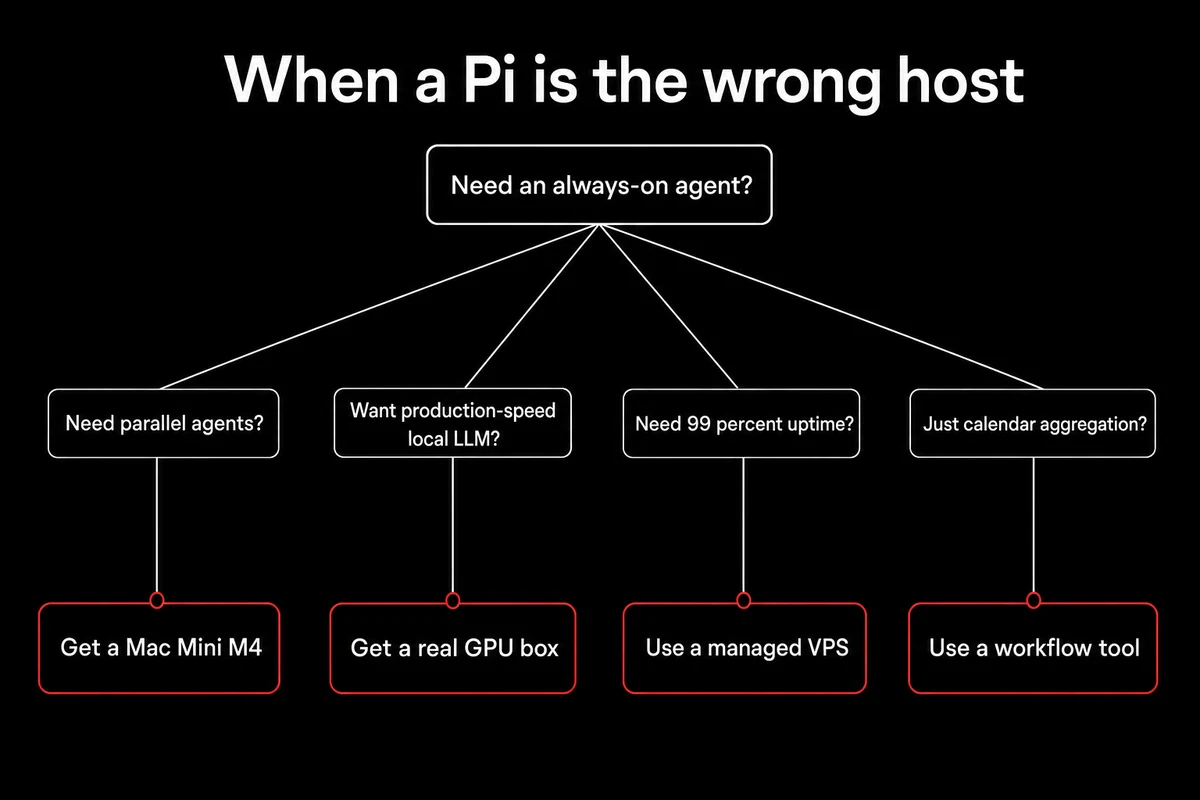
You need parallel agents serving multiple users. The Pi serializes. A Mac Mini M4 or a real VPS will run three agents at once without breaking a sweat. The Pi queues them and feels sluggish.
You want to run the LLM locally at production speed. Pi 5 silicon caps at around 2-8 tokens per second on Ollama. Fine for "let me try a prompt," useless for anything you would ship. Get a real GPU box.
You need uptime better than your home power and SD card can deliver. SD cards die under sustained writes; the install allocates a 2GB swap that wears the card faster than people expect. Home power blips. If you need 99.9% uptime, get a managed host with an SLA.
You only need a calendar-and-email aggregator with no AI loop. Zapier or any point solution is cheaper than a Pi and a token budget. The reason to run OpenClaw on a Pi is the agent loop and conversation memory. Without those, skip this entirely.
The setup I run now
I run a Pi 5 8GB with NVMe boot, the official 27W PSU, a small fan-equipped case, and the OpenClaw service under systemd behind a Tailscale ACL that only allows my phone. Telegram is the message channel, Anthropic Claude via OAuth is the model.
Heartbeats are off, replaced by a cron-driven morning briefing. CVE-2026-25253 is patched. The skills tab is empty until I have run a skill through the Koi Clawdex scanner.
If your Pi experiment outgrew the box, OpenclawVPS provisions a dedicated VPS running the same OpenClaw stack in 47 seconds, HTTPS gateway already wired up, browser-native remote desktop included. EU regions in Falkenstein, Nuremberg, and Helsinki. Plans start at $19/month with a 3-day money-back guarantee.


