TL;DR: OpenClaw is an open-source personal AI agent. You run it on a VPS, Mac mini, or Pi, pair it with an LLM you pick (Claude, GPT, or local Qwen), and talk to it through Telegram, WhatsApp, Slack, or Discord. It keeps memory in plain Markdown files and handles email, calendar, and briefings while you are away from a screen.
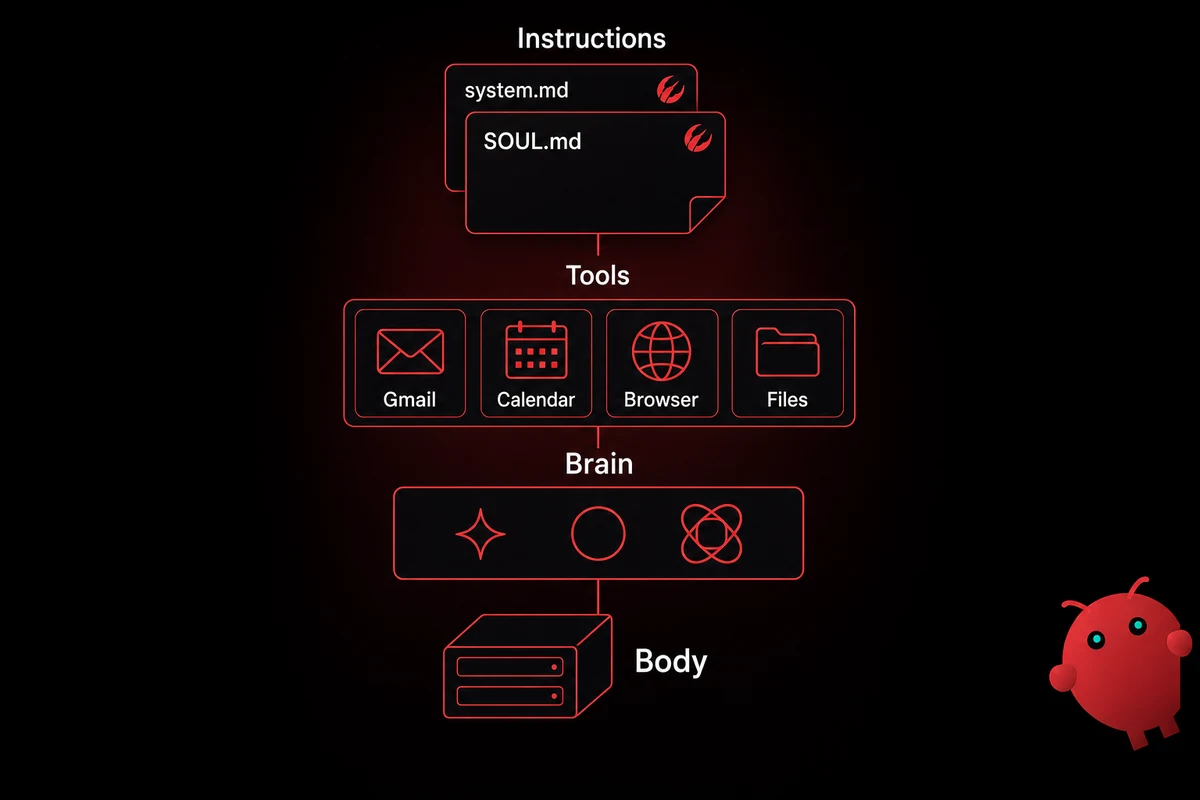
This OpenClaw guide walks the architecture: a body, a brain, tools, and instructions. The body is the host machine. People run it on a $5 VPS, an old Mac mini, a Pi, or a one-click managed instance.
The brain is the LLM you pair with through an API key. Tools are skills (ClawHub plugins) and MCP servers that let the agent read email, manage your calendar, browse the web, or search files. Instructions live in two Markdown files: SOUL.md for identity and tone, and a system prompt for behavior and guardrails.
What this stack does that ChatGPT-in-a-tab cannot is run as a service. It acts on a schedule, persists memory across sessions, and reaches out to you first through a messaging channel.
Common workflows include morning briefings, email triage, Siri-via-iMessage relays for hands-free queries, calendar planning, and small multi-agent setups. The project is open-source on GitHub at openclaw/openclaw.
What OpenClaw is, in plain language
OpenClaw is an open-source personal AI agent. You run it on hardware you choose, pair it with an LLM you choose, and talk to it through messaging apps you already use. The repo lives on GitHub at openclaw/openclaw.
A working install takes an evening on a Pi, a few minutes on a managed OpenclawVPS, or about half an hour on a self-hosted VPS you set up yourself.
What makes OpenClaw a different category from ChatGPT in a browser tab is that it runs continuously, not just when you open a window. It acts on a schedule and remembers last week, last month, and the messy three days when you were debugging your taxes.
I went a week pretending it was just a chat box before realizing the daily push had quietly replaced three things I used to open the laptop for: inbox triage, calendar check, morning news.
A note on the rename history. The project shipped as Clawdbot in November 2025, was renamed to Moltbot on January 27, 2026 after Anthropic raised a trademark issue, then renamed to OpenClaw three days later.
Same maintainers, same codebase, three names. Older forum posts still use Clawdbot or Moltbot when referring to what is now openclaw/openclaw. If you find a "Clawdbot setup" tutorial, almost everything still applies; CLI flags moved slightly, channel-pairing got cleaner in v2026.4.7, and Memory Wiki is new.
A surprising amount of public arguing about OpenClaw is actually arguing about what people choose to wire it up to, not the project itself. The core agent has a small surface area; the interesting part is the stack you build on top.
How OpenClaw works
How OpenClaw works comes down to a host machine, an LLM you reach over an API, the tools the agent can call, and two Markdown files. Each component carries a different cost profile and a different failure mode, which is why most setup walkthroughs cover them in this order. At a glance:
| Component | What it actually is | Common choices |
|---|---|---|
| Body | The host machine that runs the OpenClaw service | OpenclawVPS managed, Mac mini, Raspberry Pi, self-hosted VPS |
| Brain | The LLM your agent calls over an API | Claude Sonnet/Opus, GPT-4o/5, Gemini, OpenRouter routing, local Ollama |
| Tools | Skills and MCP servers the agent can use | ClawHub community skills, Gmail/Calendar OAuth, browser tools, MCP file search |
| Instructions | Two Markdown files that define behavior and voice | ~/.openclaw/SOUL.md (identity, tone), system prompt (rules, guardrails) |
Table: The four components of an OpenClaw setup, with concrete examples of what fills each slot.
Body first. An always-on VPS keeps the agent running when your laptop sleeps. The managed path at OpenclawVPS starts at $19/month with OpenClaw preinstalled; the DIY path is whatever VPS you provision yourself plus an apt install evening.
I started on a Pi for two weeks before moving to a VPS. The Pi was fine for chat, but the briefing-cron felt slow once Gmail OAuth was wired up. The hardware-requirements walkthrough prices the boxes side by side.
Other widely-used paths: a Mac mini in a closet, a Raspberry Pi 4 with 4 GB of RAM for low-power always-on, or a managed instance that provisions in 47 seconds. The Pi 5 build with the $180 heartbeat trap is the longer write-up of the home-server path. The WSL2 install on a daily-driver Windows PC covers that route end to end.
Picking a brain mostly comes down to cost. Claude Sonnet at moderate use sits around $3 per million input tokens; Opus is closer to $15. A heavy week on Opus can land at $40 to $60 without a spend cap.
OpenRouter sits in front of all the major providers and lets you swap models without changing your API key. Ollama with Qwen 3.5 27B is the path most operators converged on for fully-local. The DeepSeek-as-brain path is a cheaper proprietary alternative. If you already pay for ChatGPT Plus or Pro, wiring it as the brain via Codex OAuth skips API-key setup entirely and bills against your existing sub.
Set a hard spend cap on day one. Install, connect a few skills, walk away for the weekend, come back to a $200 bill. That pattern repeats across early 2026 forum posts.
Switching brains is fine. Moving providers is one config edit and a gateway reload. Tool-calling shifts subtly between Sonnet, GPT-5, and Qwen, so expect a day of re-tuning after a swap.
Tools come in two flavors. Skills are ClawHub plugins bundling prompts, scripts, and config into one named unit. MCP servers expose capabilities over the Model Context Protocol: browser, file search, custom processes. Hooking an MCP server into your install is shorter than beginners expect.
Google Workspace gets its own category. OAuth scope choices for Gmail, Calendar, Drive, Sheets, Docs, and People API are also blast-radius decisions. Pick the narrowest scope that still does the job.
Instructions are the part most beginners skip. SOUL.md is identity, tone, name, and voice. The system prompt is rules, guardrails, and tool-use directives. Both files sit at ~/.openclaw/ on a default install.
The first time I edited my SOUL.md I added a line "respond like a tired postdoc who just wants to be left alone" and the next reply was "I see we are doing this, fine, what." Same model, same channel. One Markdown line shifted the entire feel.
Voice is upstream of model choice. The persistent-memory-in-plain-Markdown walkthrough covers MEMORY.md, daily notes, Memory Wiki, and dreams in detail.
If you're starting to price out VPS plans, OpenclawVPS ships a managed box with OpenClaw preinstalled and the gateway running in 47 seconds. You skip
apt installand the OAuth dance, then spend your first evening on skills, channels, and SOUL.md. Plans start at $19/month.
What you can actually do with OpenClaw
What you can do with OpenClaw splits into three buckets. Things the agent sees (inbox, calendar, files), things it does (sends messages, runs scripts, schedules itself), and things it remembers (Markdown notes that survive reboots).
Channel reach is wider than most users realize on day one. Telegram is the universal first choice and shows up in 9 of 10 setup walkthroughs. WhatsApp is the second most-paired channel. Slack and Discord both work out of the box.
iMessage via Siri is the workflow nobody mentions in formal guides. Dictate to Siri, Siri sends an iMessage to OpenClaw, the reply comes back as a Telegram push. Hands free, useful while driving.
I wired up the Siri path on a road trip; it took maybe 20 minutes and replaced "ask my partner to Google something" for the rest of the drive.
Persistent memory is what separates the agent from a chat box. Memory lives in plain Markdown files under ~/.openclaw/memory/. SOUL.md sits at the top as identity. Daily and weekly notes accumulate underneath. Memory Wiki, added in v2026.4.7 around April 20, 2026, brings claim/evidence pages and freshness-weighted search.
Multi-agent orchestration is fine to skip until week three. The simplest version is two agents and a routing rule. One reads your inbox; another holds a long-running scratchpad; a coordinator decides which one answers a given message.
Browser tools, scripts, and scheduled jobs round out the stack. The agent runs as a service, so it can fire a 7am briefing, watch a feed, or react to a webhook. The Chrome extension and Node host pair walks you from zero to a working browser-controlling agent in about 10 minutes.
OpenClaw is not a replacement for ChatGPT for one-off chat. Loading an agent for "summarize this PDF for me right now" is the wrong tool. It also does not run without an LLM, so you are paying an API somewhere unless you go fully local with Ollama.
Most quitters fall into one of two groups: too scared to install, or too excited and trying to do everything in week one.
Mobile is a corner case. You can run OpenClaw on a $50 Android phone via Termux, but it is not the recommended primary host. If you are picking between OpenClaw and a comparable agent, the side-by-side against Hermes Agent covers what benchmark posts skip.
Use cases: what people actually run on it
The use cases people actually run come down to five workflows, in roughly the order most operators add them. Some get wired up week one and feel immediately useful. Others land later, after the agent has been running long enough to know what your week looks like. Each workflow listed here shows up in dozens of public setups. The longer thirteen everyday-life patterns write-up covers the consumer-flavored side, from voice-note journals to a household command center.
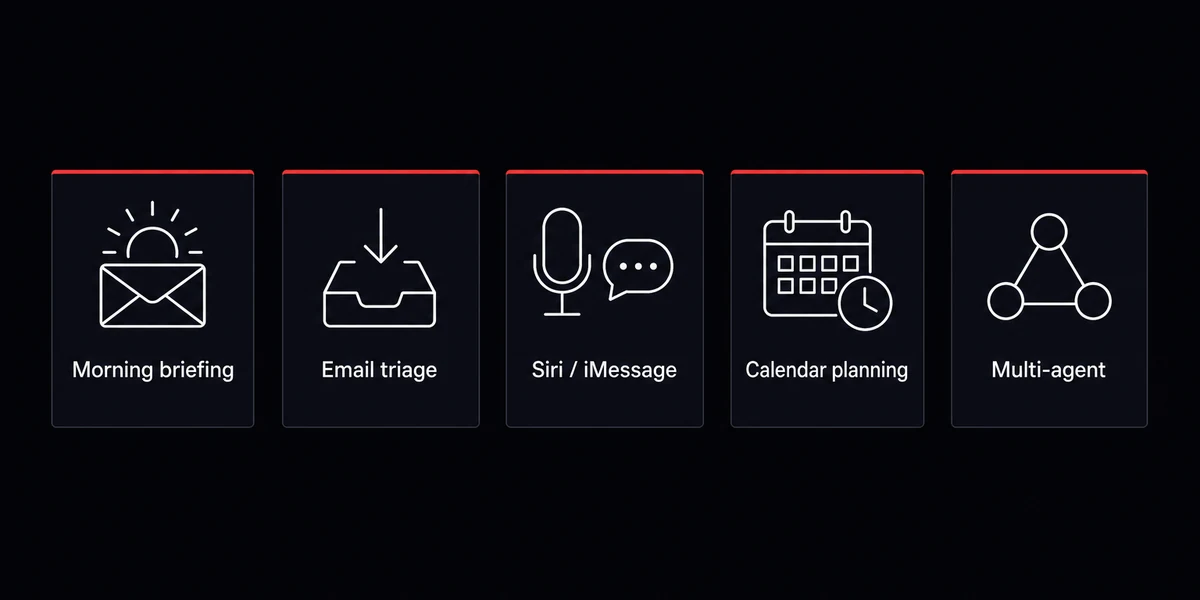
The morning briefing is the canonical first workflow. At 7am every weekday, a Telegram message arrives with today's calendar, the top five unread emails flagged as worth attention, and items from a watchlist.
Keep the prompt narrow. "Today's calendar, top 5 unread, weather" works. "Summarize everything I should know" turns into 800 tokens of vague filler. I rewrote my briefing prompt four times in the first month before it stopped leaking into the rest of the day.
Email triage builds on the briefing. The agent reads your inbox on a schedule, surfaces what matters, and drafts replies for review. Read-only is much safer for a first month than Gmail's broad "send as" scope. Expect about an hour of OAuth-screen fiddling per Google scope you add. The skills layer covers integrations like this: name a skill, drop a config, restart the gateway.
Siri-as-an-input does not appear in any formal guide. "Hey Siri, send a message to OpenClaw, is anything playing at the concert venue tonight?" The phrase travels Siri-to-iMessage-to-OpenClaw-to-Telegram-back-to-your-phone, hands free, while driving.
Calendar planning surprises people once they wire it up. The agent looks at your week, sees the gaps, and proposes time blocks. "You have three two-hour gaps Wednesday, Thursday afternoon, and Friday morning. Which one for the writing block?" It creates the event when you confirm, once you have picked one of the four calendar-integration paths.
The first time I gave it real-calendar access I assumed read-only would be the safer scope and gave it write access by accident. Nothing got deleted, but it cheerfully duplicated a recurring meeting before I caught it.
You can wire OpenClaw into Home Assistant if you want the calendar work to flip lights or set quiet modes.
Multi-agent setups are the advanced tier. The simplest version is two agents and a routing rule. Common pattern: one watches feeds, one handles your inbox, a coordinator routes incoming messages.
Adding a second or third agent is mechanically short. The hard part is routing-rule design, which costs a weekend or two of trial and error before it stops misrouting messages.
About cost. A practitioner with no spend cap and Claude Opus selected can burn $40 in three days. I did this on my second week. A research workflow called the agent every 20 minutes with no max-tokens cap, and Opus happily wrote a 2,000-token answer to a one-line question every cycle.
Three lines in the system prompt and a per-key spend cap fixed it. Set the cap before your first message.
The pattern across all five workflows is the same. Pick one. Make it work for a few days. Add the next once the first feels boring. Wiring up everything on day three is how you end up with seven half-broken integrations.
How to actually start: the first-week plan and the failure modes
The first-week plan for starting OpenClaw is one channel on day one, two days of chatting, and one skill by day seven. Most installs do not fail at the install. They fail in the first week, when nothing is connected.
An honest openclaw setup guide 2026 covers the four to seven days after the install, when the project either becomes useful or quietly gets uninstalled. Three install paths are reasonable, ordered by time-to-running-gateway.
| Path | Time to running gateway | Best for |
|---|---|---|
| Managed (OpenclawVPS) | 47 seconds, sign-up to gateway | "I want it working tonight, no shell" |
| DIY VPS (any cloud, one-click templates) | 10 to 30 min once you have an SSH key | "I want to learn the moving parts" |
| Self-host (Mac mini / Pi) | An evening of setup, ongoing electricity-only | "I want zero third-party hosting" |
Table: Three install paths for OpenClaw, ordered by time-to-first-conversation.
Here is how to install OpenClaw on a real schedule, day by day:
-
Day 1: pick one channel, connect it, set the spend cap. Telegram is the universal first choice. The Telegram pairing guide has the flow:
openclaw channels add telegram, paste the BotFather token, reply "hello" from your phone. Then set a hard spend cap. Anthropic's per-key cap lives in account settings; OpenAI has the same under usage limits. Most-skipped step in any openclaw tutorial for beginners. -
Days 2-3: honestly chat. Brain-dump goals into a
goals.mdscratchpad and let the agent read them. Do not configure skills yet. Watch what kinds of questions you actually ask once the chat is two taps away on your phone. -
Days 4-7: wire one skill, no more. Gmail OAuth is the most common second step. Run the briefing for three days, adjust the prompt and your
SOUL.mdbased on what feels off. Plan on four to seven hours of fiddling, not a single sitting.
I forgot the spend cap on my first install and discovered it two days later, after Claude had quietly worked through $17 on a script I left running.
I broke the briefing on day three. The agent flagged every newsletter as "worth your attention" because I had told it to be helpful.
Adding "ignore newsletters and unsubscribe-link footer emails" cut the briefing from 12 flagged messages to 3. Lesson: the prompt does not need to be longer; it needs to be specific about what NOT to surface.
Three failure modes show up over and over.
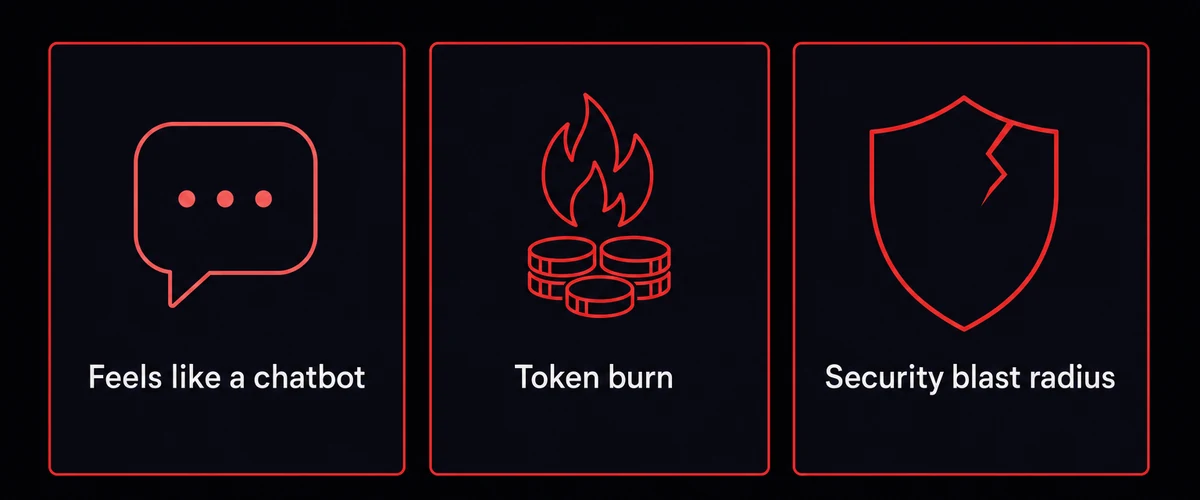
First: "feels like a chatbot." A recurring 2026 question on public forums has this phrasing almost word-for-word. Diagnostic: no tools, no channels beyond the default web UI. Connect one channel and one tool, chat for a few days, symptom disappears.
Second: "burned through tokens, nothing useful." A widely-cited operator account documented $250 in Anthropic spend before the assistant did anything productive. Two causes: no spend cap, and model choice mismatched to task. Day-one cap plus Sonnet for triage and Opus only for hard reasoning kills both.
Third gets the most internet attention: a "security nightmare dressed up as a daydream" critique that floats around the agent space, honestly framed. Most of the agent's risk is in what you connect to it, not the install.
Run on a non-personal box. Gate destructive tools behind an approval flag. Email and file OAuth scopes are the principal threat surface. A lethal-trifecta pattern (LLM with private data, untrusted input, ability to send data outward) only fires when all three line up.
The best predictor of someone still using OpenClaw past month one is whether they wired up that second tool. Channel-only setups quietly lose interest. People who reach "Telegram + Gmail + working briefing" by end of week one almost always still have it running 90 days later.
The setup I run now, and how to skip the first-week trap
Running OpenClaw without the first-week trap means picking the right install path, one channel, and skills only after you have a working chat. The setup most people start with looks different from what they end up running on day 90. The version below is what stuck for me, and what I now recommend to anyone starting from zero.
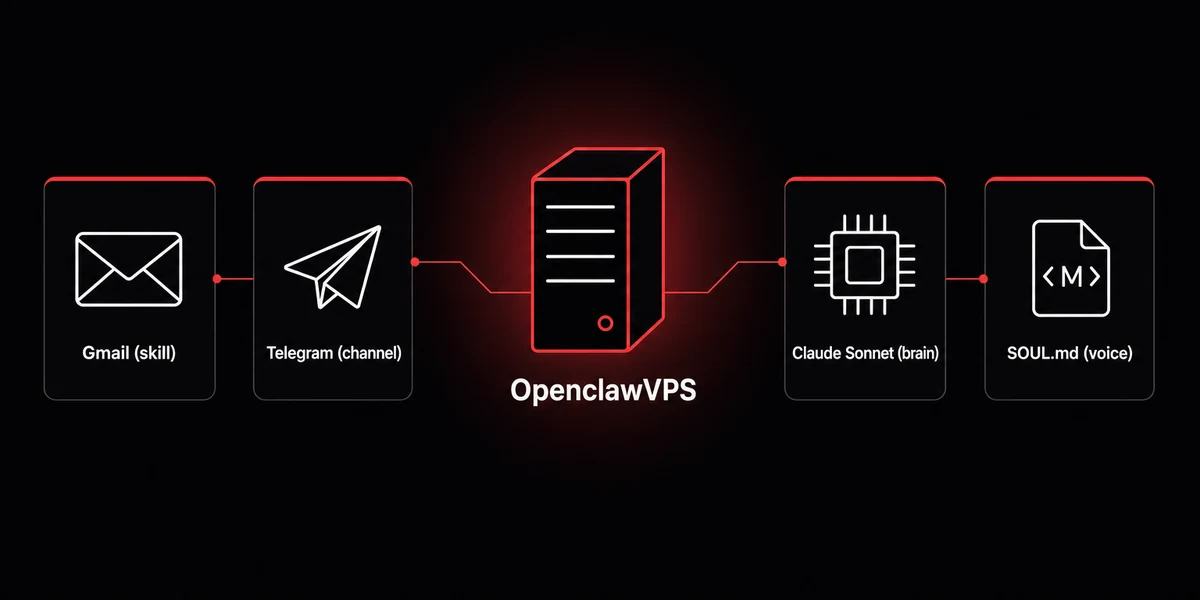
Managed if you want to skip the OS layer. DIY VPS if you want to learn the moving parts. Self-host if you want zero third-party hosting.
Managed makes sense for the first week. 47 seconds to a running gateway. If you mess up SOUL.md you rebuild without an evening on apt install, and you spend time on skills, channels, and voice instead of patching the OS.
If you do not want an evening on
apt installbefore chatting with your agent, the managed VPS path gets you to step 2 in 47 seconds. OpenClaw, the gateway, and channel scaffolding ship preinstalled. Plans start at $19/month, EU-hosted with multiple datacenter options.


