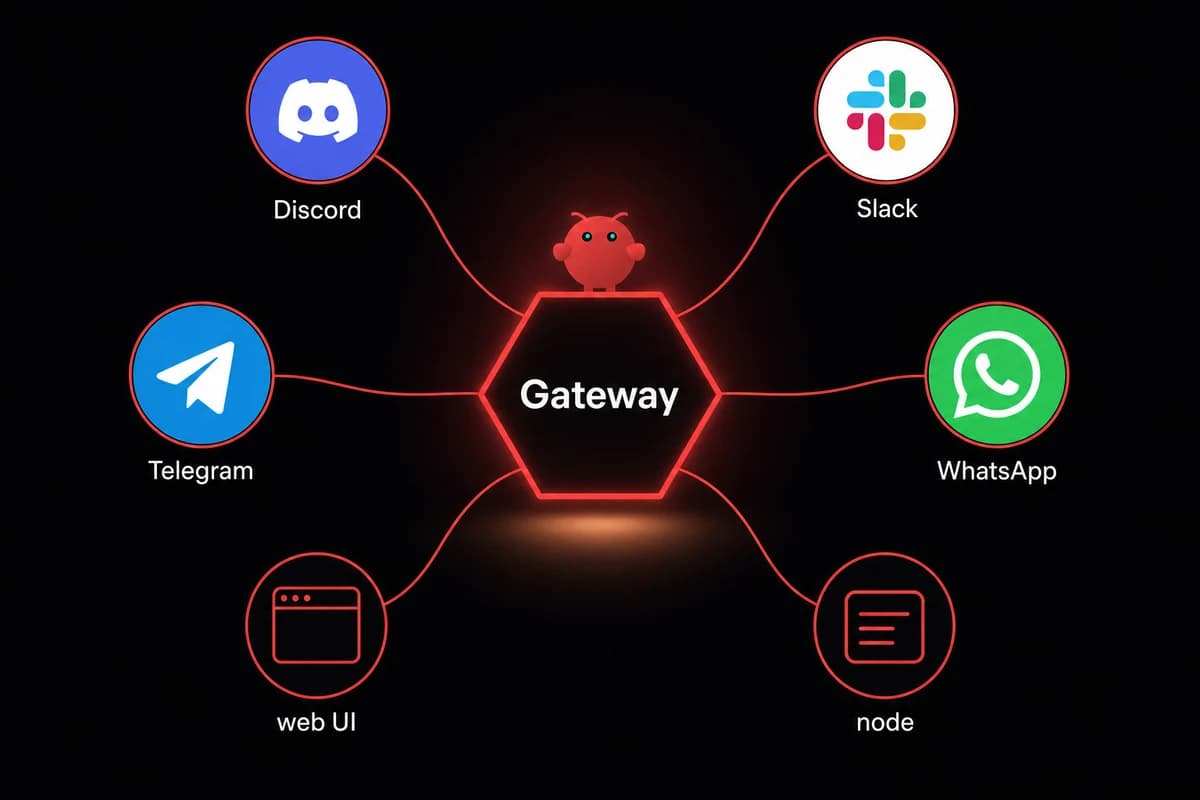
TL;DR: To configure ChatGPT as OpenClaw's backend, run openclaw onboard --auth-choice openai-codex from a Terminal with TTY, complete the OAuth flow at localhost:1455, and set agents.defaults.model.primary to openai-codex/gpt-5.3-codex. Don't run the wizard from inside an OpenClaw agent. It wipes existing config.
There are two OpenClaw ChatGPT configuration paths and they are NOT the same. openai-codex/* is the OAuth provider that uses your ChatGPT Plus ($20/mo) or Pro ($200/mo) plan. openai/* is the separate API-key provider that bills per-token against an OpenAI Platform account.
The onboard wizard groups both under "OpenAI" and that grouping is the single biggest source of half-configured setups, confirmed in GitHub issue 30533.
The OAuth path is the recommended one if you already pay for ChatGPT. Run the onboard command from a host with a real browser (the callback returns to localhost:1455), pick openai-codex, and choose "Use existing values" so the wizard doesn't reset your channels, memory, and cron.
Then set the default model with one config-set call and verify with openclaw models status against the local gateway on port 18789.
Budget about ten minutes for the happy path. Budget a re-auth every 10 to 30 days. Codex refresh tokens fail silently (issue 57399) and there's no prompt.
I burned forty minutes on my first attempt because I picked "OpenAI" in the wizard, pasted a Platform API key, and watched gpt-5.3-codex 401 every request. The wizard had quietly set me up on the API-key provider, not the Codex-OAuth one.
Configure ChatGPT as your OpenClaw backend (the recommended path)
Configure ChatGPT as your OpenClaw backend via the Codex OAuth flow if you already pay for ChatGPT Plus or Pro. Takes one command, one browser handshake, one config-set call. No API key, no Platform billing setup, no per-token math. This is the openclaw chatgpt setup most readers actually want.
The five-step happy path:
- Open a Terminal on a host with a real browser. OpenClaw's OAuth callback hits
localhost:1455, which won't work cleanly over plain SSH. On a headless VPS, use an in-browser remote desktop (RustDesk on OpenclawVPS exposes one on every plan) or the API-key path in H2 3 instead. - Run
openclaw onboard --auth-choice openai-codex. The flag tells the wizard to jump straight to Codex OAuth instead of asking you to pick from the "OpenAI" grouping. Saves you the gotcha covered next. - When the wizard asks about existing config, pick "Use existing values". Do NOT pick Reset. Reset wipes the channels you wired (WhatsApp, Telegram, Slack), the agent memory, and the cron entries. I picked Reset out of muscle memory once and lost a week of agent state.
- The wizard prints an OAuth URL. Open it in your browser, log in to ChatGPT, click Authorize. The callback returns to
localhost:1455and may show a blank or error page in the browser. That's expected. The terminal will detect the callback and continue. - Set the primary model:
openclaw config set agents.defaults.model.primary openai-codex/gpt-5.3-codex. Usegpt-5.3-codex, notgpt-5.4. GPT-5.4 routes through a different responses endpoint that 401s on Codex OAuth (issue 38706, covered in H2 5).
Whether it actually works is a separate question, answered by openclaw models status in H2 4. No ChatGPT sub? Skip to the API-key path in H2 3.
The two-paths fork: OAuth vs API key (and the wizard trap that catches everyone)
The onboard wizard shows one option called "OpenAI". Behind that single label sit two providers with different auth, different billing, and different runtime needs. Picking the wrong one is the trap.
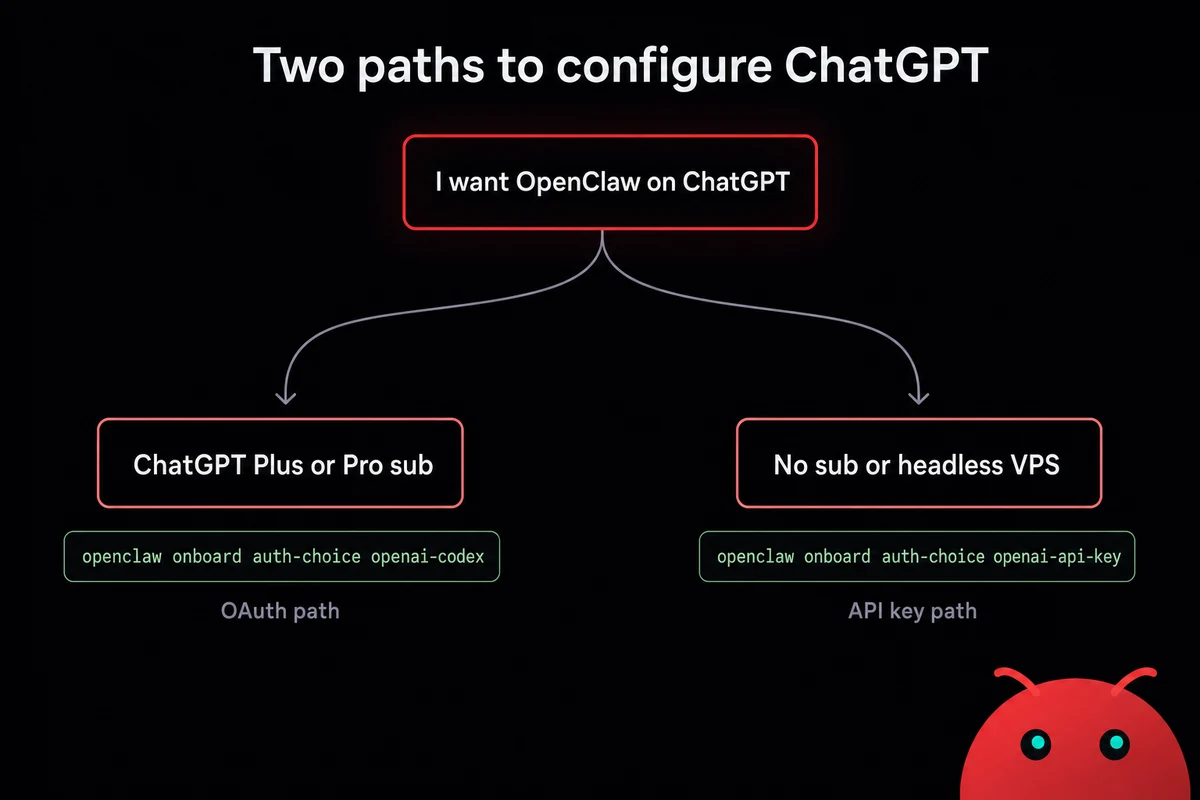
The naming map below is the one piece of context every guide buries. Provider keys are the actual identifiers OpenClaw uses internally. Setting a model name on the wrong provider key returns 401 even when the credentials work.
| Provider key | What it is | How it bills |
|---|---|---|
openai-codex/* | ChatGPT account OAuth | Billed via your $20/mo Plus or $200/mo Pro plan |
openai/* | OpenAI Platform API key | Per-token against your Platform account, pay-as-you-go |
openai-codex/gpt-5.3-codex | Codex on a ChatGPT sub | Plus plan: 5-hour weekly quota cap on Codex usage |
openai/gpt-4o (example) | GPT-4o via API key | Per-token Platform billing |
openai-codex/* and openai/* are not the same.The wizard trap plays out like this. You run openclaw onboard without the --auth-choice flag. The wizard asks "Which provider?", you see "OpenAI", you pick it. The wizard asks for an API key.
You paste a sk-... key from platform.openai.com. The wizard accepts it. Setup finishes. You set agents.defaults.model.primary to openai-codex/gpt-5.3-codex because that's what the docs said. Every request 401s.
You're now on the openai/* provider with an openai-codex/* model name. The API-key provider has no OAuth scopes for the Codex responses endpoint, so the model is unreachable. Issue 30533 shows the onboarding mix-up and was closed as "not planned".
When to pick which:
- OAuth (openai-codex/*): you already pay for ChatGPT Plus or Pro and want zero extra spend. Plus's weekly quota covers casual agent work; Pro covers heavy use except
gpt-5.5-pro(see H2 5). - API key (openai/*): per-token billing for higher quota, you need
gpt-5.4orgpt-5.5-pro, or you're on a headless VPS where the OAuth callback dies.
Still on the fence about ChatGPT versus another backend? The OpenClaw vs ChatGPT side-by-side covers model quality and pricing against Claude and DeepSeek.
Configure ChatGPT via the API-key path (headless / SSH-friendly alternative)
The openclaw openai api key path is what you want if you don't have a ChatGPT sub, you're SSH'd into a headless box without an in-browser remote desktop, or you want per-token billing. Same destination, different door.
The four-step path:
- Generate an API key at platform.openai.com/api-keys. Name it something you'll spot in the Platform audit log (e.g.,
openclaw-vps-prod). Copy it once; the Platform UI never shows it again. - Run
openclaw onboard --auth-choice openai-api-key. Symmetric to the OAuth flag. The wizard skips OAuth and asks for the key directly. You can also set it after the fact withopenclaw config set providers.openai.api_key sk-...and skip the wizard entirely. - Set the primary model:
openclaw config set agents.defaults.model.primary openai/gpt-5.4. Note the provider key isopenai/*here, NOTopenai-codex/*. This DOES work withgpt-5.4; the 401 mentioned earlier is specific to Codex OAuth. - Set a Platform billing limit before you send any traffic. Per-token has no auto cap. Go to platform.openai.com/usage and set a hard monthly limit. I learned this the easy way only because a friend warned me. The hard way is a $400 surprise the next morning.
On OpenclawVPS, the dashboard exposes an in-browser remote desktop (RustDesk) on every plan. That's how the OAuth path becomes viable on a remote VPS without copying callback URLs between machines. You run the browser on the VPS itself, click Authorize, the callback resolves to the VPS's own localhost:1455.
Headless VPS, no browser TTY, OAuth callback dies. That's the moment you want a managed box with in-browser remote-desktop already set up. OpenclawVPS provisions a dedicated VPS with OpenClaw preinstalled and RustDesk-in-browser exposed on every plan, so the OAuth flow works the same way it would on your laptop. Done in 47 seconds. Plans start at $19/month.
The API-key path is also the fallback when OAuth refresh-token decay (covered next) gets old.
Verify your OAuth or API-key setup works (one command, two things to check)
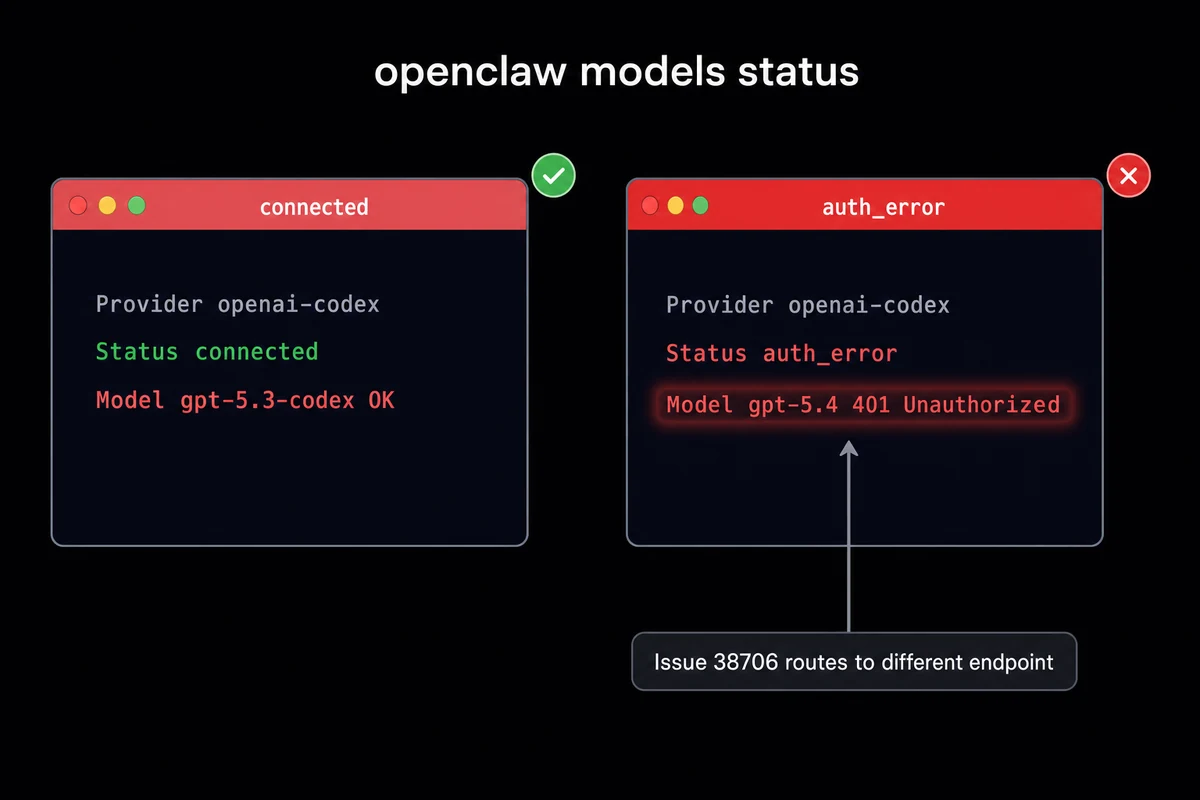
Two checks verify your setup is wired end-to-end. First, run openclaw models status against the local gateway on 127.0.0.1:18789. Output is a small table per provider showing connection state and recent auth errors. Pass looks like a connected status and no auth_error column. Then run one model call: openclaw chat -m openai-codex/gpt-5.3-codex "say hello". A reply means you're done.
The status table row you want shows:
openai-codex connected gpt-5.3-codex OK
No auth-error column, no cooldown flag, no Missing scopes: annotation. If the provider is connected but a specific model row reports an error, that's check two's job. For the API-key path, swap the chat command to openai/gpt-5.4 "say hello". A reply confirms the auth path is end-to-end correct: credentials valid, scopes correct, model reachable, gateway routing the request.
The two failure shapes to spot:
- Provider connected but model 401: wrong model name on the wrong provider. Most common variants are
gpt-5.4on the Codex OAuth provider, orgpt-5.3-codexon the API-key provider. Fix isopenclaw config set agents.defaults.model.primary <correct provider>/<correct model>. - Provider not connected at all: token isn't stored where the gateway expects it. For OAuth, look in
~/.openclaw/auth-profiles/openai-codex.json. If the file is missing or empty, re-run the onboard command. For API key, check~/.openclaw/openclaw.jsonfor theproviders.openai.api_keyfield.
Specifically, the openai-codex oauth openclaw token is stored at ~/.openclaw/auth-profiles/openai-codex.json.
The honest part: OAuth token decay, GPT-5.4 routing, and the other things that break
The honest part is that the OAuth path has six recurring failure modes, and the API-key path has two of those plus its own. Knowing what they look like before they hit you is most of the troubleshooting work.
Refresh tokens fail silently every 10 to 30 days. Issue 57399 confirms it; closed as not planned, so the workaround is the workflow. No prompt, no system alert. The provider row in openclaw models status just starts showing disconnected and your agent goes quiet. Set a calendar reminder every two weeks or wrap the status check into a cron that pings you on the disconnected state.
GPT-5.4 via Codex OAuth returns 401, then silently falls back to gpt-5.3-codex. Issue 38706. Requests look fine but output quality drops because you're on a generation behind the model you set. I caught this once when my agent's response quality nose-dived for a week before I realized it had been on gpt-5.3-codex via fallback the whole time. Stay on gpt-5.3-codex for Codex OAuth; if you need gpt-5.4, use the API-key path.
GPT-5.5 Pro is NOT supported on Codex OAuth, even on the Pro plan. Verbatim from the community thread: "gpt-5.5-pro is not supported when using Codex with a ChatGPT account, though GPT-5.5 standard does work." gpt-5.5 standard works fine on Codex OAuth; gpt-5.5-pro requires the API-key path.
5-hour weekly Codex quota on the Plus plan. Not an OpenClaw limit, an OpenAI plan cap. Saturate the Plus weekly Codex window with heavy agent traffic and requests fail with quota messages until reset. Heavy users either upgrade to Pro or run dual-stack: Codex OAuth for normal traffic, API-key fallback when the weekly window is gone.
The wizard wipes config if you pick "Reset" instead of "Use existing values". The wizard's "Reset" option resets every part of OpenClaw, not just the OpenAI provider. Channels gone, memory gone, cron gone. If you're rerunning the wizard to refresh OAuth, ALWAYS pick "Use existing values".
Windows users: callback exchange may fail with TypeError: fetch failed. Issue 45036, still open at time of writing in 2026. After you paste the localhost callback URL into the terminal, the OAuth flow throws a fetch error and never completes. Workaround: run the OAuth flow from an in-browser remote desktop on a Linux VPS (RustDesk via the OpenclawVPS dashboard works) instead of copying callback URLs from Windows to a remote host.
The same six gotchas as a scannable reference:
| Gotcha | Symptom | Workaround | Issue ref |
|---|---|---|---|
| Refresh-token decay | Provider goes disconnected after 10-30 days, no prompt | Re-run openclaw onboard --auth-choice openai-codex, set a calendar reminder | 57399 |
| GPT-5.4 routes wrong on Codex OAuth | 401 logged, silent fallback to gpt-5.3-codex, quality drops | Stay on gpt-5.3-codex for Codex OAuth, or use API-key path | 38706 |
| GPT-5.5 Pro not supported on Codex OAuth | Model 401 even on Pro plan | Use gpt-5.5 standard, or switch to API-key path | community thread |
| Plus 5h weekly Codex quota | Requests fail with quota messages until reset | Upgrade to Pro, or fall back to API-key for overflow | OpenAI plan limit |
| Wizard "Reset" wipes everything | Channels, memory, cron all reset | Pick "Use existing values" on every re-auth | self-surgery rule |
Windows callback TypeError: fetch failed | OAuth fails after callback URL is pasted | Run OAuth from in-browser remote desktop on Linux VPS instead | 45036 |
Tired of "budget a re-auth every 10 to 30 days"? The managed path swaps that for a one-click reconnect from the dashboard. OpenclawVPS handles the token refresh reminder, the in-browser RustDesk for the OAuth flow, and the gateway restart on the same screen. Plans start at $19/month, 3-day money-back guarantee.
Switching ChatGPT for another backend later (Claude, DeepSeek, local)
Switch openclaw from claude to chatgpt today, switch back next month. You wired ChatGPT. Three months from now, OpenAI raises prices, DeepSeek ships a model you actually like, or you want Opus for a specific workflow. The swap is one command per provider, assuming the second provider is already configured.
The model-switch itself: openclaw config set agents.defaults.model.primary <provider>/<model>. If you want to keep ChatGPT as a fallback when the new primary fails, set agents.defaults.model.fallbacks to a list of provider/model pairs in priority order. OpenClaw routes around an unreachable primary without restarting the gateway.
Multi-provider config lives in ~/.openclaw/openclaw.json. Add the new provider's auth (API key, OAuth profile, local endpoint URL) under providers.<name>, then change the primary. Other providers stay configured as fallbacks.
For DeepSeek, the same OAuth-or-API-key fork applies with different defaults. The DeepSeek setup walkthrough covers model names, the V3-vs-R1 choice, and rate-limit quirks.
For the general pattern of adding any model to an existing OpenClaw config, the add-a-model walkthrough is the canonical reference. For the smaller daily question of swapping the active OpenClaw model without re-doing auth, that article covers the one-line config set and fallback-list pattern.
Once your model is wired and verified, spinning up an agent is the next step. Add the agent definition, attach the model you just configured, hook it up to a channel.
How I run OpenClaw on ChatGPT now
Running OpenClaw on ChatGPT now means a managed VPS handles the parts of this article that suck. The OAuth flow runs in an in-browser RustDesk on the VPS itself, so the callback never has to cross machines. The gateway is preinstalled, the port is open, and the token-refresh reminder shows up on the same dashboard where you watch the agent logs. Done in 47 seconds, billed at $19/month on Starter or $39 on Pro.