TL;DR: Three ways to change models in OpenClaw. CLI: openclaw models set anthropic/claude-sonnet-4-5. Mid-conversation: /model sonnet. Per-agent: set model in agents.list in openclaw.json. Set up aliases so you can type /model opus instead of the full string. If you get "model not allowed," check your allowlist in agents.defaults.models.
I switch models maybe five times a day. Opus for anything that needs real thinking. Sonnet for routine agent work. Gemini Flash for heartbeats and background checks that don't need intelligence, just speed. Before I figured out the shortcuts, each switch meant editing openclaw.json, saving, waiting for the reload. If you haven't added models yet, start there. This guide assumes you already have at least two configured.
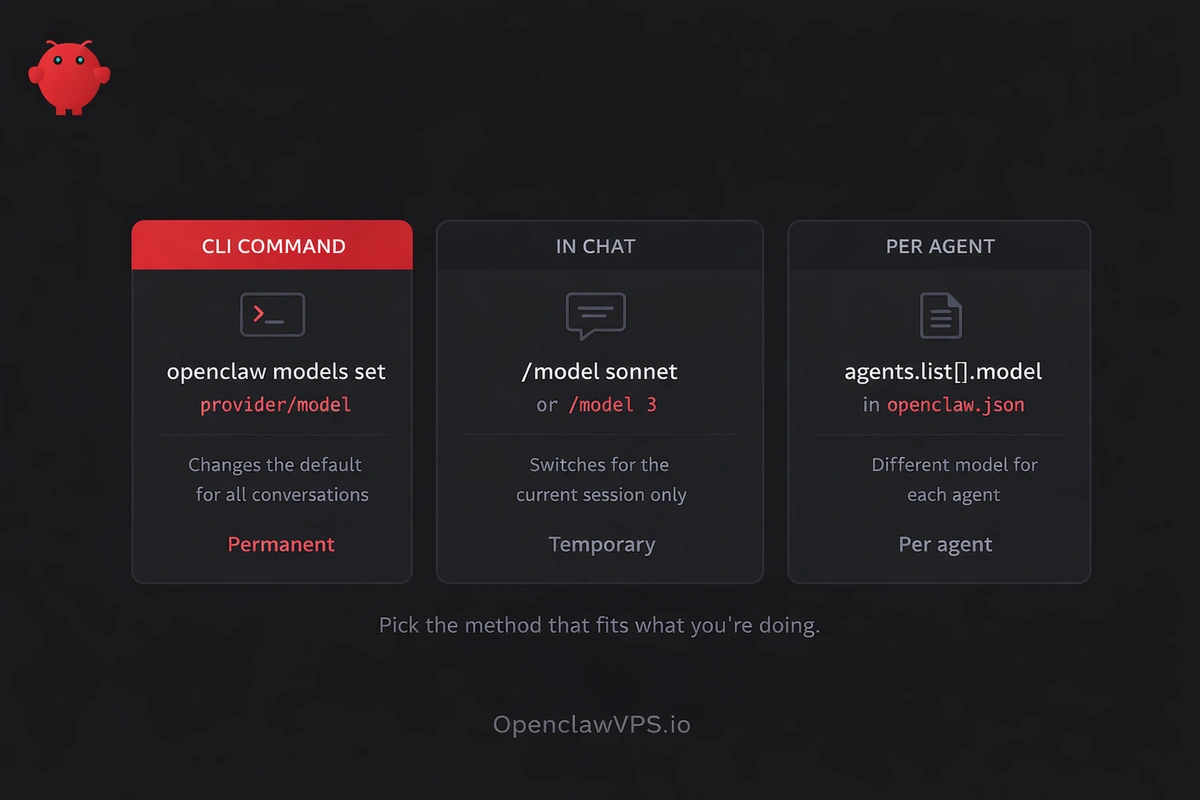
There are three ways to change models, and they work at different levels. Pick the one that fits what you're doing.
Change model from the CLI
This is the permanent switch. It changes which model your AI assistant uses for everything going forward.
openclaw models set anthropic/claude-sonnet-4-5That's it. One command. The gateway picks it up without a restart (hybrid reload mode, which is the default). To verify it took:
openclaw models statusYou'll see your new primary model at the top, plus any fallbacks and image models you have configured. If you want to check what's available before switching:
openclaw models list --allThat prints the full catalog. Add --provider anthropic to filter by provider, or --local to see only Ollama and other local models.
A few more commands that come up often:
openclaw models set-image google/gemini-3-flash
openclaw models fallbacks add openai/gpt-5.2
openclaw models fallbacks list
The image model handles vision tasks when your primary can't accept images. Fallbacks kick in when your primary model hits a rate limit or goes down.
Switch models mid-conversation
This is the one I use most. You're in a chat, the current model isn't cutting it, and you want something better without leaving the conversation.
/modelThat opens a numbered picker showing every model you have configured. Pick one by number:
/model 3Or type the full model path:
/model anthropic/claude-opus-4-6Or, if you've set up aliases (and you should), just use the short name:
/model opusThe switch happens instantly. No restart, no config editing. Your conversation keeps going with the new model. On Discord, /model opens an interactive dropdown with provider and model menus.
One thing to know: /model only changes the model for the current session. When you start a new conversation, it goes back to whatever your default is. If you want the change to stick permanently, use the CLI command from the section above.
Set up aliases (this saves the most time)
Aliases turn anthropic/claude-sonnet-4-5 into just sonnet. Two ways to set them up.
From the CLI:
openclaw models aliases add opus anthropic/claude-opus-4-6
openclaw models aliases add sonnet anthropic/claude-sonnet-4-5
openclaw models aliases add flash google/gemini-3-flash
openclaw models aliases add ds deepseek/deepseek-chat
In openclaw.json:
{
  "agents": {
    "defaults": {
      "models": {
        "anthropic/claude-opus-4-6": { "alias": "opus" },
        "anthropic/claude-sonnet-4-5": { "alias": "sonnet" },
        "google/gemini-3-flash": { "alias": "flash" },
        "deepseek/deepseek-chat": { "alias": "ds" }
      }
    }
  }
}
Now /model opus or /model ds works from any chat. Quick question about finding a file? /model flash, ask, then /model opus when you need to think harder. I do this all day.
One side effect: once you add models to agents.defaults.models, it becomes an allowlist. Only models listed there can be selected with /model. If you try to switch to something not on the list, you get "Model not allowed." Add it to the list or remove the models key entirely to allow everything.
Give each agent its own model
If you run multiple agents, you probably don't want them all using the same model. The coding agent needs Opus. A scheduling agent is fine with Haiku. And the research agent works great on DeepSeek.
Set this up in openclaw.json under agents.list:
{
  "agents": {
    "defaults": {
      "model": {
        "primary": "anthropic/claude-sonnet-4-5"
      }
    },
    "list": [
      {
        "id": "code",
        "workspace": "~/.openclaw/workspace-code",
        "model": "anthropic/claude-opus-4-6"
      },
      {
        "id": "scheduler",
        "workspace": "~/.openclaw/workspace-scheduler",
        "model": "anthropic/claude-haiku-4-5"
      },
      {
        "id": "research",
        "workspace": "~/.openclaw/workspace-research",
        "model": "deepseek/deepseek-reasoner"
      }
    ]
  }
}
The defaults.model.primary applies to any agent that doesn't have its own model field. Agents with an explicit model use that instead.
Fair warning: there's a known bug (GitHub #29571, reported February 2026) where agents.defaults.model.primary overrides per-agent model config at runtime. If your agent keeps using the default instead of its own model, the workaround is to change the global default to match the agent you're using most, then override the others. It's annoying. The fix is in progress.
Set up fallbacks so switching happens automatically
Instead of manually switching when a model goes down, let OpenClaw do it:
{
  "agents": {
    "defaults": {
      "model": {
        "primary": "anthropic/claude-opus-4-6",
        "fallbacks": [
          "openai/gpt-5.2",
          "deepseek/deepseek-reasoner",
          "google/gemini-3-flash"
        ]
      }
    }
  }
}
When Opus hits a rate limit, OpenClaw tries GPT-5.2. If that fails too, DeepSeek. Then Gemini Flash. Mixing providers in the fallback chain is smart because rate limits, outages, and latency spikes tend to hit one provider at a time. The chain has a cooldown ladder and four documented bugs worth knowing about before you wire your first one, and Gemini 3.1 Pro has a known fallback-slot gotcha if you ever try to put it anywhere other than primary.
You can also manage fallbacks from the CLI without touching the config:
openclaw models fallbacks add openai/gpt-5.2
openclaw models fallbacks add deepseek/deepseek-reasoner
openclaw models fallbacks list
openclaw models fallbacks clear
You can also set a separate model for heartbeats and sub-agents. Heartbeats are those periodic "are you still there?" checks that don't need a frontier model. A community member on VelvetShark reported cutting costs from $943/month to $347/month just by routing heartbeats and sub-agents to cheaper models.
What to watch out for
"Model not allowed" errors. If you added models to agents.defaults.models, that list becomes the allowlist. Any model not on it gets rejected. Either add the missing model or remove the models key to allow everything.
Stale config after updates. Sometimes the gateway holds onto old config even after you save changes. Run openclaw doctor --fix to clear stale files, then restart with openclaw gateway restart. This fixes most "I changed it but nothing happened" problems.
Per-agent overrides not working. The bug from #29571 means agents.defaults.model.primary can override per-agent models. Workaround: set the global default to whatever your most-used agent needs, and override the rest individually.
Model strings are case-sensitive. anthropic/claude-sonnet-4-5 works. Anthropic/Claude-Sonnet-4-5 doesn't. Always lowercase. Check exact strings with openclaw models list --all.
Try it
Pick a model, switch to it. The fastest way is setting up aliases and using /model in chat. Two seconds per switch. Once your models are configured, use skills to automate routing, fallbacks and model selection per task. Browse the skills marketplace for automation skills that handle this.
If you want to compare how other platforms handle model switching, most don't even offer it mid-conversation. OpenClaw's /model command is one of the things that keeps me on it.


