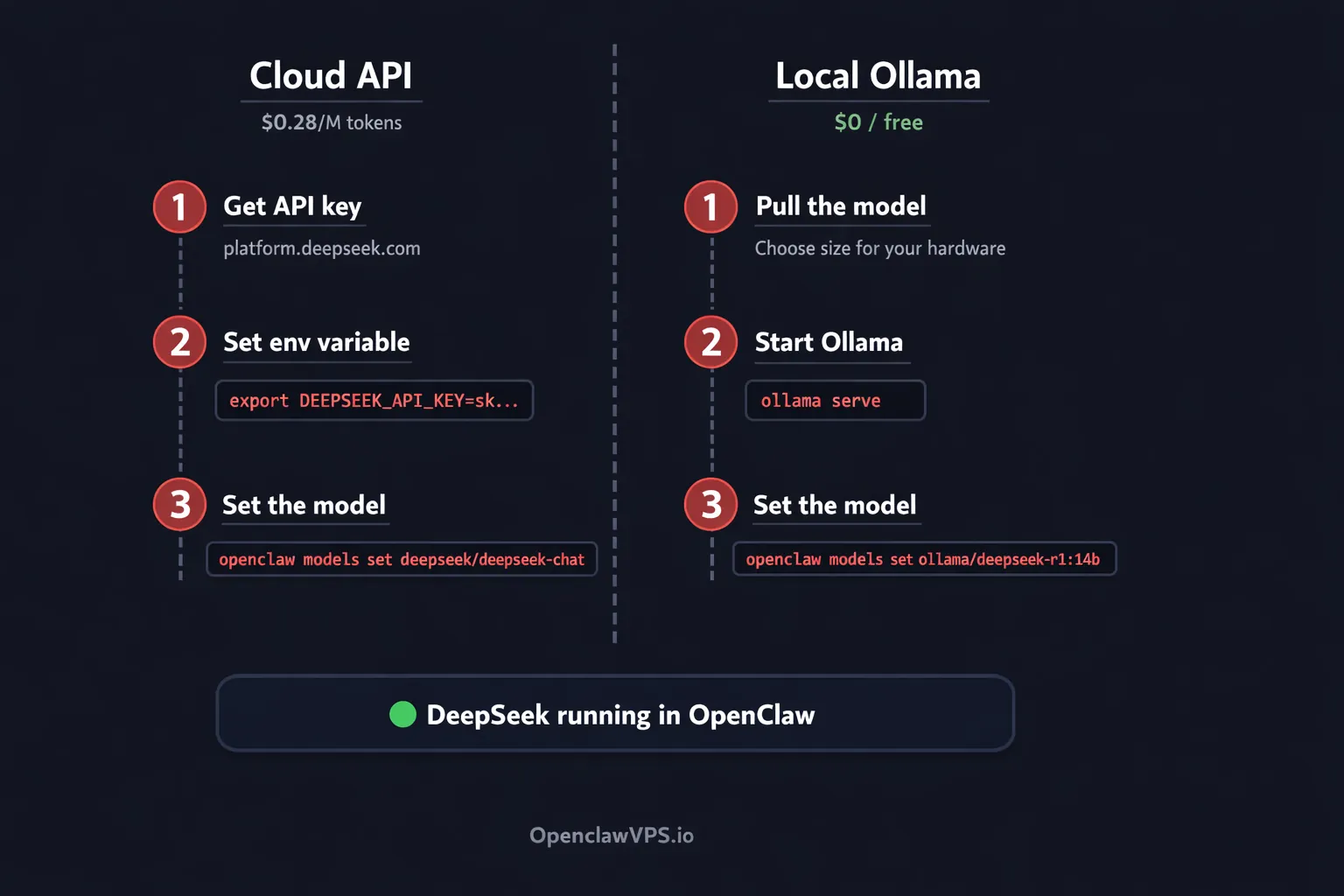
TL;DR: Two ways to run DeepSeek in OpenClaw. Cloud API: export DEEPSEEK_API_KEY=sk-... then openclaw models set deepseek/deepseek-chat. Local via Ollama: ollama pull deepseek-r1:14b then openclaw models set ollama/deepseek-r1:14b. API costs $0.28 per million input tokens. Local costs nothing. Both work in under five minutes.
I run DeepSeek on three of my four OpenClaw agents. The coding agent stays on Claude Opus because reasoning quality matters there. Everything else? DeepSeek. My research agent processes thousands of tokens per day on deepseek-chat, and the bill last month was $4.20. The same workload on GPT-5.4 would have cost over $150.
OpenClaw treats DeepSeek like any other provider. One environment variable, one CLI command, done. And if you want zero cost and full privacy, you can run distilled R1 models locally through Ollama. Same OpenClaw instance, same agent routing, no data leaving your network.
This guide covers both paths.
☁️ Cloud API
platform.deepseek.com
- Full V3.2 (671B MoE) quality
- 128K context out of the box
- $0.28/M input, $0.42/M output
- 90% cache discount on repeated prompts
- 5M free tokens on signup
🖥️ Local Ollama
Runs on your hardware
- Zero cost beyond electricity
- Data never leaves your machine
- Distilled R1 models from 1.5B to 70B
- Works offline, no API key needed
- Best for privacy-sensitive agents
What DeepSeek ships in March 2026
DeepSeek's API runs on V3.2, a 671-billion parameter Mixture-of-Experts model that activates 37 billion parameters per token. Two model IDs point to it:
deepseek-chatruns V3.2 in non-thinking mode. Fast, cheap, good for conversation and bulk work.deepseek-reasonerruns V3.2 in thinking mode. It shows chain-of-thought reasoning before answering, similar to OpenAI's o1 or Claude with extended thinking. Slower, but better at math, code, and multi-step logic.
Both share a 128K context window. Default max output is 4K tokens for chat, 32K for reasoner. You can push chat to 8K and reasoner to 64K if you need longer responses.
Pricing makes it the cheapest serious API available:
| Input (cache miss) | Input (cache hit) | Output | |
|---|---|---|---|
| DeepSeek V3.2 | $0.28 | $0.028 | $0.42 |
| GPT-5.4 | $2.50 | N/A | $15.00 |
| Claude Sonnet 4.6 | $3.00 | N/A | $15.00 |
Cache hits happen automatically when your prompts share a prefix. System prompts, repeated instructions, anything that stays the same across requests. At $0.028 per million tokens, cached input is almost free.
New accounts get 5 million free tokens. No credit card required.
V4 has been rumored since February 2026 but hasn't shipped as of this writing. When it lands, the model IDs will likely change, and I'll update this guide. For now, V3.2 is what you get.
Path 1: DeepSeek cloud API
Get an API key from platform.deepseek.com. Sign up, go to API Keys, generate one. Takes about 30 seconds.
Set the environment variable in your OpenClaw server's shell:
export DEEPSEEK_API_KEY=sk-your-key-hereTo make it persist across reboots, add it to your shell profile (~/.bashrc, ~/.zshrc, or your OpenClaw .env file).
Now tell OpenClaw to use it:
openclaw models set deepseek/deepseek-chatThat's it. Send a message and DeepSeek V3.2 answers.
Want the thinking model instead? Swap the model string:
openclaw models set deepseek/deepseek-reasonerReasoner takes longer to respond because it reasons through the problem first. Use it for coding tasks, math, or anything that needs step-by-step logic. For casual chat, scheduling, or bulk processing, deepseek-chat is faster and cheaper.
Sick of managing API keys and server configs? OpenClaw VPS ships pre-configured with every major provider. Set your DeepSeek key once in the dashboard and it handles the rest. Plans start at $19/month.
Path 2: DeepSeek local via Ollama
DeepSeek R1 distilled models run locally through Ollama. These are smaller versions trained on reasoning data from the full 671B model. They're dumber than the API, but they're free and nothing leaves your machine.
First, pull the model that fits your hardware:
- Disk
- 1.1 GB
- RAM
- 4 GB
Testing, tiny tasks
- Disk
- 4.7 GB
- RAM
- 8 GB
Light reasoning on laptops
- Disk
- 5.2 GB
- RAM
- 8 GB
Best small model (Qwen3)
- Disk
- 9 GB
- RAM
- 16 GB
Speed and quality balance
- Disk
- 20 GB
- RAM
- 24 GB+
Serious local reasoning
- Disk
- 43 GB
- RAM
- 64 GB+
Near-API quality
| Model | Size on disk | RAM needed | Best for |
|---|---|---|---|
deepseek-r1:1.5b | 1.1 GB | 4 GB | Testing, tiny tasks |
deepseek-r1:7b | 4.7 GB | 8 GB | Light reasoning on laptops |
deepseek-r1:8b | 5.2 GB | 8 GB | R1-0528 Qwen3 update, best small model |
deepseek-r1:14b | 9 GB | 16 GB | Good balance of speed and quality |
deepseek-r1:32b | 20 GB | 24 GB+ | Serious local reasoning |
deepseek-r1:70b | 43 GB | 64 GB+ | Near-API quality, needs beefy GPU |
I use the 14B on a Mac Mini with 16GB RAM. Good enough for summarization and simple Q&A. For anything that needs real reasoning, I switch to the cloud API. The local-model RAM table I use for sizing maps each model tier to the right box.
ollama pull deepseek-r1:14bWait for the download, then tell OpenClaw:
openclaw models set ollama/deepseek-r1:14bNo API key needed. Ollama must be running on the same machine (or reachable via network). If you haven't started it: ollama serve.
The trade-off is speed and intelligence. The 14B model is roughly equivalent to GPT-3.5 on most benchmarks. The 32B gets closer to GPT-4 territory. None of them match the full V3.2 API. But for tasks where privacy matters or where you're processing data you can't send to a third party, local is the right call.
Per-agent model routing
The real power shows up when you assign different models to different agents. In openclaw.json:
{
  "agents": {
    "coder": {
      "model": {
        "primary": "anthropic/claude-opus-4-6"
      }
    },
    "researcher": {
      "model": {
        "primary": "deepseek/deepseek-chat"
      }
    },
    "private": {
      "model": {
        "primary": "ollama/deepseek-r1:14b"
      }
    }
  }
}
Coding agent gets Opus for the heavy thinking. Research agent gets DeepSeek at $0.28 per million tokens. The private agent runs locally for anything sensitive. Three agents, three cost tiers, one OpenClaw instance. MiniMax M2.7 at $0.30 input slots into that same research-agent tier if you want a second open-weight option to A/B against DeepSeek.
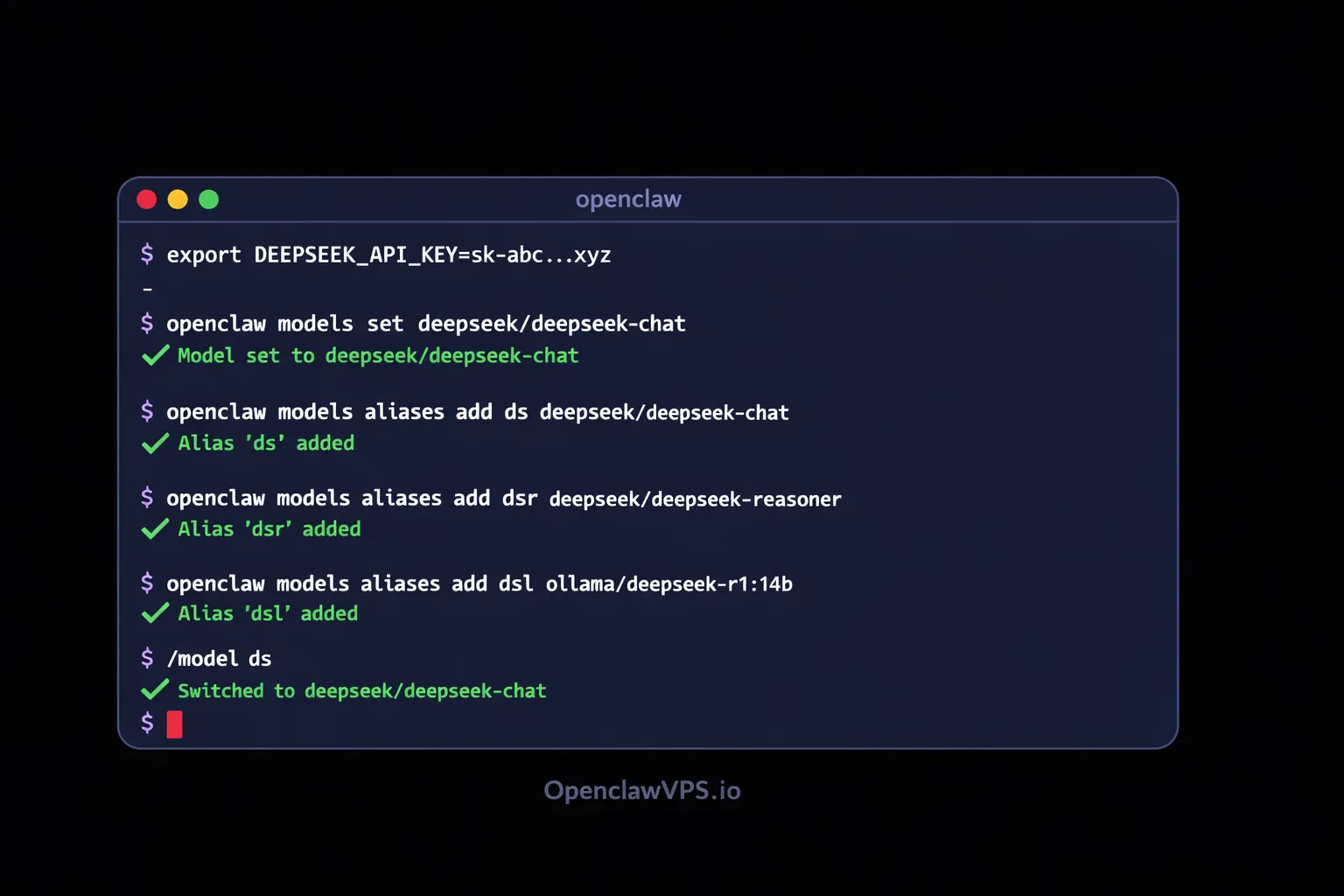
Set up an alias so you can switch models mid-conversation without typing the full string:
openclaw models aliases add ds deepseek/deepseek-chat
openclaw models aliases add dsr deepseek/deepseek-reasoner
openclaw models aliases add dsl ollama/deepseek-r1:14b
Now /model ds in any conversation switches to DeepSeek cloud. /model dsl switches to local. Fast.
Fallback chains with DeepSeek
DeepSeek can sit anywhere in a fallback chain. I put it as the secondary for my coding agent. If Claude hits a rate limit or goes down, OpenClaw tries DeepSeek before falling back to Gemini:
{
  "coder": {
    "model": {
      "primary": "anthropic/claude-opus-4-6",
      "fallbacks": [
        "deepseek/deepseek-reasoner",
        "google/gemini-2.5-flash"
      ]
    }
  }
}
Or flip it. Make DeepSeek the primary and use a more expensive model as the fallback for when you need guaranteed quality:
{
  "researcher": {
    "model": {
      "primary": "deepseek/deepseek-chat",
      "fallbacks": [
        "anthropic/claude-sonnet-4-6"
      ]
    }
  }
}
Mixing providers in the fallback chain is smart because outages, rate limits, and latency spikes tend to hit one provider at a time. If DeepSeek's API has a bad day (it happens, especially during peak hours in Chinese time zones), your agent keeps working on a different provider without you touching anything. The fallback model deep-dive walks through the cooldown ladder and the four open bugs that can swallow this whole pattern if you don't set it up right.
The cost math
Monthly cost at 60M tokens
Real workload: 3 agents, ~2M tokens/day
Claude Sonnet 4.6
GPT-5.4
DeepSeek V3.2
DeepSeek + cache
OpenClaw + DeepSeek
Real numbers from my setup. I run three agents that collectively process about 2 million tokens per day (input + output combined). Monthly cost by provider if I used a single one everywhere:
| Provider | Monthly cost (60M tokens) |
|---|---|
| DeepSeek V3.2 (chat) | ~$21 |
| DeepSeek V3.2 (with cache hits) | ~$8 |
| GPT-5.4 | ~$525 |
| Claude Sonnet 4.6 | ~$540 |
| Gemini 2.5 Flash | ~$6 |
| Ollama local | $0 (electricity only) |
DeepSeek sits in a sweet spot. It's not the absolute cheapest (Gemini Flash edges it out on raw price), but it's significantly smarter than Flash on reasoning tasks. For agents that need to think, DeepSeek gives you 90% of the quality at 10% of the price compared to GPT or Claude. The Gemini Flash-vs-Pro cost math covers when that raw-price edge actually matters and when Pro pays for itself instead.
And those cache hits add up fast. If your agent has a long system prompt that stays the same across conversations, every request after the first one gets the 90% discount on input tokens. My research agent's system prompt is about 2,000 tokens. Over thousands of requests, that cached prefix saved me roughly $15 last month compared to what the same traffic would have cost without caching.
Troubleshooting
"401 Unauthorized" or "Invalid API key"
Your DEEPSEEK_API_KEY is either not set or wrong. Run echo $DEEPSEEK_API_KEY to check. If it's empty, re-export it. If you're using a .env file, restart OpenClaw after editing.
"Model not found"
The model string must include the provider prefix. deepseek/deepseek-chat works. Just deepseek-chat doesn't. OpenClaw needs the prefix to route to the right API.
Ollama "connection refused"
Ollama isn't running. Start it with ollama serve in a separate terminal or as a system service. If it's running on a different machine, set the Ollama base URL in your OpenClaw config. The smart-home walkthrough covers the OLLAMA_HOST=0.0.0.0 systemd override for cross-container access.
Slow responses from local model
Smaller distilled models on CPU are slow. Two options: use a smaller model (drop from 14B to 7B), or offload to GPU if you have one. For Ollama, set OLLAMA_NUM_GPU=999 to push everything to the GPU. If you don't have a GPU, accept the latency or switch to the API for time-sensitive tasks.
Context limit hit
API supports 128K tokens. Local models default to a much smaller context (usually 2048-4096). In Ollama, set num_ctx higher in the Modelfile or pass it at runtime, but watch your memory. A 14B model at 32K context can eat 20GB+ of RAM.
Debugging server configs at 2am gets old fast. OpenClaw VPS handles Ollama, API keys, and model routing out of the box. Managed hosting so you can focus on building agents, not fixing infrastructure.
Ready to run DeepSeek on your agents?
DeepSeek at $0.28 per million tokens. Ollama distilled models at $0. Both work in OpenClaw with one command. If you want managed hosting where providers are pre-configured and agents run 24/7 without server babysitting:


