TL;DR: OpenClaw supports five methods to add models: built-in providers, OAuth login, Ollama, LM Studio, and custom OpenAI-compatible APIs. Every model uses the provider/model-name format. For built-in providers, set the API key and run openclaw models set provider/model. For local models, add the provider to models.providers in openclaw.json. Verify with openclaw models list.
I wasted an hour on my first model swap. Typo in the model string. Forgot to reload the gateway. Classic.
It's actually a 5-minute job once you know the pattern. Five methods, every provider, nothing extra. If you're also setting up agents to use these models, see how to add agents in OpenClaw — but models first.
The model reference format
Every model in OpenClaw follows one pattern: provider/model-name.
anthropic/claude-sonnet-4-5. openai/gpt-4o. ollama/llama3.3. OpenClaw splits on the first forward slash to separate provider from model ID. That's what goes in your config, your CLI commands, everywhere.
Get this wrong and nothing works. Get it right and everything else is just plugging in keys.
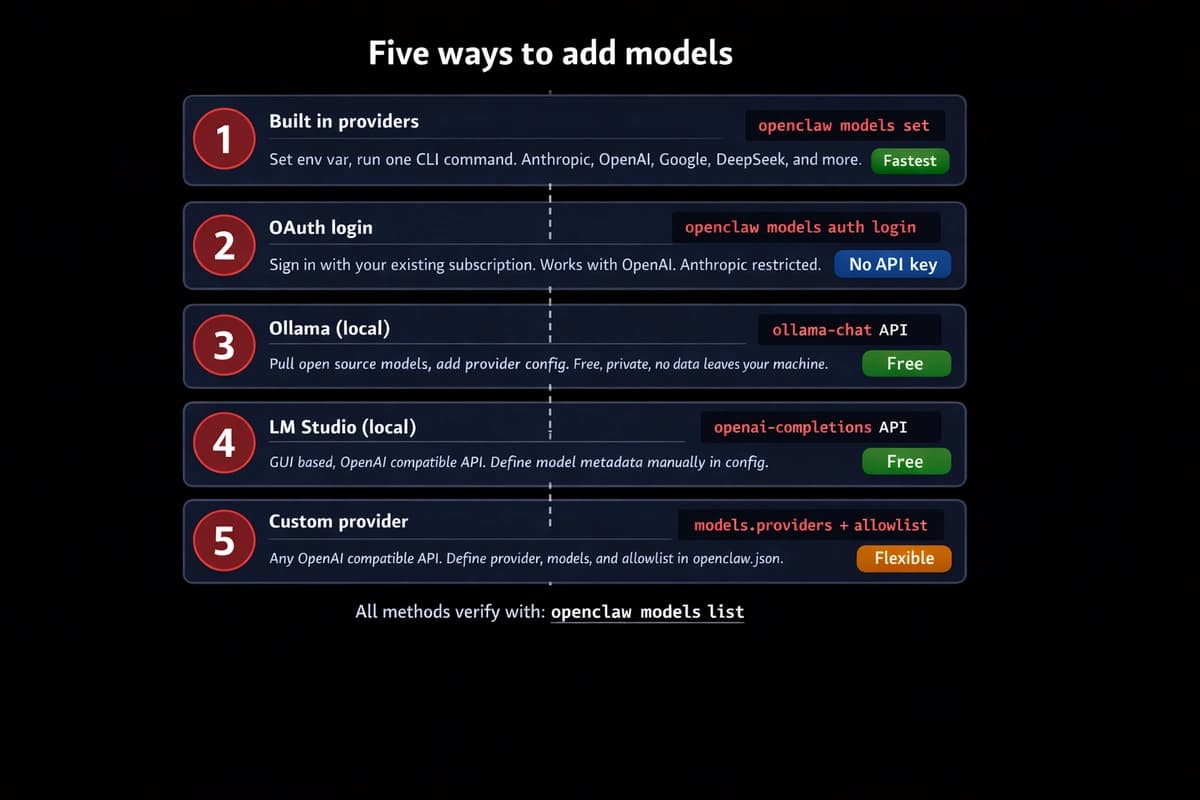
Method 1: built-in providers (fastest)
OpenClaw ships with a catalog of pre-configured providers. Anthropic, OpenAI, Google Gemini, DeepSeek, xAI, Groq, Mistral, OpenRouter. For these, you don't touch any config files. Just set a key and pick the model. The four-line Gemini provider block is the same shape for that row, with AIza key and Flash-vs-Pro pricing notes.
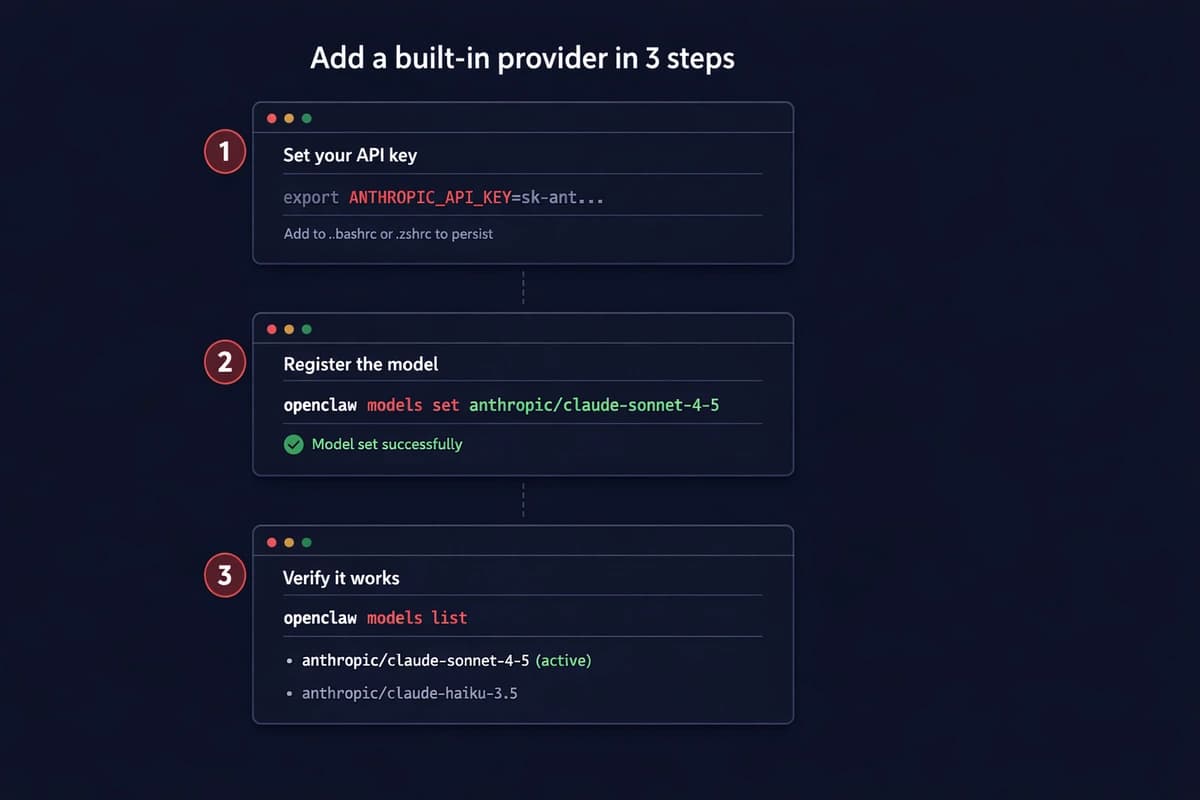
Set your API key:
export ANTHROPIC_API_KEY=sk-ant-your-key-hereAdd it to .bashrc or .zshrc so it sticks. Then:
openclaw models set anthropic/claude-sonnet-4-5Done. That's your default model for all agents. Verify:
openclaw models listYou should see the model listed with status "available." If it says "unavailable," your key is wrong or the env var didn't load. Run echo $ANTHROPIC_API_KEY to check.
Here's every built-in provider and the env var it needs:
| Provider | Env variable | Example model |
|---|---|---|
| Anthropic | ANTHROPIC_API_KEY | anthropic/claude-sonnet-4-5 |
| OpenAI | OPENAI_API_KEY | openai/gpt-4o |
GEMINI_API_KEY | google/gemini-3-flash | |
| DeepSeek | DEEPSEEK_API_KEY | deepseek/deepseek-chat |
| xAI | XAI_API_KEY | xai/grok-3 |
| Groq | GROQ_API_KEY | groq/llama-3.3-70b |
| Mistral | MISTRAL_API_KEY | mistral/mistral-large |
| OpenRouter | OPENROUTER_API_KEY | openrouter/meta/llama-3.3 |
This flexibility with model choice is one of OpenClaw's key advantages. For alternatives and comparisons to other AI platforms, see the full breakdown.
Multiple keys? Use the plural form with commas:
export ANTHROPIC_API_KEYS=sk-ant-key1,sk-ant-key2,sk-ant-key3OpenClaw rotates between them when one hits a rate limit. Not round-robin. Only on 429 responses.
Skip the server setup. OpenClaw VPS comes pre-configured with multi-model support. Add your API keys from the dashboard, pick your models, running in under a minute. See plans →
Method 2: OAuth login (use your existing subscription)
If you already pay for a Claude Pro/Max or ChatGPT Plus subscription, you can authenticate with your account directly instead of buying separate API credits.
For OpenAI:
openclaw models auth login --provider openaiThis opens a browser window. Sign in with your OpenAI account. OpenClaw stores the token and uses your subscription for all OpenAI model requests.
For Anthropic, the flow uses a setup token:
openclaw models auth paste-token --provider anthropicYou generate the token from the Claude CLI or the Anthropic console, then paste it in.
The catch. Anthropic cracked down on this in early 2026. OAuth tokens from Pro/Max subscriptions now return 401 errors in third-party tools. So for Anthropic specifically, API keys are your only reliable option right now. OpenAI OAuth still works fine.
Bottom line: OAuth saves money if your provider supports it. But don't count on it for Anthropic models. Use API keys there.
Method 3: Ollama (local, free)
Ollama runs open-source models on your machine. No API costs. No data leaving your network. (This works on Android phones too, though performance is limited to CPU-only inference.)
Install it:
curl -fsSL https://ollama.com/install.sh | shPull a model:
ollama pull llama3.3Add Ollama as a provider in ~/.openclaw/openclaw.json:
{
  "models": {
    "providers": {
      "ollama": {
        "baseUrl": "http://127.0.0.1:11434",
        "api": "ollama-chat"
      }
    }
  }
}
Stop. Read that baseUrl. It's http://127.0.0.1:11434. Not http://127.0.0.1:11434/v1. That trailing /v1 is the number one Ollama mistake. It forces OpenAI compatibility mode and breaks tool calling. I burned 45 minutes on this. The other four Ollama config traps catch new installs at the same step.
Set it as your model:
openclaw models set ollama/llama3.3Verify:
openclaw models list --localEvery model you've pulled shows up automatically. No need to define them individually in the config.
Method 4: LM Studio (local, GUI-based)
LM Studio is the other local option. Different from Ollama in one way: it exposes an OpenAI-compatible API. So the config uses /v1.
Start the LM Studio server, then add it:
{
  "models": {
    "providers": {
      "lmstudio": {
        "baseUrl": "http://127.0.0.1:1234/v1",
        "api": "openai-completions",
        "models": [
          {
            "id": "your-model-id",
            "name": "Model Display Name",
            "contextWindow": 8000,
            "maxTokens": 2000
          }
        ]
      }
    }
  }
}
Notice you have to define model metadata manually here: context window and max tokens. Ollama reads these from the Modelfile automatically. LM Studio's OpenAI layer doesn't report them, so you tell OpenClaw yourself.
openclaw models list --provider lmstudioMethod 5: custom providers (any OpenAI-compatible API)
Got a provider that's not built-in? If it speaks the OpenAI API format, OpenClaw can use it.
Two steps. Define the provider in models.providers, then add the model to your allowlist.
{
  "models": {
    "providers": {
      "myhost": {
        "baseUrl": "https://api.myhost.com/v1",
        "apiKey": "env:MYHOST_API_KEY",
        "api": "openai-completions",
        "models": [
          {
            "id": "myhost-model-70b",
            "name": "MyHost 70B",
            "contextWindow": 32000,
            "maxTokens": 4096
          }
        ]
      }
    },
    "allowlist": ["myhost/myhost-model-70b"]
  }
}
The allowlist key needs the fully-qualified name: myhost/myhost-model-70b, not just myhost-model-70b. Miss this and the model won't show up in openclaw models list.
The id field has to match exactly what the provider's API expects. Check their docs. Wrong ID means failed requests or hitting a different model than you intended.
Add fallbacks
Don't run a single model with no backup. When your primary hits rate limits or the provider goes down, your agents just stop.
{
  "agents": {
    "defaults": {
      "model": {
        "primary": "anthropic/claude-sonnet-4-5",
        "fallbacks": ["anthropic/claude-haiku-4-5", "openai/gpt-4o"]
      }
    }
  }
}
Sonnet goes down? OpenClaw tries Haiku. Haiku down? Falls back to GPT-4o. This saved me during the Anthropic outage in February. Agents kept running while everyone else's were dead.
Route different models per agent
Once you have multiple models configured, you can assign each agent its own. Put the expensive model where it matters, cheap ones everywhere else.
{
  "agents": {
    "list": [
      {
        "id": "coding",
        "workspace": "~/.openclaw/workspace-coding",
        "model": {
          "primary": "anthropic/claude-sonnet-4-5"
        }
      },
      {
        "id": "chat",
        "workspace": "~/.openclaw/workspace-chat",
        "model": {
          "primary": "deepseek/deepseek-chat"
        }
      },
      {
        "id": "personal",
        "workspace": "~/.openclaw/workspace-personal",
        "model": {
          "primary": "ollama/llama3.3"
        }
      }
    ]
  }
}
Coding agent gets Sonnet. Chat gets DeepSeek at $0.27/million tokens. Personal stuff runs on Ollama for free. Same OpenClaw instance, three different models matched to three different jobs.
Troubleshooting
"Model not found" means the model string is wrong. Run openclaw models list --all to see exact strings. It's anthropic/claude-sonnet-4-5, not claude-sonnet-4.5 or anthropic/sonnet.
Ollama "connection refused" means the server isn't running. Start with ollama serve. On macOS it runs as a background service automatically. On Linux you might need to start it manually or set up systemd.
Config changes not showing up. Model provider changes sometimes need a gateway restart:
openclaw gateway restart"Rate limit exceeded" with no fallback. Add fallback models. OpenClaw only rotates on 429 responses. No fallbacks configured = dead agent.
Run openclaw doctor if anything feels off. It validates your entire config, checks API keys, and flags issues before they break something.
Don't want to manage configs and restarts? OpenClaw VPS handles the infrastructure. Pick your models from a dashboard, bring your own API keys, and your agents stay online 24/7. No config files to edit. See plans →
Quick reference
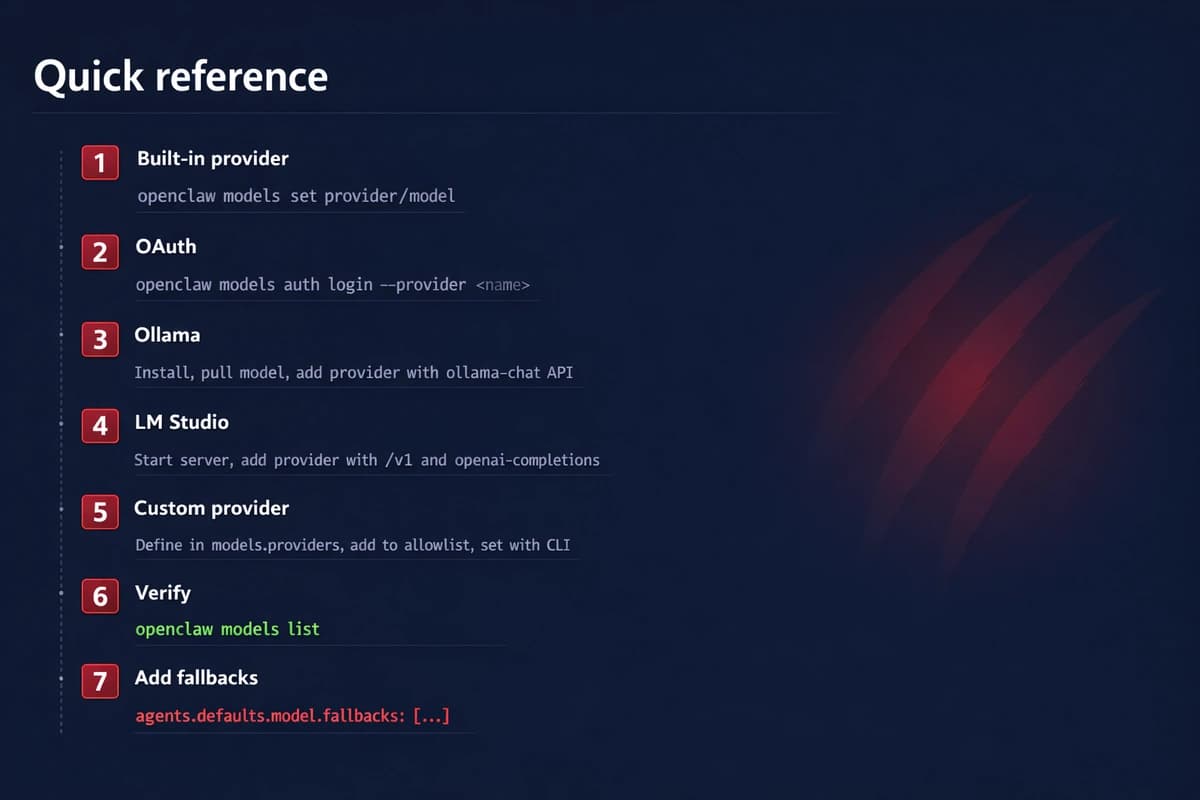
- Built-in provider: Set env var →
openclaw models set provider/model - OAuth:
openclaw models auth login --provider <name> - Ollama: Install → pull model → add provider to
openclaw.jsonwithollama-chatAPI - LM Studio: Start server → add provider with
/v1andopenai-completionsAPI - Custom: Define in
models.providers→ add toallowlist→ set with CLI - Always verify:
openclaw models list - Always add fallbacks. Your future self will thank you.
Check the OpenClaw model docs for the full model catalog and the provider reference for advanced provider config.
Once your models are set up, the next step is adding agents. From there, extend what your agents can do with skills and MCP servers, or connect them to Telegram so you can message them from your phone.
Ready to run OpenClaw without the server headaches? OpenClaw VPS gives you a managed instance with dashboard model config, 24/7 uptime, and zero maintenance. Get started →


