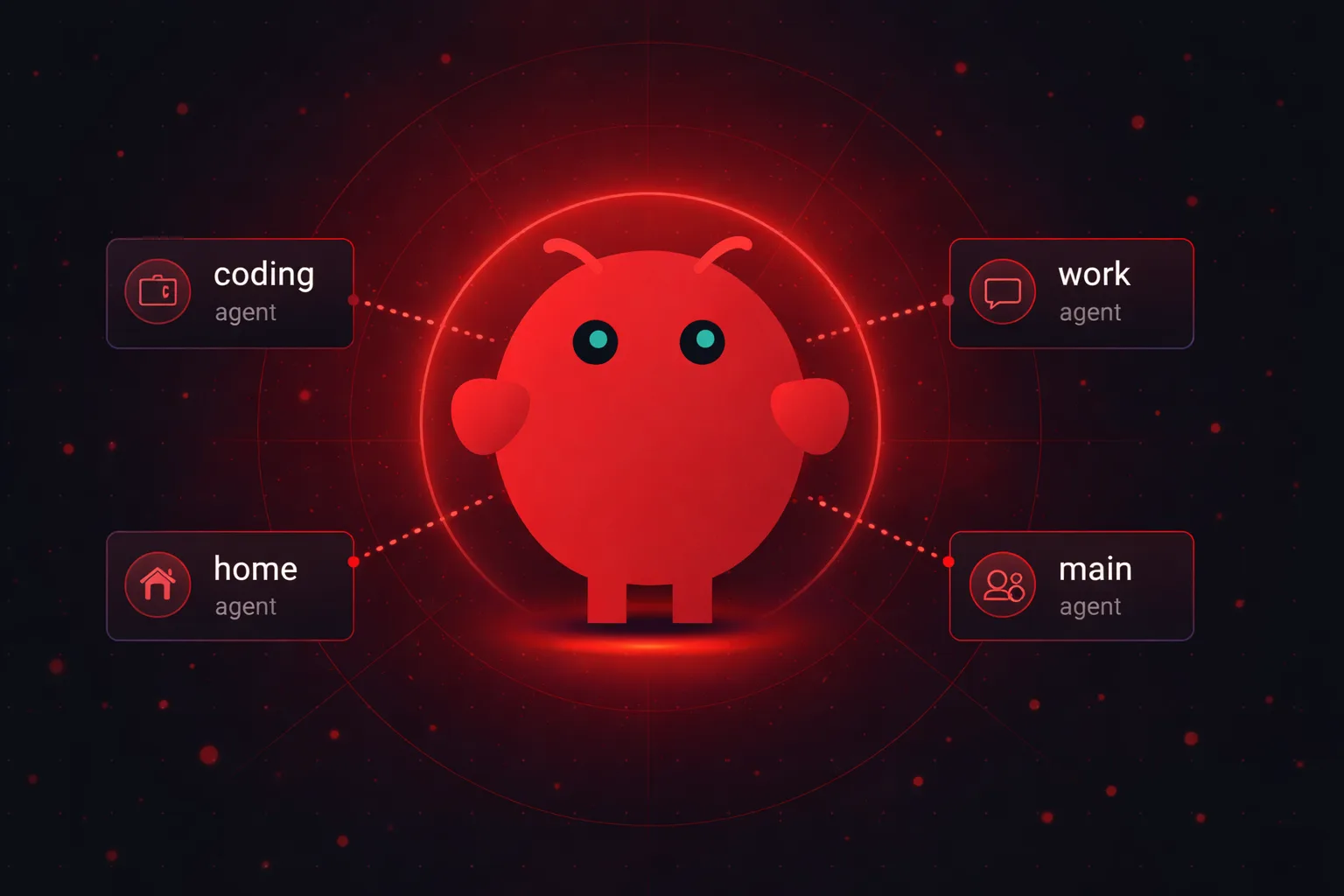
TL;DR: Create a workspace folder (mkdir ~/.openclaw/workspace-<name>). Write a SOUL.md with personality and boundaries. Register with openclaw agents add <id> --workspace <path>. Add the agent to agents.list in openclaw.json. Bind it to a channel in the bindings section. The whole thing takes 15 minutes.
Running one OpenClaw agent is fine. Until it isn't.
I hit the wall about two weeks in. My single agent was handling work emails, answering coding questions, managing my grocery list, and trying to schedule meetings on my calendar. All in the same conversation thread, all with the same personality, all sharing the same memory.
It got confused. I got frustrated.
That's when I set up multi-agent. Separate brains for separate jobs. One agent handles work stuff through Telegram. Another one lives on WhatsApp for personal things.
A third does nothing but code reviews, each running its own model. The difference was instant.
This walkthrough covers the full process: adding agents through the CLI, writing the workspace files that define each agent's personality, and binding agents to specific channels so messages actually go where they should. But here's the thing most tutorials skip over, there's one file in the workspace that makes or breaks your entire multi-agent setup. More on that in a minute.
What "add agent" actually means in OpenClaw
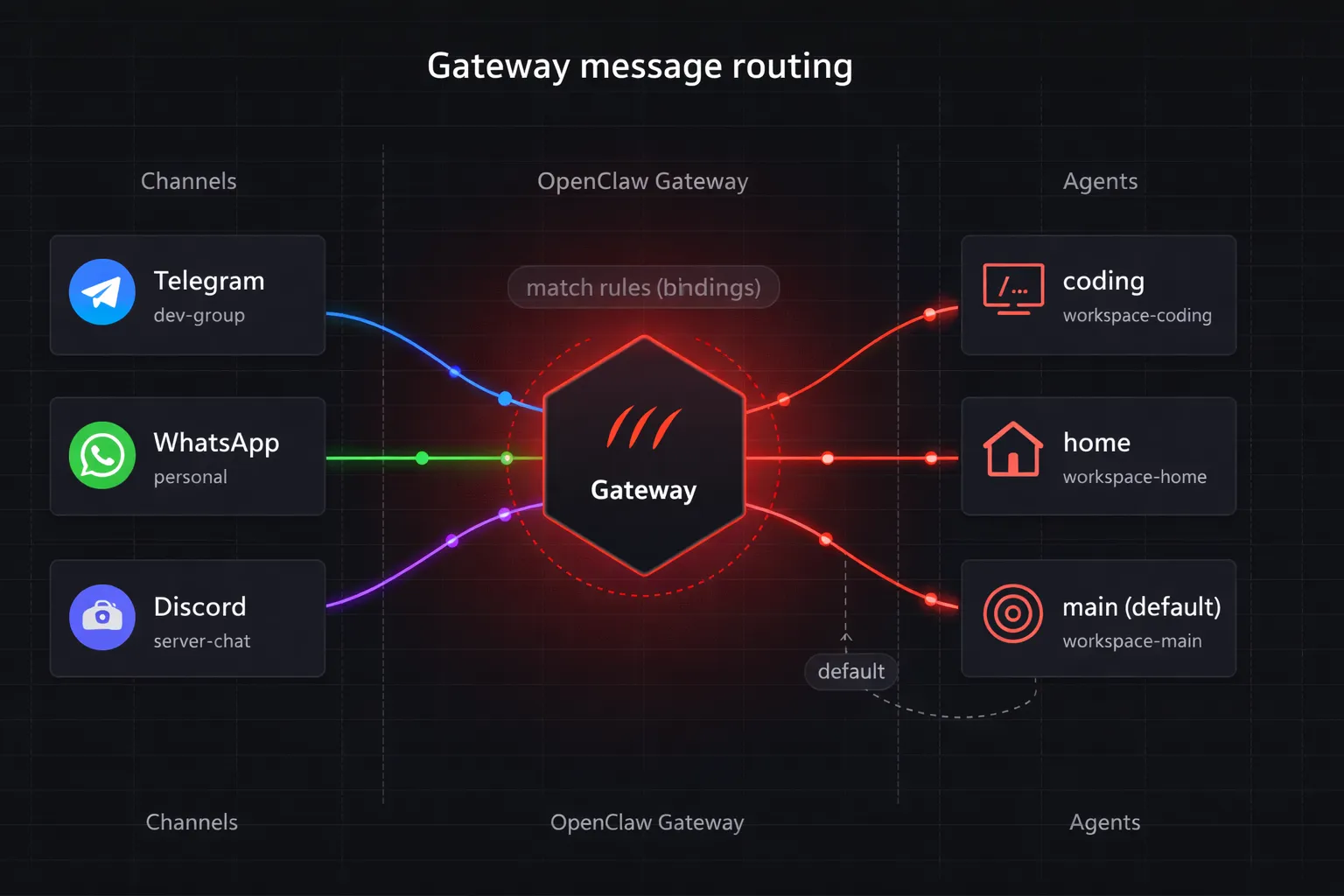
OpenClaw runs everything through a Gateway. Think of it as a central switchboard. One Gateway process, multiple agents running inside it.
Each agent gets its own workspace folder. Its own personality files. Its own session history and memory. They don't share anything unless you explicitly tell them to.
The default setup gives you one agent. That's the one you've been talking to. Adding more lets you specialize: a "work" agent that knows your company's tools, a "home" agent that tracks personal stuff, a "coding" agent with access to GitHub, or an agent social media scheduler. Same Gateway, different desks, different job descriptions.
Two patterns exist for this. Persistent agents live indefinitely and usually map to a channel or bot account. Sub-agents spin up for specific tasks and auto-archive when done.
So for most people, persistent agents are what you want.
Before you start
Quick checklist. Don't skip these or you'll waste 20 minutes debugging something obvious.
- OpenClaw installed and running (check with
openclaw gateway status) - At least one working channel, WhatsApp, Telegram, Discord, whatever
- Access to your config at
~/.openclaw/openclaw.json - A clear idea of what this new agent should actually do
That last point matters more than people think. "I want another agent" is not a plan. "I want an agent that handles only coding questions through my dev Telegram group" is a plan. Be specific before you touch any config files.
Don't want to manage servers? OpenClaw VPS gives you a fully managed OpenClaw instance with multi-agent support out of the box. One-click deploy, automatic updates, and your agents are always online. Plans start at $19/month.
Step 1: create the agent workspace
Every agent needs a home. Create a folder for it:
mkdir ~/.openclaw/workspace-codingName it whatever makes sense. I use workspace-<purpose> because six months from now you won't remember what workspace-alpha-v2 was for.
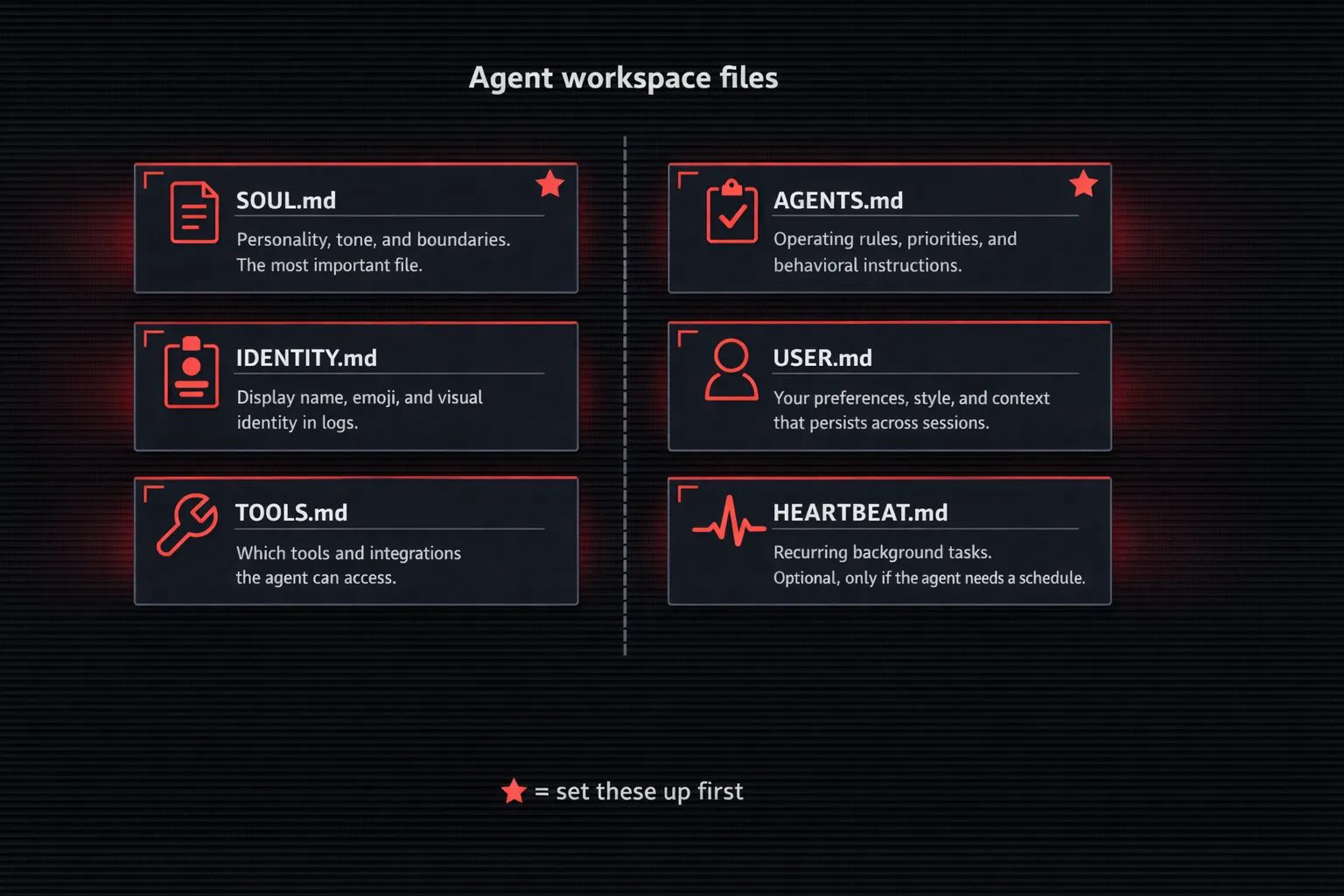
Inside this folder, OpenClaw looks for specific files. Here's what each one does:
AGENTS.md is the operating manual. Rules, priorities, how to behave. Gets loaded at the start of every session.
This is where you put "never share code outside this chat" or "always respond in English."
SOUL.md is the personality. Tone, boundaries, deep behavioral traits. I'll go deep on this one in the next section because it's the file everyone gets wrong.
IDENTITY.md holds the agent's name, vibe, and emoji. Gets created during the bootstrap ritual when you first initialize the agent. Cosmetic but useful when you're juggling multiple agents in logs.
USER.md stores what the agent knows about you. Your preferences, your style, context that carries across sessions.
TOOLS.md defines which tools and skills the agent can access. A coding agent might get GitHub integration through MCP servers. A personal agent doesn't need that.
HEARTBEAT.md sets up recurring background tasks. Optional. Only enable this if the agent needs to do something on a schedule, like checking for new emails every hour.
Now here's where people go wrong. They create the folder, dump all six files in there, and spend hours writing each one. Don't.
AGENTS.md and SOUL.md are the two that actually matter at the start. The rest are nice-to-have. Get those two right first, add the others later.
Step 2: write the SOUL.md (this is where most setups fail)
Remember that one file I mentioned in the intro? This is it.
I've seen two failure modes. People either leave SOUL.md completely blank, or they paste in some generic "you are a helpful AI assistant" prompt they found on Reddit. Both are bad.
A blank SOUL.md means your agent has no personality, no boundaries, no idea what it's supposed to be good at. A generic one is barely better.
A good SOUL.md is specific. Here's what I use for my coding agent:
You are a senior software engineer. You write clean, readable code.
You prefer simple solutions over clever ones.

When reviewing code, focus on bugs and security issues first.
Style nitpicks come last, if at all.

You don't write tests unless explicitly asked.
You don't refactor working code unless there's a real problem.

When you're unsure about something, say so. Don't guess at APIs
or library methods. Check the docs or ask me.

Tone: direct, technical, no small talk. Skip the "Great question!"
stuff. Just answer.
Compare that with a social media agent:
You manage social media replies and scheduling.
You match the brand voice: casual, friendly, slightly witty.
Never sarcastic. Never political.

You draft replies but never post without my approval.
You flag anything negative for manual review.

Keep responses under 280 characters when drafting for Twitter.
For Instagram captions, aim for 2-3 sentences max.
See the difference? Each agent knows exactly what it is, what it isn't, and where its limits are.
One more thing. Keep your SOUL.md under 500 words. I know the temptation is to write a novel, but everything in SOUL.md eats into your context window.
Every token spent on personality is a token not spent on your actual question. Short and sharp beats long and detailed.
Step 3: register the agent
With the workspace ready, use agents add to tell OpenClaw about it:
openclaw agents add coding --workspace ~/.openclaw/workspace-codingReplace coding with whatever ID makes sense. Keep it lowercase, no spaces. The agents add command registers this ID, and it's what you'll reference everywhere else in the config.
What happens behind the scenes: OpenClaw creates an entry for this agent and sets up a session store under ~/.openclaw/agents/coding/. That's where conversation history and memory live, completely separate from your other agents.
Verify it worked:
openclaw agents listThe agents list command should show your new agent alongside the default one. If you wrote an IDENTITY.md in the workspace, pull it in with:
openclaw agents set-identity --from-identityThis sets the agent's display name and emoji based on what's in IDENTITY.md. Purely cosmetic, but it makes logs way easier to scan when you're running multiple agents.
Step 4: configure in openclaw.json
Open your config file:
nano ~/.openclaw/openclaw.jsonAdd your new agent to the agents.list array:
{
  "agents": {
    "list": [
      { "id": "main", "default": true, "workspace": "~/.openclaw/workspace-main" },
      { "id": "coding", "workspace": "~/.openclaw/workspace-coding" }
    ]
  }
}
The "default": true flag on your main agent means it catches everything that doesn't match a specific binding. Only one agent should have this.
You can override the model per agent too. Maybe your coding agent needs Claude Sonnet for better code generation, but your personal agent runs fine on something cheaper:
{
  "id": "coding",
  "workspace": "~/.openclaw/workspace-coding",
  "model": {
    "primary": "anthropic/claude-sonnet-4-20250514"
  }
}
Save the file. Here's something cool: OpenClaw watches openclaw.json for changes and hot-reloads automatically. No manual restart needed for most config changes. Just save and it picks it up within seconds.
Step 5: bind the agent to a channel
This is the routing part. Without bindings, every message goes to your default agent. Bindings tell the Gateway: "when a message comes in on this channel from this account, send it to that agent."
Add a bindings section to your config:
{
  "bindings": [
    {
      "agentId": "coding",
      "match": { "channel": "telegram", "accountId": "dev-group" }
    }
  ]
}
The match object supports several fields:
- channel matches the platform (telegram, whatsapp, discord)
- accountId matches a specific bot account or phone number
- chatType matches group vs. private conversations
- peer matches a specific user or group ID
You can combine these. Want your coding agent to only handle messages in a specific Telegram group? Set both channel and peer.
Want it to handle all Telegram traffic from a specific bot account? Just channel and accountId.
When no binding matches an incoming message, the default agent handles it. So that's your safety net.
Verify everything is wired up correctly:
openclaw agents list --bindingsThis shows each agent and its routing rules. If something looks wrong, fix it in the config and let hot-reload do its thing. If hot-reload didn't catch a change (rare but it happens), force it with openclaw gateway restart.
Real-world setups that actually work
I've tried a bunch of configurations. Here's what stuck. (If you're comparing OpenClaw's agent architecture to other platforms, there's a full comparison available.)
- Home (WhatsApp)
- Work (business number)
- General assistant
- Coding (Claude + GitHub)
- Social media
- Email, notes, research, code, personal
The two-agent split. This is the most common setup and the one I'd start with. A "home" agent on your personal WhatsApp and a "work" agent on your business number. Different personalities, separate memory, zero bleed between contexts.
Three agents with roles. General assistant, coding agent, and a social media agent. The coding agent gets Claude Sonnet plus GitHub tools. The social agent handles scheduling and drafts replies.
The general one catches everything else. This is what I run daily, and it covers 90% of my needs.
Five or more agents. I tried this. Built separate agents for email triage, meeting notes, research, coding, and personal stuff. Fun to build? Absolutely. Pain to maintain? Also yes.
Config files get messy, you forget which agent does what, and half of them sit idle most days. My honest take: start with two, add a third when you genuinely need it, and resist the urge to go beyond that unless you have a real reason.
If you want a head start on multi-agent configs, the agent community has a repo called openclaw-agents on GitHub. It ships 9 pre-built agent team templates with group routing and safe config merging. Worth checking out before you build everything from scratch.
When things go wrong
Agents aren't hard to set up, but a few things trip people up regularly.
"Agent failed before reply" usually means your SOUL.md has a problem. Either there's a syntax error in the markdown, or the file is too long and eating your entire context window.
Check the logs with openclaw logs --agent coding and look for token limit warnings. Trim the SOUL.md down and try again.
Messages going to the wrong agent is almost always a binding mismatch. Run openclaw agents list --bindings and double-check your match rules.
The most common mistake? A typo in the accountId or peer field. Copy-paste these values from your channel config instead of typing them manually.
Agent feels dumb compared to the default. Nine times out of ten, the agent is missing AGENTS.md or TOOLS.md. Without AGENTS.md, it has no operating instructions. Without TOOLS.md, it doesn't know what tools are available to it.
It's like hiring someone and not telling them what their job is.
Config changes not taking effect. Hot-reload handles most edits, but occasionally the Gateway needs a manual kick. Run openclaw gateway restart and it picks everything up fresh.
Tired of debugging server issues? With OpenClaw VPS, you skip all of this. We handle the Gateway, the uptime, and the restarts. You just configure your agents and go. See plans →
Tips from running multiple agents daily
Keep workspaces organized. I use workspace-<purpose> naming for every single one. When you have four agents and their folders are called ws1, test-agent, and new, you will regret it.
Back up your SOUL.md files. Seriously. They're the hardest files to recreate because they're tuned through trial and error over weeks.
I keep mine in a private Git repo.
Start each agent with fewer agent skills, not more. Give the coding agent GitHub access and nothing else. Give the social agent only the scheduling tool.
Scope creep kills agent quality fast. But you can always add tools later.
When your config gets long, use $include to split it into separate files:
{
  "agents": { "$include": "./agents.json5" },
  "bindings": { "$include": "./bindings.json5" }
}
Test each agent in isolation before binding it to a live channel. Send test messages directly through the CLI to make sure the personality and tools work the way you expect.
Finding out your coding agent has the wrong tone in a client Telegram group is not ideal.
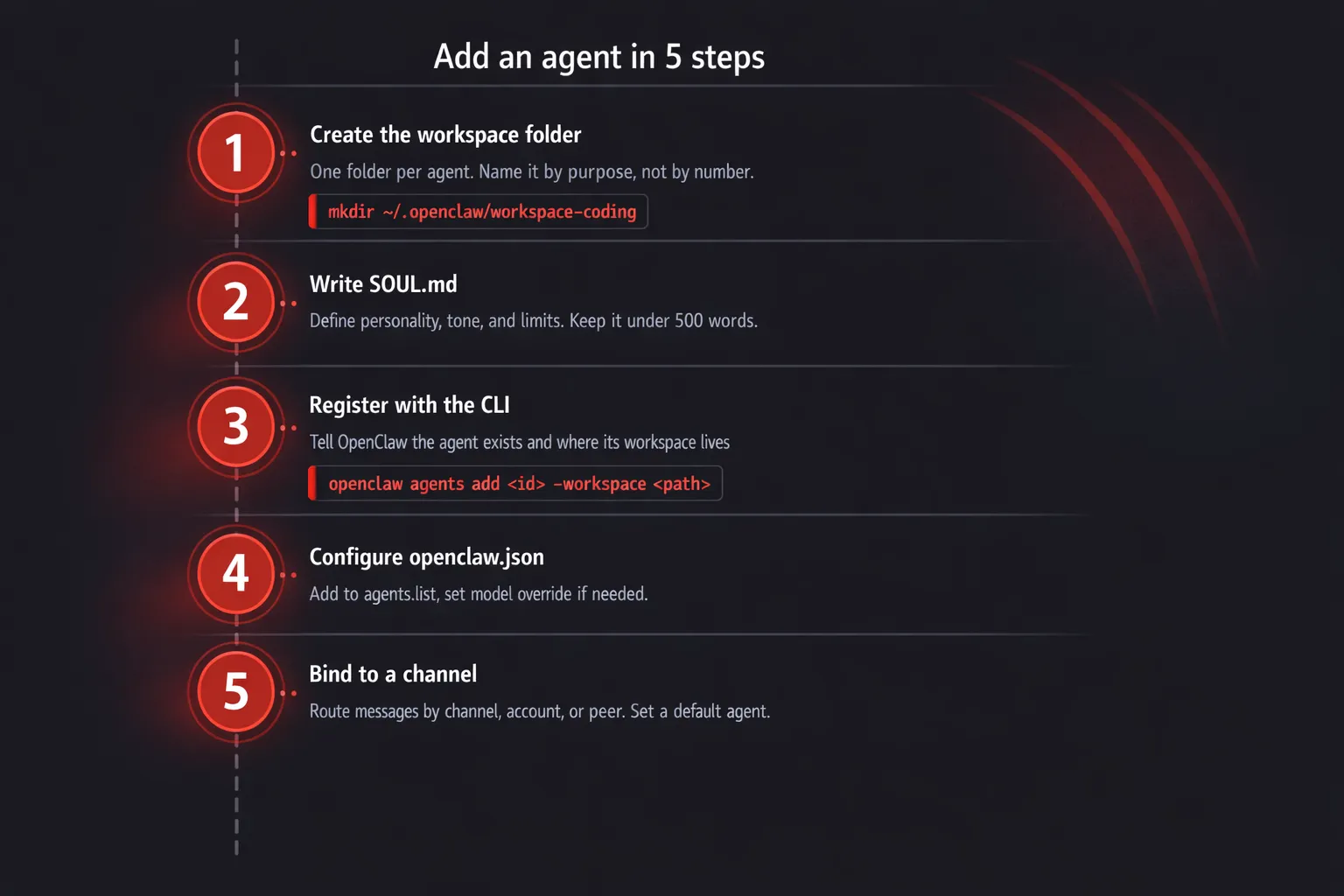
And one last thing: the five steps again if you need a quick reference. Create workspace. Write SOUL.md. Register with openclaw agents add. Configure in openclaw.json. Bind to channels.
That's it. The whole thing takes about 15 minutes once you know what you're doing.
Check the OpenClaw docs on multi-agent routing for advanced matching rules and the agent workspace reference for the full list of workspace files.
Ready to run your own agents?
If you want multi-agent OpenClaw without managing a server, OpenClaw VPS handles the infrastructure so you can focus on building your agents. Deploy in under a minute, get automatic updates, and your agents stay online 24/7. No terminal babysitting required.


