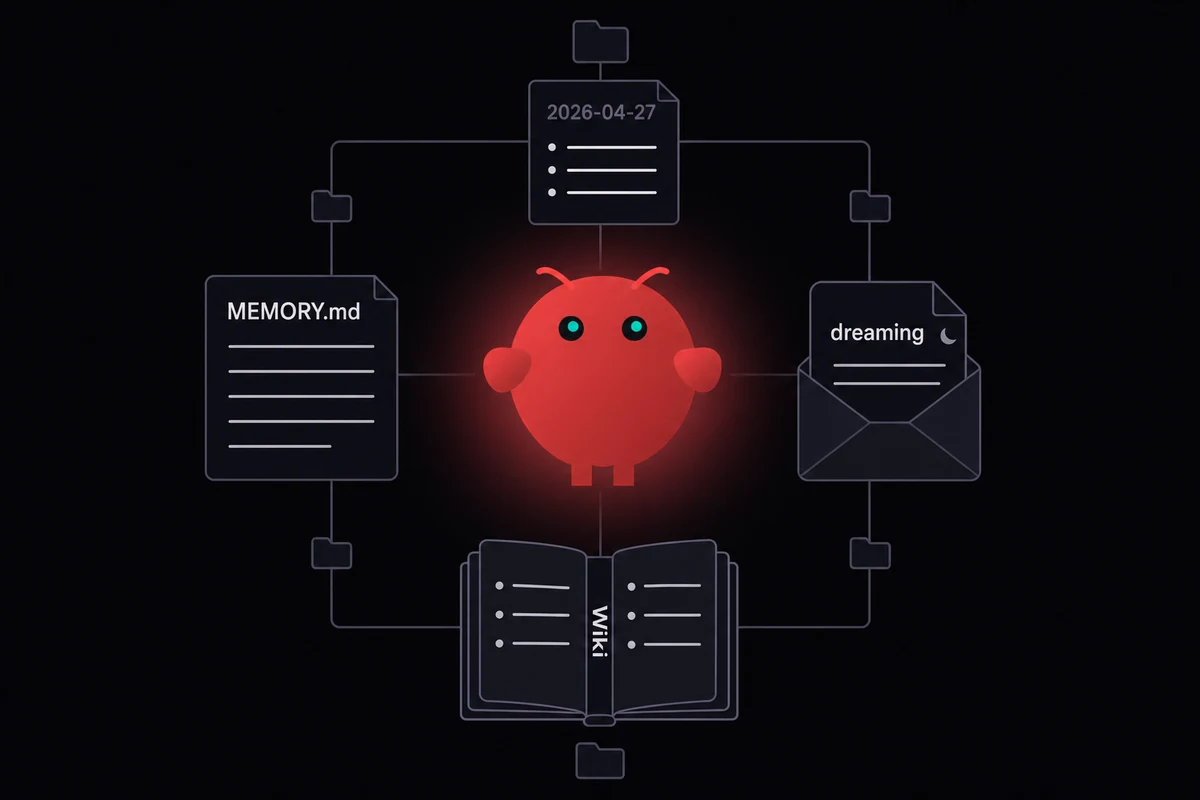
TL;DR: OpenClaw memory is plain Markdown on disk inside your agent's workspace, with MEMORY.md at the top and a small tree of files under it. Most of what people call "forgetting" is compaction around 75 to 86% of the context window, and turning on the pre-compaction memory flush stops most of it.
Last Tuesday I lost a thread of context I had been building up in a writing-bot's MEMORY.md for two weeks. The session crossed 80% of the window, the auto-summary fired, and afterwards the agent confidently named a side character it had never heard of. I had not turned the pre-compaction memory flush on.
That is the boring fix that saves you the most pain. After a few months running OpenClaw on everything from a $400 ThinkPad to a managed VPS in Falkenstein, I keep finding the same broken assumption.
People think the agent has hidden state somewhere. It does not. I have learned that memory is files on disk, written and read on a schedule you can audit, and two of those files did not exist a week ago.
How OpenClaw memory works in four files
OpenClaw memory is plain Markdown. Four artifacts sit on disk in your agent's workspace, loaded into context at session start by deterministic rules. There is no hidden state, no opaque vector store the agent reads behind your back. Whatever was written to a file before the session began is what the model "remembers". Nothing more.
| File or folder | What it holds | When it loads |
|---|---|---|
MEMORY.md | Top-level long-term index, hand-curated or written by the dreaming pass | Every session start |
memory/YYYY-MM-DD.md | Daily note, one file per day | Today and yesterday auto-load |
memory/dreaming/ | Output of the cleanup pass, isolated since 4.15 | On demand via memory tools |
memory/wiki/*.md | Optional Memory Wiki pages with YAML frontmatter, claims, evidence | On demand via memory tools |
| Two built-in tools | memory_search (sqlite-vec + FTS5 hybrid) and memory_get | Available every turn |
Table: The four memory artifacts and when each one is read into context
MEMORY.md is the file you actually edit. It sits at the top of the workspace, the one place where you can hand-write a fact and trust it will load next morning. Daily notes are short-term scratch, auto-rotating with today and yesterday in context, and anything older is only reachable through memory_search.
I noticed memory/dreaming/ showing up as its own folder when I upgraded one of my bots to 4.15. Before that, the cleanup pass dumped its sleep-phase and REM-phase blocks straight into MEMORY.md, and I had to clean cycles out by hand every week or so. Daily memory stays clean since.
The OpenClaw Memory Wiki shipped a week ago in v2026.4.7. I started running it on a family bot the same day, where entity, concept, and source pages each become a Markdown file with YAML frontmatter, structured claims, confidence scores, and timestamps. A compile step makes machine-readable digests, and a lint step catches contradictions and stale entries.
On top of those files there are two lookup tools. memory_search runs hybrid lookup with sqlite-vec for vectors plus FTS5 for keywords. memory_get fetches a specific path.
Embedding auto-detect happens at startup from whatever you have in your environment. With an OpenAI, Gemini, Voyage, or Mistral key it picks one; otherwise it falls back to a local Ollama embedding model, or to pure FTS5 keyword search if no embedder is set up.
Why your agent forgets in long sessions
Back in February, a writing-bot of mine lost three weeks of plot context in one auto-summary. The session crossed compaction, the running transcript got swapped for a flat summary, and a side character it had built up across two months disappeared from the next reply. I had skipped the pre-compaction flush on that bot too.
Most of what people call "the agent forgot" is that exact swap. Around 75 to 86% of the context window the running transcript becomes one flat summary, and the model confidently misremembers specifics afterwards. "OpenClaw memory not working" almost always traces back to compaction.
That is the loud one. Quieter failures come from MEMORY.md, SOUL.md, AGENTS.md, and a half-dozen project notes all wanting a slot at session start, and after a while you stop paying attention to which ones actually load.
The silent one bit me harder. I had a 23,000-character MEMORY.md in a writing-bot, and a project handoff note at the bottom that the agent never saw. Two debug sessions before I found the truncation in a verbose-mode log.
A bootstrap cap sits around 20,000 characters. Files get cut from the bottom and there is no error message anywhere in the trace. I now keep a pinned note on my desk that says "lines under 18,000."
Identity loss is quieter still. After a flat summary fires, SOUL.md drifts and earlier tool outputs vanish along with the running transcript.
Skills hide in plain sight. A skill listed in the manifest will not always get picked up by the model on the right turn, and the only way to tell is to read the trace.
My last failure mode is one I almost shipped my own bot into. After three months I had lossless-claw + QMD + Supermemory + Neon + GitHub heartbeat glued together, and an outage in any one piece took the whole chain down.
The memory itself was fine the whole time. Pulling everything back into nested folders under one short index was what got me out, and that bot has held up since.
Built-in memory vs the plugin shelf
It took roughly three months on built-in memory before I reached for a plugin, and that delay surprised me.
MEMORY.md plus memory_search plus the dreaming pass carried those three months for me, on a writing-bot I cared about. Plugin shelves are shorter than the marketing makes them look, and most write-ups push whichever vendor pays the writer. For single-agent setups in the first few months, the built-in stack is enough.
You outgrow it when one specific thing breaks: a corpus gets too big and pure search returns noise, the agent has to reason about relationships between facts, or you run the same agent across many machines and the local-disk index cannot follow.
| Plugin or layer | What it adds | Best fit | Tradeoff |
|---|---|---|---|
| Built-in MEMORY.md + memory_search | Plain Markdown, hybrid retrieval | Single agent, single machine, < 3 months | Caps out around the bootstrap limit |
| Memory Wiki (4.7+, built-in) | Claim and evidence, freshness scoring | Operational knowledge, business facts | Extra discipline to write claim entries |
| Lossless Claw | Layered summaries, fresh tail | Long sessions that hit compaction | One more plugin to update |
| QMD | Obsidian-style sidecar over a vault | You already live in Markdown notes | Fragile when your vault grows huge |
| Mem0 | Hosted memory plus an open-source mode | You want a vendor SLA | Adds a paid dependency |
| Supermemory | Cross-channel cloud memory | One agent across many channels | Vendor lock-in, paid tier |
| Cognee | Knowledge graph instead of flat files | Your queries are relational | Heavier setup, harder to debug |
Table: The plugin shelf at a glance, with built-in MEMORY.md plus six common alternatives
A natural progression most operators describe goes like this: MEMORY.md first, then vector search, then a knowledge graph once you realise most of your queries are structured and not full-text. Most operators sit on rung one and have no reason to climb yet.
If your setup looks like "lossless-claw + QMD + Supermemory + Neon + GitHub heartbeat", you do not have a memory problem. You have a plumbing problem. Memory Wiki shipping inside core in 4.7 is partly a way to drop one of those layers.
A folder layout that holds up under load
An OpenClaw memory configuration that holds up under load stacks five subfolders under one short index. memory/people/, memory/projects/, memory/decisions/, memory/daily/, and memory/dreaming/ each hold one type of fact, while MEMORY.md at the top stays small and points down. Hierarchy keeps the index under the bootstrap cap and lets the agent fetch depth on demand.
The community pattern looks like this:
MEMORY.md
memory/
  people/
  projects/
  decisions/
  daily/
  dreaming/
A short OpenClaw MEMORY.md example, taken from one of my own bots:
# Memory index
- People: see memory/people/
- Active projects: openclaw-vps, family-bot, writing-bot
- Recent decisions: see memory/decisions/2026-04/
- Today's note: memory/daily/2026-04-27.mdSOUL.md, the agent's identity file, sits next to MEMORY.md at the top of the agent workspace. Both files load on every session start, and both deserve hosting on something more durable than a laptop disk. Practitioners agree there is a MEMORY.md ceiling around 800 to 2,000 words past which the file silently truncates.
Habits help here too. Use the manual /remember slash command for high-stakes facts and verify it landed where you expected. A hygiene pass once a week catches contradictions, since the dreaming pass does additive cleanup but never deletes.
I run a small script that grep-counts duplicate names across memory/people/ once a week. The first run flagged three files for the same client because past-me had used three spellings of his last name, and the agent had been blending context across all three at random for about a month.
Babysitting
memory/on a laptop that sleeps gets old fast. OpenclawVPS provisions a dedicated VPS in 47 seconds with persistent disk, the gateway preinstalled, and EU data residency in Falkenstein, Nuremberg, or Helsinki. Yourmemory/tree survives the laptop dying. Plans start at $19/month.
Memory that follows the agent across machines
Back in February. Cold-boot lockout on a $400 ThinkPad after a kernel panic mid-apt upgrade, with the only MEMORY.md for that bot living on a luks home partition I could not recover. Two months of facts gone with the disk.
That trap shows up everywhere in this ecosystem and almost nobody writes about it. A laptop dies and the only memory the bot ever had goes with the disk. An OS reinstall does the same, and so does a credential-stealer working through your home folder.
MEMORY.md and SOUL.md are both named targets in 2026 infosec coverage, alongside browser cookies and SSH keys on the pickup list. Hosting the memory tree off the daily-use machine fixes the durability problem and the security one in the same move.
Prototype on a laptop, then move off it. Running a VPS yourself counts as real ops work, where you spend hours on firewall rules and unit files plus a weekly attention to backups that only pays off if the disk dies.
I ran a self-managed VPS for about two months earlier this year before the firewalld rules started eating my agent-building hours. A managed VPS is what we ship at OpenclawVPS: gateway plus persistent disk in 47 seconds, EU regions only, so your memory/ tree never leaves the bloc.
With 4.15, LanceDB picked up cloud object storage support. The index that backs memory_search can now sit on remote storage, and the same agent on your laptop, your iPhone shortcut, an Android phone over Termux, and your VPS reads the same memory.
One agent serving WhatsApp, Telegram, and Slack out of one persistent memory tree is just one self-hosted AI assistant, not three with three different memories. Wire WhatsApp into the gateway and the rest, and they all point at the same memory/ folder.
What changed in 4.7 and 4.15
Two releases this month rewrote the operator-facing memory story. If you read a guide written before mid-April 2026, treat half of its advice as outdated.
| Release | Memory feature | What it changes for operators |
|---|---|---|
| 4.7 | Memory Wiki ships in core | Drop a plugin from your stack; structured claims with confidence scores |
| 4.7 | Session branch and restore | Pre-compaction checkpoints; recover from any snapshot |
| 4.7 | Native memory PR #50,848 merge | Memory in the context-assembly flow, 92% retrieval accuracy on benchmarks |
| 4.15 | LanceDB cloud storage | Memory index follows agents across machines |
| 4.15 | Bounded memory reads | Capped excerpt length with explicit "more available" metadata |
| 4.15 | Dreaming output isolation | Goes to memory/dreaming/, daily notes stay clean |
Table: Memory-relevant changes in OpenClaw 4.7 and 4.15
A self-healing markdown-wiki idea was floated publicly in early April 2026. OpenClaw v2026.4.7 shipped Memory Wiki a couple of weeks later with almost the same architecture: claim-and-evidence pages, lint passes, every fact timestamped.
Almost nobody talks about 4.15 lean mode for local models. If you run Claude as the backend model you can ignore it. If you run Ollama or LM Studio under ~32B parameters, turning lean mode on drops the heavyweight default tools and stops the smaller model drowning in a 50,000-token system prompt.
The setup I run now
My recipe stays boring. I keep the pre-compaction flush on, and the folders under memory/ go hierarchical so the index stays small. The disk holding them never doubles as my browser disk.
None of those takes more than five minutes to set up, and most setups I see skip at least one.
If you are still on a laptop, your memory is one disk failure from a fresh start. The subscription chat product like ChatGPT keeps your memory on its servers, and OpenClaw keeps it on yours.
Get started with OpenclawVPS →
Frequently asked questions
Where does OpenClaw store memory?
Plain Markdown files inside the agent workspace.
The four artifacts are MEMORY.md (top-level index, loaded every session), memory/YYYY-MM-DD.md (daily notes, today and yesterday auto-load), memory/dreaming/ (cleanup output, isolated since 4.15), and the optional Memory Wiki tree under memory/wiki/ (4.7+). On a managed VPS those files live on persistent disk so they survive machine restarts and re-pairing.
Why does OpenClaw forget things after a long session?
Compaction. Two weeks ago I watched a writing-bot do this at 81% of the window: the running transcript got swapped for a flat summary and the model started inventing details that had been clear an hour earlier.
There is a fix that turns the wipeout into something additive. Turn on the pre-compaction memory flush so high-value facts get written to MEMORY.md before the summary fires. Install Lossless Claw if your sessions cross the threshold often, since layered summaries plus a 2,000-token fresh tail keep the recent material untouched.
Can I use OpenClaw memory search without an embedding API key?
Yes. memory_search falls back to a local Ollama embedding model when no API key is set, and pure FTS5 keyword search still works for small workspaces.
What is the difference between MEMORY.md and daily notes in OpenClaw?
MEMORY.md is the long-term index. Daily notes (memory/YYYY-MM-DD.md) are short-term scratch that auto-load for today and yesterday, then age out.
I keep one rule. If I want the agent to remember it in three months, it goes in MEMORY.md or one of the structured folders. If it is a thought from today, it goes in the daily note.


