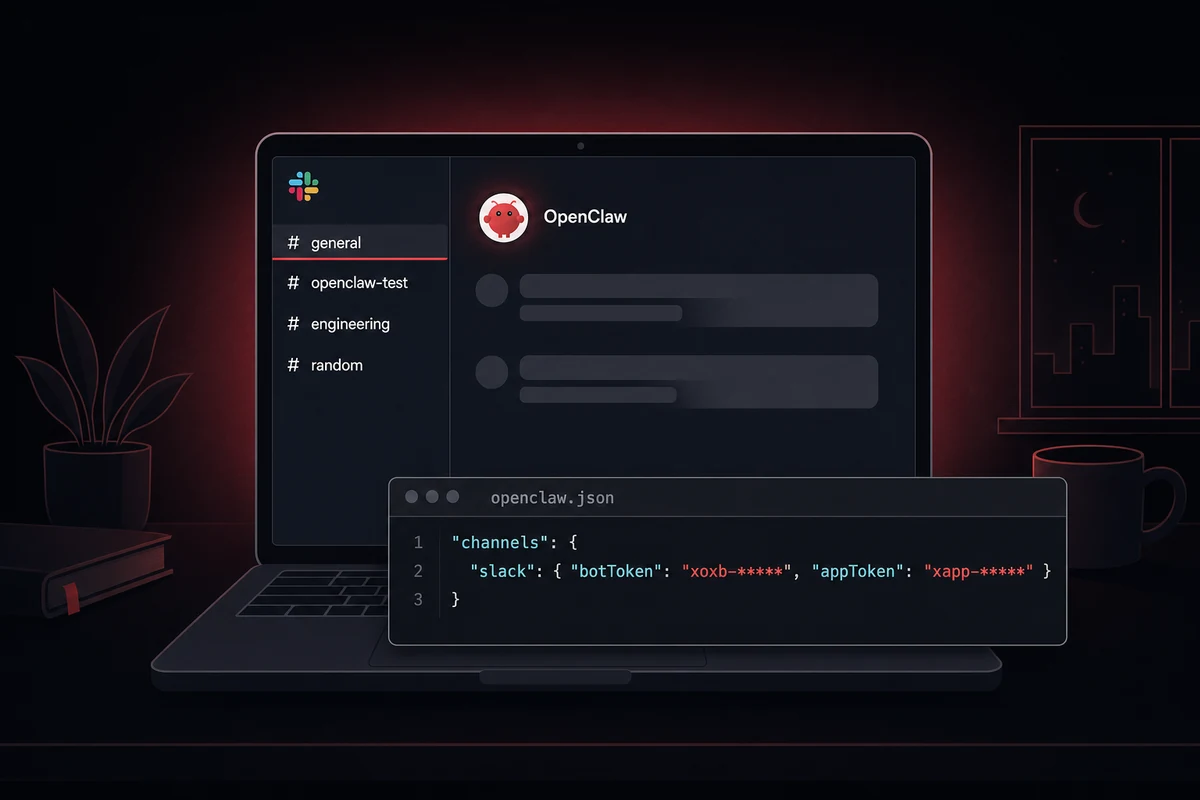
xoxb- bot token and xapp- app-level token), nine OAuth scopes, Socket Mode enabled, and port 18789 free on the host. Create the Slack app from manifest, paste both tokens into the config file, restart the gateway. Most failures are a missing app-level token or a port collision.The setup has three layers. The Slack side: an app created from manifest, Socket Mode toggled on, nine bot scopes set. The token side: the xapp- App-Level Token and the xoxb- Bot User OAuth Token pasted into openclaw.json.
The OpenClaw side: confirm nothing else listens on port 18789, restart the gateway, watch for Slack: connected in the boot log. Three things usually break it: a forgotten appToken, a 12-hour token rotation, or another process bound to 18789, and the gateway logs invalid_auth or EADDRINUSE within the first ten seconds when any of them hits.
One anecdote I think about every time someone asks me about allowBots: a bot I watched once replied to another AI in a shared channel 47 times in 12 seconds before someone killed the process. Set requireMention before you set allowBots.
OpenClaw Slack configuration: the 8 clicks that matter
The fastest reliable path is creating the Slack app from a manifest. The YAML pre-fills the OAuth scopes, event subscriptions, and Socket Mode toggle in a single submit. You skip three tabs of dashboard work. Six of the ten SERP guides recommend this flow.
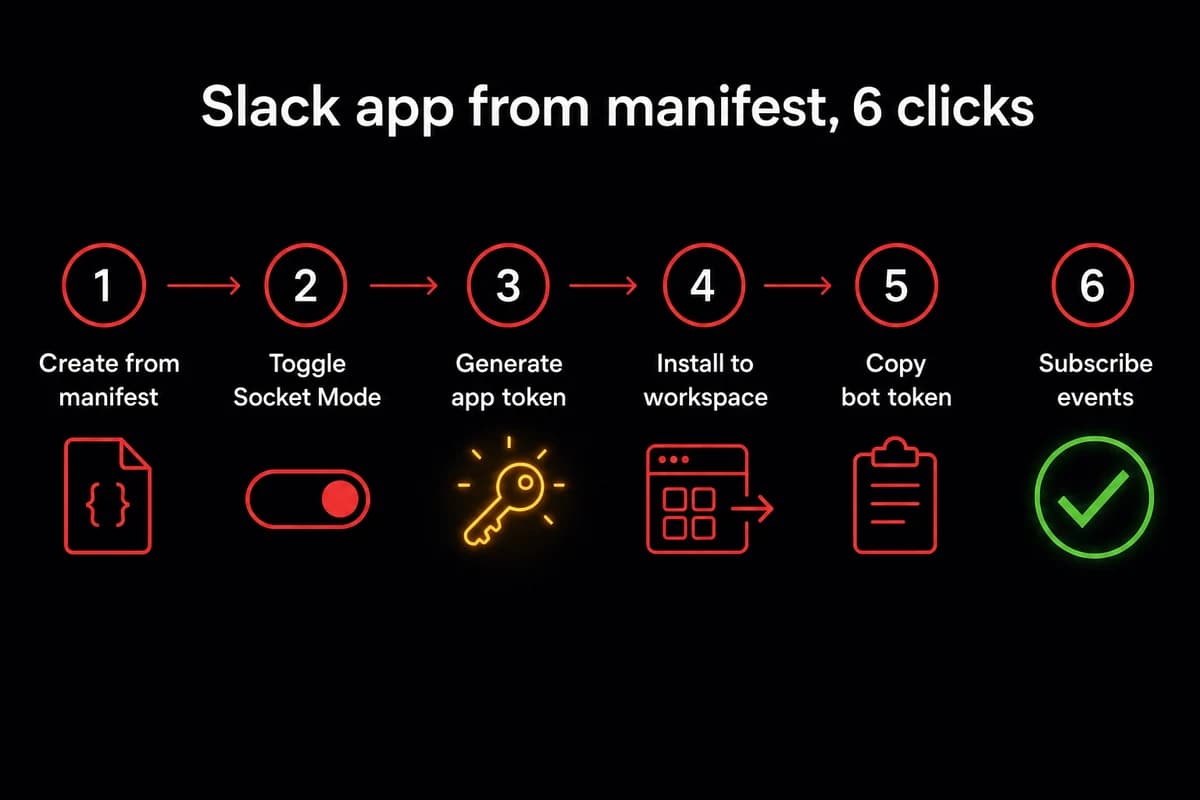
The full click sequence is six numbered actions:
- Create the app from a manifest. Open
api.slack.com/apps, click Create New App, pick From a manifest, choose your workspace, and paste the YAML below. - Toggle Socket Mode ON. Under Basic Information → Socket Mode, flip the switch.
- Generate the
xapp-App-Level Token. Click Generate Token and Scopes withconnections:writeselected. I once forgotconnections:writeand spent 20 minutes wondering why Socket Mode would not connect. - Install the app to your workspace. Open OAuth & Permissions → Install to Workspace and approve the scopes.
- Copy the
xoxb-Bot User OAuth Token. It appears at the top of the same OAuth & Permissions page after install. - Verify bot events. Open Event Subscriptions → Subscribe to bot events and confirm
app_mention,message.channels,message.im,message.groups,message.mpim.
The manifest looks roughly like this:
display_information:
  name: OpenClaw
features:
  bot_user:
    display_name: OpenClaw
    always_online: true
oauth_config:
  scopes:
    bot:
      - chat:write
      - app_mentions:read
      - channels:history
      - channels:read
      - im:history
      - im:read
      - im:write
      - users:read
      - connections:write
settings:
  event_subscriptions:
    bot_events:
      - app_mention
      - message.channels
      - message.im
      - message.groups
      - message.mpim
  socket_mode_enabled: true
That gets you the nine bot scopes a full-featured OpenClaw Slack bot needs at minimum. The table maps each one to what it unlocks, so you can audit your installed scopes against the canonical list.
| Scope | What it enables | Required for |
|---|---|---|
chat:write | Bot can post messages to channels and DMs it joins | Every outbound message |
app_mentions:read | Bot sees @OpenClaw mentions in channels | The default invocation pattern |
channels:history | Bot reads message history in public channels it joins | Threading and context |
channels:read | Bot can list channels and look up channel IDs | groupPolicy allowlists |
im:history | Bot reads DM history with each user | DM-first deployment |
im:read | Bot can list its open DMs | DM session management |
im:write | Bot can open a DM with a user | First-message handshake |
users:read | Bot resolves user IDs to display names | Mentions and reply formatting |
connections:write | Bot can open a Socket Mode WebSocket | Socket Mode only, drop for HTTP |
Socket Mode allows up to ten concurrent WebSocket connections per app, plenty for any single bot. The two SERP guides that skip the bot-events list usually skip message.groups and message.mpim, which leaves the bot mute in private channels and group DMs.
Wire the two OpenClaw Slack tokens into OpenClaw
Two tokens, two jobs. The xoxb- Bot User OAuth Token signs outbound API calls. The xapp- App-Level Token opens the WebSocket to Slack so OpenClaw gets events without a public URL.
Most guides paste the bot token and forget the app token. A common boot failure is openclaw.json shipping with only botToken set, and the gateway logs invalid_auth on connect. I keep my appToken in 1Password and my botToken in env vars so the two never get swapped.
Open openclaw.json and paste both into the channels.slack block:
{
  "channels": {
    "slack": {
      "botToken": "xoxb-1234567890123-1234567890123-abcdef...",
      "appToken": "xapp-1-A012345-0123456789012-abcdef..."
    }
  }
}
For production, prefer environment variables with OpenClaw's placeholder syntax: "botToken": "openshell:resolve:env:SLACK_BOT_TOKEN". The same pattern shows up in the MCP server walkthrough.
One trap. If the env var is not set at boot, OpenClaw passes the literal placeholder string to Slack as the token. Slack returns invalid_auth. The error blames Slack; the bug is in your shell. A 30-second echo $SLACK_BOT_TOKEN saves time.
Restart the gateway. The expected boot log is one line: Slack: connected (workspace=<T...>, bot_user=<U...>). If you do not see it within ten seconds, jump to troubleshooting. The cause is almost always one of four things.
DM-first deployment: the safer order
Start DM-first, then expand to channels. If a config error exists, only one person sees it. If the bot replies twice or chokes on an attachment, the blast radius is one user, not all of #general. The sequencing matters more than the SERP guides admit.
Open a DM with the bot first. Send a hello, confirm threading works, confirm media flows both directions. The Telegram bridge follows the same pattern.
After DMs work, add the bot to a dedicated #openclaw-test channel with three willing testers. Do not start in #general. Debugging in front of the entire company is never worth the day you save.
Once you trust the bot in #openclaw-test, lock it down with a channel allowlist:
"channels": {
  "slack": {
    "groupPolicy": {
      "mode": "allowlist",
      "allowedChannels": ["C0123456789", "C0987654321"]
    }
  }
}
The C... IDs come from the channel URL. Threading defaults to 20 messages of prior history per turn; raise threadHistoryLimit for longer planning threads.
Production-safe defaults: "requireMention": true and "allowBots": false. The bot only responds when a human @-mentions it, never to another bot's posts. The full pattern is in security best practices.
Socket Mode or HTTP: pick by ops surface, not by speed
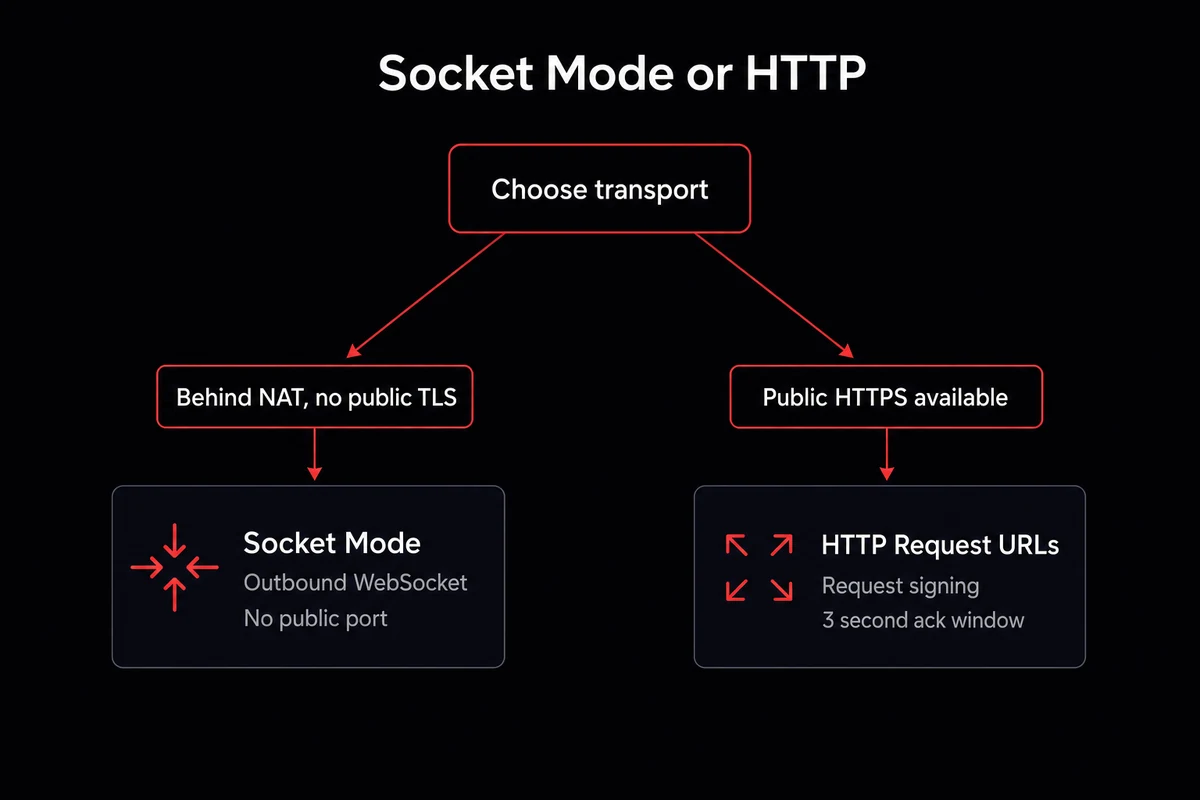
Socket Mode and HTTP Request URLs both work. They make a different tradeoff. Socket Mode opens an outbound WebSocket to Slack. No public URL, no inbound port. It works behind NAT or a corporate firewall, anywhere the network is hostile to inbound traffic. The cost: no request-signing check, because Slack is not POSTing to you.
HTTP Request URLs flips this. Slack POSTs every event to your public HTTPS endpoint and OpenClaw checks it with Slack's signing secret. You get a clean audit trail and stateless ack semantics. The cost is a public TLS endpoint with a valid cert. OpenclawVPS's one-click HTTPS exposure fits because the gateway is already on a real domain.
| Dimension | Socket Mode | HTTP Request URLs |
|---|---|---|
| Public endpoint required | No, outbound only | Yes, HTTPS with valid cert |
| Request signing | Not available | Required, via Slack signing secret |
| Concurrency cap | 10 WebSockets per app | No protocol cap |
| Ack window | Implicit on receive | 3 seconds per event |
| Works behind NAT | Yes, no config | No, needs port-forward or tunnel |
| Best for | Local dev, NATed VPS, small teams | Production with audit trail |
Two transport-tuning numbers are worth knowing. The Socket Mode pong timeout defaults to 15 seconds, the window before the gateway decides the WebSocket is dead. The reconnect backoff caps at around 30 seconds and stops after 12 failures. If you wake up to an offline bot, the gateway gave up a while ago.
Slack's chat.postMessage rate limit is roughly one message per second per channel. OpenClaw backs off on a 429, but a chatty bot in a busy channel will feel slow against that ceiling.
Running socket mode OpenClaw behind NAT means the gateway never has to expose a public port, which is why I run it for everything that does not need a request-signing audit trail. The exception is regulated environments where the signing secret is a compliance line item.
Running this on your laptop is fine until you close the lid. OpenclawVPS spins up a VPS with OpenClaw preinstalled and the gateway already exposed on a real domain in about 47 seconds. Plans start at $19/month.
The four configuration failures and how to recognize them
Almost every Slack-OpenClaw failure I have seen in 2026 falls into one of four buckets. The bucket is usually obvious from the first log line.
EADDRINUSE on port 18789. The gateway's default port is 18789, and it exits the moment something else is bound there. Run lsof -i :18789 to see what owns the port, kill it, restart. I once spent ten minutes blaming openclaw.json before realizing I had two terminal tabs open with the old gateway running.
invalid_auth. Tokens missing, tokens swapped (pasting xoxb- into the appToken slot is the classic), or an env-var placeholder that never resolved. Eyeball the prefixes: bot token starts with xoxb-, app token starts with xapp-. printenv SLACK_BOT_TOKEN is the 30-second check.
missing_scope. A scope was added in the Slack dashboard after the app was installed, and Slack does not back-fill scopes on running tokens. The fix is to reinstall the app under OAuth & Permissions → Reinstall to Workspace.
Token rotation expiry. If your Slack org has token rotation enabled, the xoxb- token expires every 12 hours. OpenClaw has no native refresh handler; the tracking issue is openclaw/openclaw#42747. Your options: disable rotation, build a sidecar that calls oauth.v2.access, or hand the problem to a managed offering. The symptom is a bot that worked yesterday and dies overnight.
Throughput edges worth knowing: OpenClaw chunks long responses at 4000 characters per Slack message. Inbound media caps at 20MB per file (configurable via mediaMaxMb), and Slack itself caps eight files per message.
Rust binary, localhost only, encrypted credentials, deny-by-default allowlists
Single binary, 10MB RAM, one second boot. Download and run
4,000 lines. Audit the entire codebase in an afternoon
Every chat group gets its own container and filesystem
127K stars, multi-user RBAC, the most polished UI
Telegram, cron jobs, 3,200+ skills. VPS handles hardening
The four failures above are fixable. The upkeep is the part that wears teams down: 12-hour token rotation, port conflicts after kernel updates, scope refreshes after every dashboard tweak. OpenclawVPS handles those out of the box. Plans start at $19/month with a 3-day money-back guarantee.
Self-host vs managed: the four-hour gap
Self-host vs managed is a four-hour gap: a full openclaw slack setup the self-host way runs four to eight hours for an experienced engineer solo, and two to five days for a team doing it the first time. That is not the OpenClaw config itself; it is everything around it. The infrastructure list is what bites:
- EC2 or a similar always-on VM
- RDS or another managed Postgres for state
- A Redis instance for short-term memory
- DNS records pointing at the gateway
- A TLS cert you remember to renew
- Observability so you know when the gateway died
- An on-call rotation
The managed path collapses that to roughly 47 seconds. OpenclawVPS spins up a dedicated VPS in Falkenstein, Nuremberg, or Helsinki. OpenClaw is already running, the gateway exposed on a real domain, HTTPS handled. You add the two Slack tokens and restart. The WhatsApp setup follows the same shape.
What you trade is a $19 to $39 per month line item against the maintenance load: token-rotation refresh, port-conflict recovery after kernel updates, scope reinstalls, OS patching.
If you already have a VPS, a TLS cert, and engineering bandwidth, self-host. The pitch is not "managed is better." It is "managed is faster."
How I run OpenClaw on Slack now
The setup is real work the first time: eight dashboard clicks, nine OAuth scopes, two tokens, one free port, and a token-rotation plan if your org enforces one. I have done it enough times to be fast, and it still takes a focused half-hour. The iMessage bridge follows the same shape for multi-channel rollouts.
OpenclawVPS spins up a dedicated VPS in about 47 seconds with OpenClaw already running and the gateway exposed on a real domain. Paste in the two tokens, restart, and the bot is live. Plans start at $19 per month with a 3-day money-back guarantee, and there is a free demo at /demo.


