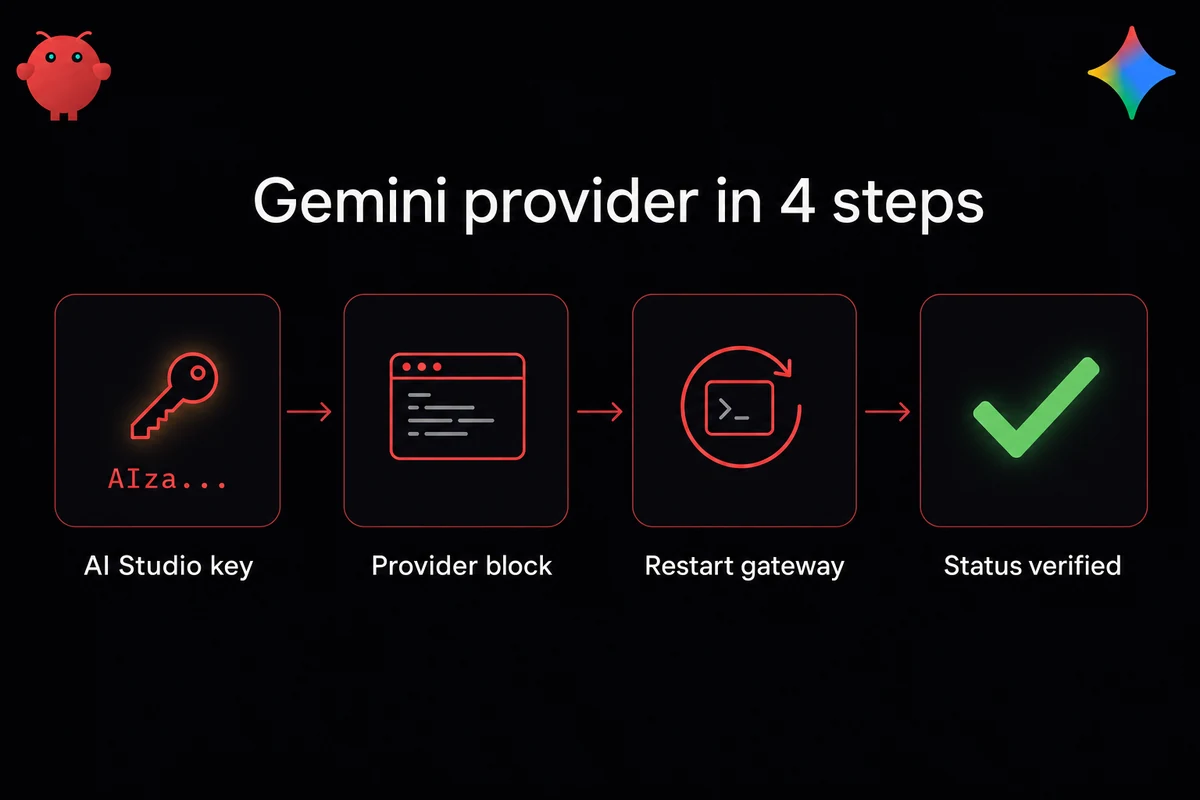
TL;DR: Wire Gemini into OpenClaw by adding one provider block to your openclaw.json config with the google-generative-ai adapter and an AIza-prefixed key from Google AI Studio, then restart the gateway. Pick Gemini 2.5 Flash as your default and reserve Gemini 2.5 Pro for heavy reasoning. The Gemini CLI OAuth path triggered 403 TOS bans earlier this year, so use a standalone AIza key instead.
A working OpenClaw and Gemini configuration is four things: a key, a provider block, a model choice, and a check command. Grab an AIza... key from aistudio.google.com and drop it into ~/.openclaw/openclaw.json under models.providers.google with api: google-generative-ai.
Not OpenAI-compatibility mode; that path rejects Gemini's JSON-Schema fields and breaks image input. Set GEMINI_API_KEY so CLI tools pick the same credential, restart the gateway, run openclaw status to confirm. If you've never wired a provider into OpenClaw before, the full setup walkthrough covers the surrounding steps.
Model choice maps to cost. Flash runs at $0.075 in / $0.30 out per million tokens, the default for most agent loops. Pro 2.5 jumps to $1.25-$2.50 in and $3-$15 out with a hard 8,192-token output cap. Skip the Gemini CLI OAuth path; H2 3 covers why.
The four-line Gemini provider block (API key + free tier)
Shortest path is four things: the adapter name, the baseUrl, the key prefix, and the gateway restart. The openclaw onboard gemini wizard does the same work step-by-step if you'd rather skip the JSON edit.
Four happy-path steps:
- Get an AIza key from aistudio.google.com (sign in, hit "Get API key").
- Add the provider block below to
~/.openclaw/openclaw.jsonundermodels.providers. - Export
GEMINI_API_KEYandGOOGLE_API_KEYso CLI and gateway agree. - Restart the gateway and run
openclaw statusto verify.
Open aistudio.google.com, sign in, hit "Get API key", and either reuse a Google Cloud project or let AI Studio spin one up. Free tier kicks in right away, no billing setup. Treat the key like a password.
Do not reuse gcloud OAuth credentials here. OAuth-issued credentials and AIza keys are not interchangeable, and the standalone AIza key path is the only credential I trust on a production gateway.
Here's the block I keep:
"google": {
  "api": "google-generative-ai",
  "baseUrl": "https://generativelanguage.googleapis.com",
  "apiKey": "AIza..."
}
That's it. google-generative-ai is the native adapter and the only one you should use here.
I wasted half a day on the OpenAI-compat adapter before image input broke and I gave up. Structured output also crashed on JSON-Schema fields Gemini accepts but OpenAI's schema doesn't. If you're adding any model provider to OpenClaw, the adapter line is the one I always double-check first.
Set the env vars so CLI tools and the gateway agree:
export GEMINI_API_KEY="AIza..."
export GOOGLE_API_KEY="AIza..."
GOOGLE_API_KEY is the fallback some libraries check first. I forgot the GEMINI_API_KEY export on my first systemd unit and chased a phantom auth error for ninety minutes before noticing the unit file's env block was empty.
Prefer the wizard?
openclaw onboard --auth-choice gemini-api-keySame four steps in a wizard. I edit by hand because I want to see what's on disk; on a fresh box the wizard is fine.
One prerequisite: node 18 or newer, 20 recommended. The gateway will start on 16 and then fall over the moment a Gemini call goes through. Run node --version first.
Then restart and verify:
openclaw restart
openclaw status
Success: a google provider with no error tag. A wrong-key error reads provider: google [error: API_KEY_INVALID] and usually means a stray newline or an env var that hasn't loaded. The hardware requirements page covers the runtime side if openclaw status red-flags more than the provider block.
Choose the Gemini model that fits the workload
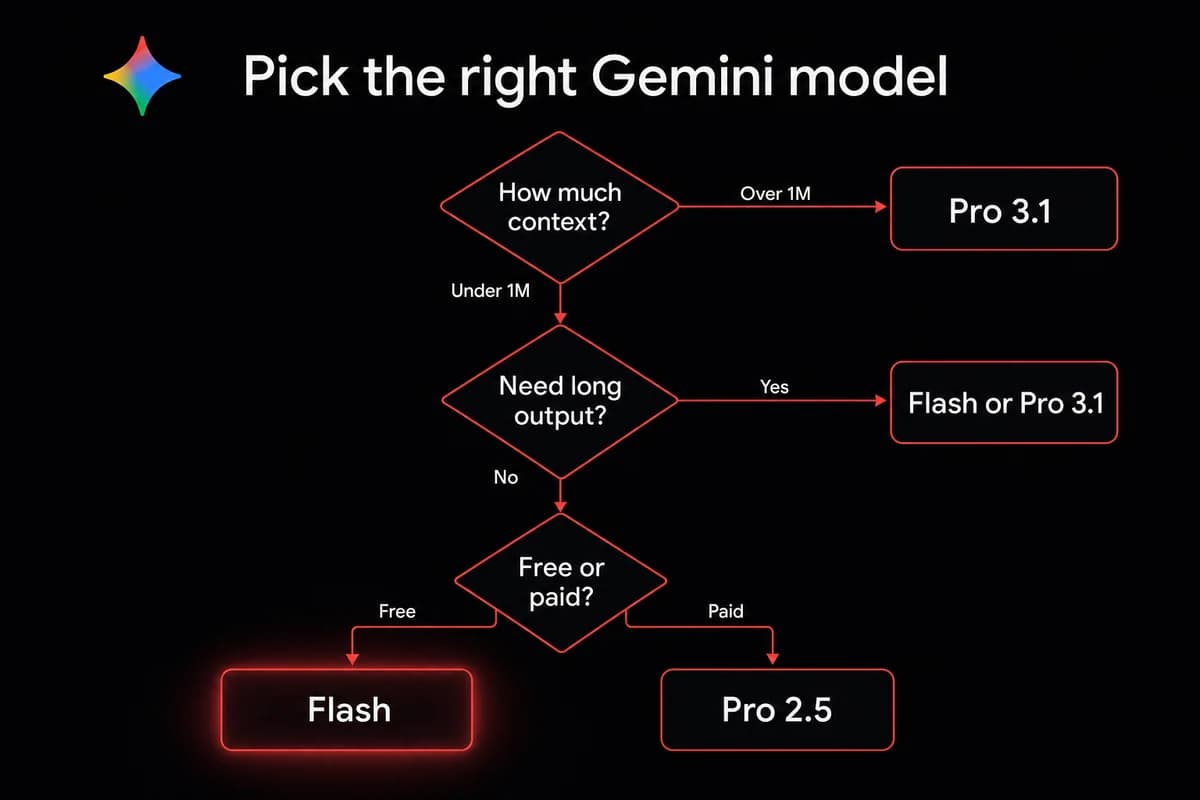
If you've ever picked the wrong default and watched the bill triple, read this carefully. OpenClaw v2026.2.21 ships with four valid Gemini IDs: gemini-2.5-flash, gemini-2.5-flash-lite, gemini-2.5-pro, and gemini-3.1-pro-preview. Anything else throws Unknown model.
On my own box I keep gemini-2.5-flash as the primary. Flash runs $0.075 in / $0.30 out per million tokens. A 20-message loop with 5K-token average context lands around three cents per session.
Free tier on Flash: 15 RPM and 1M tokens per day. Personal experimentation works, sustained agent traffic breaks.
gemini-2.5-pro sharpens reasoning and inflates the bill. Input runs $1.25-$2.50 per million depending on context; output runs $3-$15.
Pro's headline feature is the 1,048,576-token context window, useful when feeding the agent a whole codebase or a long PDF. The gotcha: a hard 8,192-token output cap. Ask Pro for a 12K-token report and you get 8,192 tokens with a truncated tail.
Running OpenClaw with Gemini 3 Pro (preview, via gemini-3.1-pro-preview) is the bleeding-edge option. Context window doubles to 2,097,152 tokens, pricing posts at $2 in / $12 out.
The model feels sharper on reasoning that used to need Pro 2.5. Catch is plumbing: v2026.2.21+ required and the registry isn't patched for fallback use, so it works in the primary slot only. Drop it into a fallbacks array and you get the same Unknown model error. Fix queued in issue #36111.
| Model | Context | Output cap | Free tier | Paid $/M (in / out) |
|---|---|---|---|---|
| gemini-2.5-flash | 1M tokens | No fixed cap | 15 RPM, 1M tok/day | $0.075 / $0.30 |
| gemini-2.5-flash-lite | 1M tokens | No fixed cap | 15 RPM, 1M tok/day | Lower than Flash |
| gemini-2.5-pro | 1,048,576 tokens | 8,192 tokens | 2 RPM, 50K tok/day | $1.25-2.50 / $3-15 |
| gemini-3.1-pro-preview | 2,097,152 tokens | No 8K cap | preview limits | $2 / $12 |
Smart routing is the pattern I use in production. Flash as primary, Pro on a fallbacks array for requests where Flash misfires, Claude or GPT as the second fallback.
If you're already comfortable switching models, the routing config is the same shape. The Claude side of the same routing pattern walks through where Claude is still the better fallback for tool-calling-heavy loops.
When the 8K output cap actually bites
You won't notice the 8K cap on tool-calling loops or RAG-fronted Q&A. The cap shows up on long-form synthesis: multi-page reports, 200-page-doc structured outlines, multi-file refactors emitting 15K tokens of patches.
Truncation is silent, not an error. Output ends mid-sentence and the rest is gone. If Pro 2.5 responses end abruptly, that's the cap. Move the task to Flash (no cap), Pro 3.1 (no cap, primary-slot only), or chunk the request.
The OAuth ban that made me switch back to one standalone API key
The OAuth-ban 403 mail arrived on a Tuesday in mid-February. "Gemini API access disabled. Terms of Service violation." Twelve days of "appeal pending" later, Google ran a system-wide unban on March 2, 2026, for every account caught in the wave. By then I'd migrated three agents to a borrowed key.
I assumed it was a region problem for the first ninety minutes. Checked the gateway IP, swapped the egress region, even toyed with the idea that Falkenstein had been blacklisted. The mail flagged how I'd authenticated, not where the traffic came from.
Documented across two Google AI Developers Forum threads (IDs 122810 and 124816), with multiple paid-tier Ultra subscribers affected. Operators were running OpenClaw agents through the Gemini CLI OAuth flow, which authenticates the CLI session against your full Google account. Looped agent traffic read as bot abuse.
Standalone AIza keys from AI Studio carry a different signature and didn't trip the flag. An agent looping a few hundred times an hour through a CLI-auth session looks a lot like a scraper.
My rule: use a standalone AIza key for OpenClaw even if you also use the Gemini CLI elsewhere. Treat keys with the care you'd give any other production credential. The two credentials never share a flag surface, and that's the habit that saved me a second 403 mail.
A second auth gotcha gets mistaken for a regional block. Operators on cloud regions sometimes see The provided API key has an IP address restriction and assume their region is geo-blocked. It's not. The key has an IP allowlist in AI Studio. Open the key, clear restrictions or add the gateway's egress IP, save.
Cost math: when Flash is enough and when Pro pays for itself
Cost math caught me out the first month. I ran on Pro 2.5 thinking I was buying quality; the bill came in around $90 for what was, in retrospect, mostly Flash-shaped traffic. Tool-calling loops, RAG, code generation under 4K tokens. None of it needed Pro's ceiling.
After moving routine traffic to Flash, the next month's bill landed around $6.
Back-of-envelope: a 20-message loop with 5K-token average context costs roughly $0.03 per session on Flash. Same loop on Pro at $2.50 in / $15 out runs closer to $1 per session. At 30 sessions a day, the gap compounds to roughly $30/day.
Pro pays off when reasoning quality dominates cost. Long-context document analysis at 500K-plus tokens per call where Flash loses the plot mid-context. Code review across a multi-file repo where one wrong refactor costs more than the bill. Structured output where you've measured Flash's accuracy ceiling and it's below what you need.
Everything else, around 95 percent of traffic in my own logs, runs on Flash. The same Flash-first reasoning works for DeepSeek deployments if you're mixing providers.
Cache reuse is the other lever. Gemini caches roughly 200,000 tokens per cached prompt; reusing the cache cuts input cost on stable system prompts. A 30K-token system prompt cached once and reused brings the input bill close to zero.
The free tier is bounded. 1M tokens per day on Flash works for personal use and breaks on sustained agent traffic. The OpenClaw use-cases page covers which workloads actually need Pro.
Common configuration failures (Flash or Pro, 8K output limit, and 4 more)
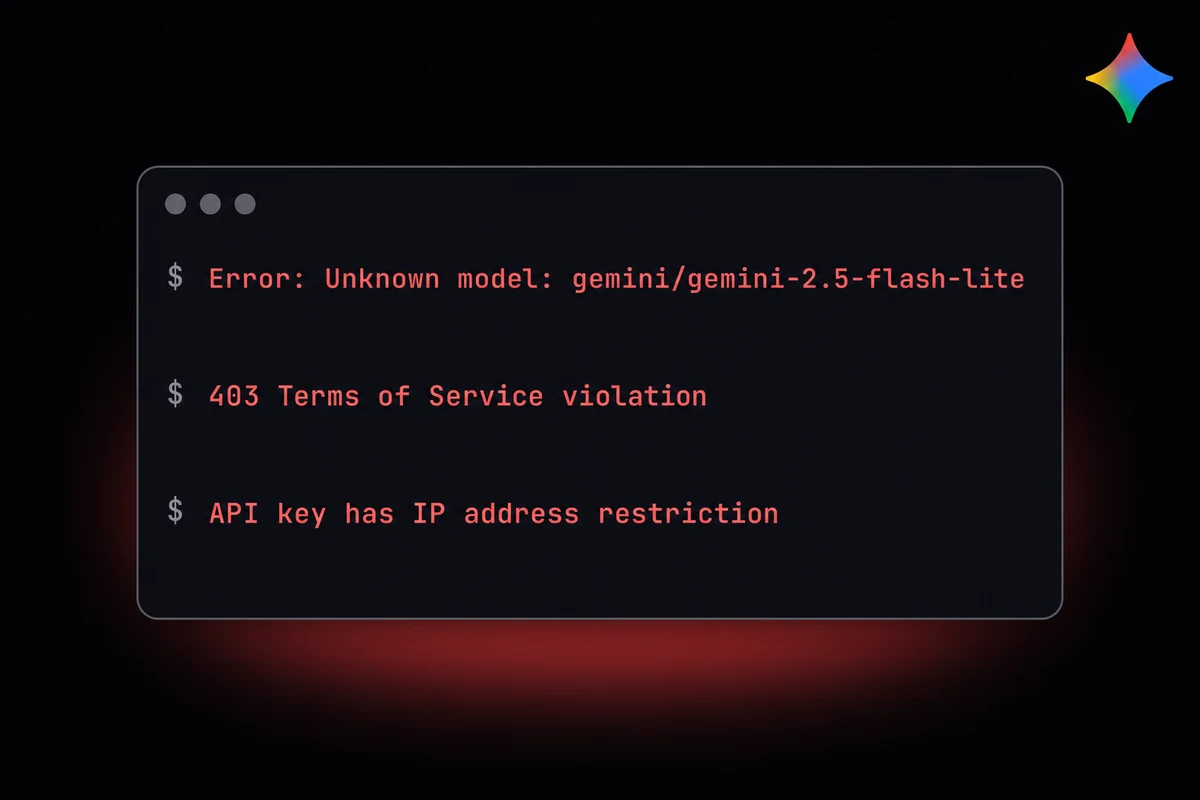
Six failure modes account for most "my Gemini config is broken" threads. Each has a one-line fix, but symptoms can look like anything from a network issue to a billing problem. The table below is what I check first when an agent goes red.
| Symptom | Likely cause | Fix |
|---|---|---|
| Unknown model: gemini/... | Invalid model ID or old OpenClaw build | Use one of the four valid IDs; upgrade to v2026.2.21+ |
| 403 TOS violation | Gemini CLI / OAuth flow flagged | Switch to standalone AIza key from AI Studio |
| API key has IP address restriction | Key restrictions panel set to wrong IP | Open key in AI Studio, clear restrictions or add gateway IP |
| Image input or structured output broken | OpenAI-compat adapter for Gemini | Set api: google-generative-ai (native) in provider block |
| Output truncated mid-sentence on Pro | 8K output cap on gemini-2.5-pro | Move long output to Flash or 3.1 Pro, or chunk request |
| Gemini 3.1 fails in fallbacks array | Registry not updated for 3.1 fallback slot | Keep 3.1 as primary only until issue #36111 lands |
Failure A: Unknown model: gemini/... Almost always an invalid model ID or an OpenClaw build predating v2026.2.21. Valid IDs: gemini-2.5-flash, gemini-2.5-flash-lite, gemini-2.5-pro, gemini-3.1-pro-preview. Older gemini-2.0-flash from stale tutorials throws this too.
Failure B: 403 TOS violation. Drop OAuth; use a standalone AIza key. OpenClaw alternatives frame credential separation the same way. Detail in H2 3.
Failure C: API key has IP address restriction. First time I hit this I spent forty minutes assuming a region was geo-blocked. The key has an IP allowlist in AI Studio. Open the key, clear restrictions or add the gateway's egress IP, save. Picks up on the next request.
Failure D: Image input or structured output broken. Check the adapter in openclaw.json. api: openai-compatible at Gemini's base URL accepts text but rejects Gemini's JSON-Schema fields, which include image input. Change to google-generative-ai.
Failure E: Output truncated mid-sentence on Pro 2.5. Hard cap; see H2 2. Switch to Flash, Pro 3.1, or chunk the request.
Failure F: Gemini 3.1 in fallbacks array fails. Registry isn't patched for 3.1 fallback routing (issue #36111). Keep 3.1 as primary only; put Pro 2.5 or Flash in fallback slots.
If you need Pro 3.1's ceiling as a fallback, a custom router that re-issues against 3.1 as primary works but it's ugly. Routing tricks like this are easier once you've wired in MCP servers.
Diagnostic commands:
openclaw status                  # loaded providers and model registry
openclaw logs --tail 50          # last fifty lines of gateway output
openclaw doctor                  # broader health check
status first, logs --tail 50 for the actual error text, doctor for wrong settings the other two miss. Most problems clear in under five minutes once you stop assuming the error message means what it literally says.
Skip the 403 mails and registry workarounds. OpenclawVPS provisions a managed OpenClaw VPS in 47 seconds with the gateway preinstalled, the egress IPs documented, and the Gemini config dance handled. EU regions (Falkenstein, Nuremberg, Helsinki) and a 3-day money-back guarantee. Plans start at $19/month.
The managed path I run my own production agents on
Everything above assumes you're running OpenClaw on your own box. JSON to edit, keys to rotate, IP restrictions to debug. That's the operator path, fine when you want the control.
When I don't want the control, OpenclawVPS is what I drop a Gemini key into. The gateway is preinstalled and the Gemini config sits in a known-good state, ready for the AIza key.
Dedicated VPS in 47 seconds, RustDesk in-browser desktop, EU regions (Falkenstein, Nuremberg, Helsinki), 3-day money-back. Starter $19/month, Pro $39/month, free demo at /demo. The getting-started overview ties it together if you're new.