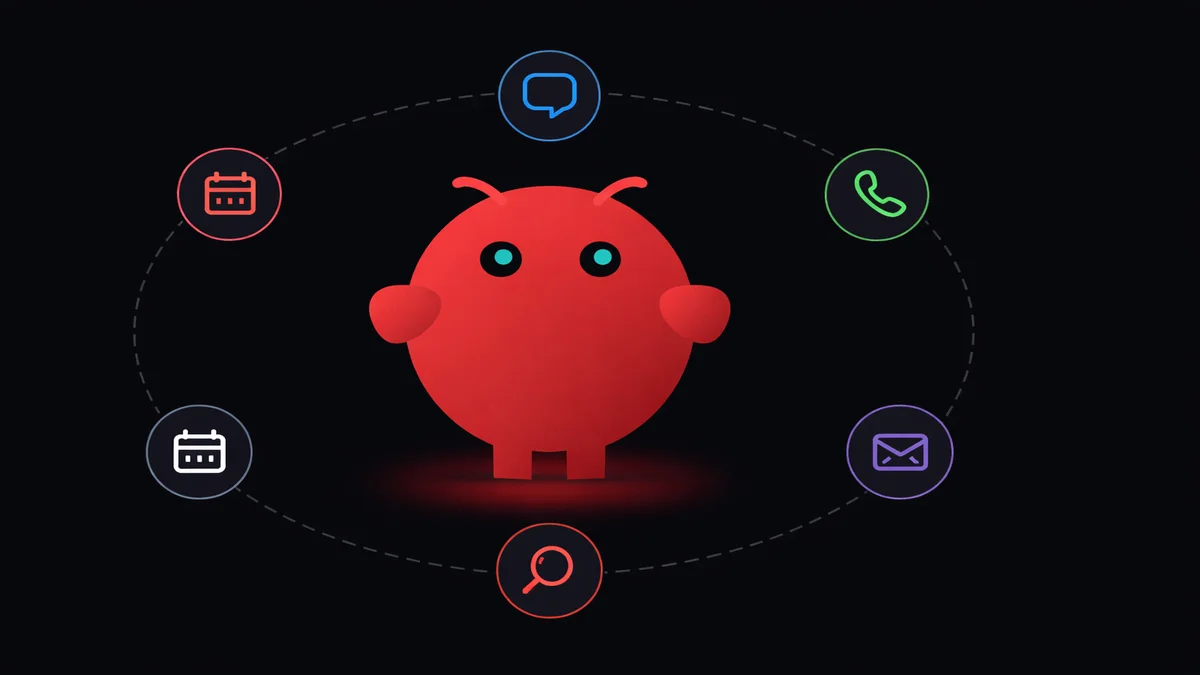
TL;DR: OpenClaw is a self-hosted AI assistant you own and control. Pick any model (Claude, GPT, DeepSeek, Gemini), create multiple agents for different jobs, add tools for calendars, search, files, and connect it all to WhatsApp, Telegram, or Discord. I replaced two $20/month AI subscriptions with one OpenClaw instance. Full setup takes about a minute with OpenClaw VPS.
I was paying for ChatGPT Plus and Claude Pro at the same time. Two apps, two billing cycles, two separate memory systems that couldn't talk to each other.
My coding questions went to Claude. Everything else went to ChatGPT because I'd been using it the longest and couldn't be bothered to migrate.
$40/month. For two AI assistants that didn't know about each other.
Then I set up OpenClaw and replaced both. One AI assistant, running on its own server, doing everything the paid ones did. Some things they couldn't do at all. I'll get to those.
If you've been bouncing between AI assistant subscriptions and none of them quite fit, this is the guide I wish I'd found six months ago. OpenClaw isn't a chatbot. It's a platform where you build the exact AI assistant you need, with the model you want, connected to the tools you actually use.
What makes OpenClaw different from ChatGPT or Gemini
ChatGPT and Gemini are products. You get what they give you. The model they picked, the features they shipped, the data policies they wrote. You're renting someone else's AI assistant.
OpenClaw flips that. It's an open-source platform that runs on its own server. You pick the model, you own the data, and you decide what the AI assistant can do. If you're new to the project, the OpenClaw explained guide covers what it is and why 335,000 developers use it.
That's not a philosophical difference. It changes what's actually possible.
-
You pick the model. Claude for code, DeepSeek for casual chat, GPT for long research. One AI assistant, multiple models, each assigned where it works best. ChatGPT locks you into GPT. OpenClaw lets you swap models per conversation, per agent, per task.
-
You own the data. Conversations never leave your server. No training on your inputs, no third-party data processing agreements, no "we may share anonymized data with partners" buried in paragraph 47. Your AI assistant's memory stays on your machine.
-
Multiple agents, not one chatbot. This is the part that made me cancel my subscriptions. Instead of one AI assistant doing everything badly, you create separate agents for separate jobs. My coding agent has a different personality, different model and different tools than my personal assistant agent. They don't share context. They don't get confused.
-
Real tools, not toy plugins. Skills and MCP servers give your AI assistant the ability to read files, search the web, manage your calendar, check your GitHub repos. Not through some limited app store. Through an open protocol with thousands of published tools. You can browse what's available in the skills marketplace.
-
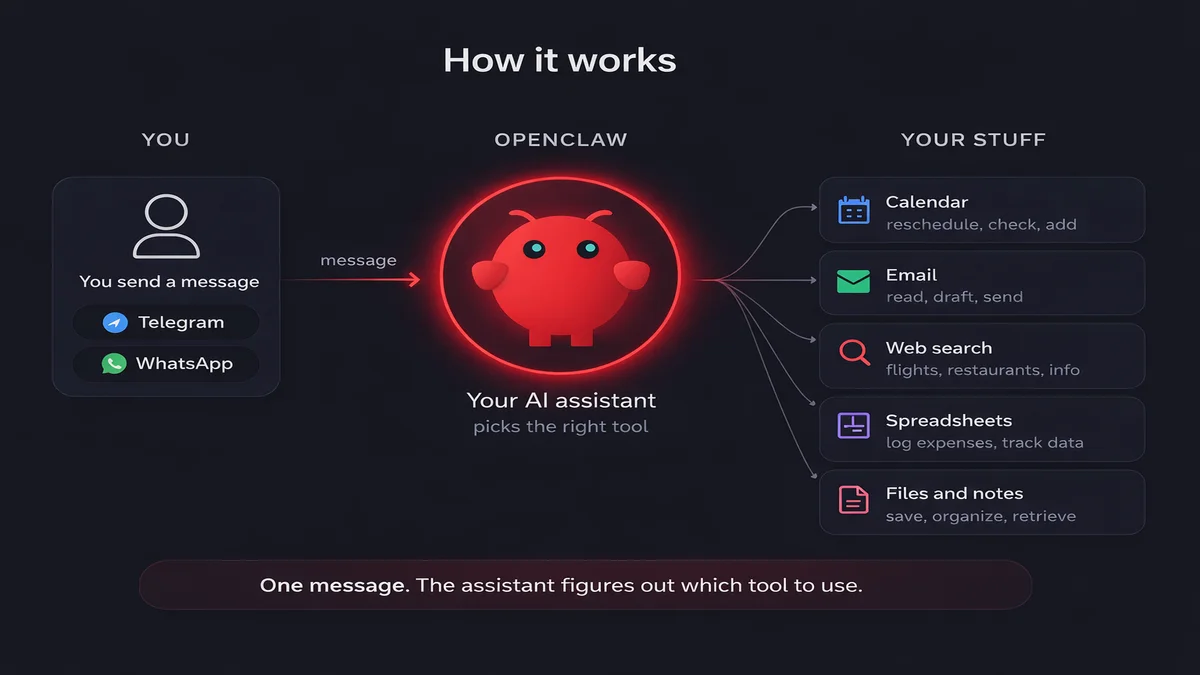
It lives in your actual messaging apps. WhatsApp, Telegram, Discord, Slack. Your AI assistant shows up where you already talk. No separate app, no browser tab you forget to check. It can even control your Chrome browser to automate web tasks for you.
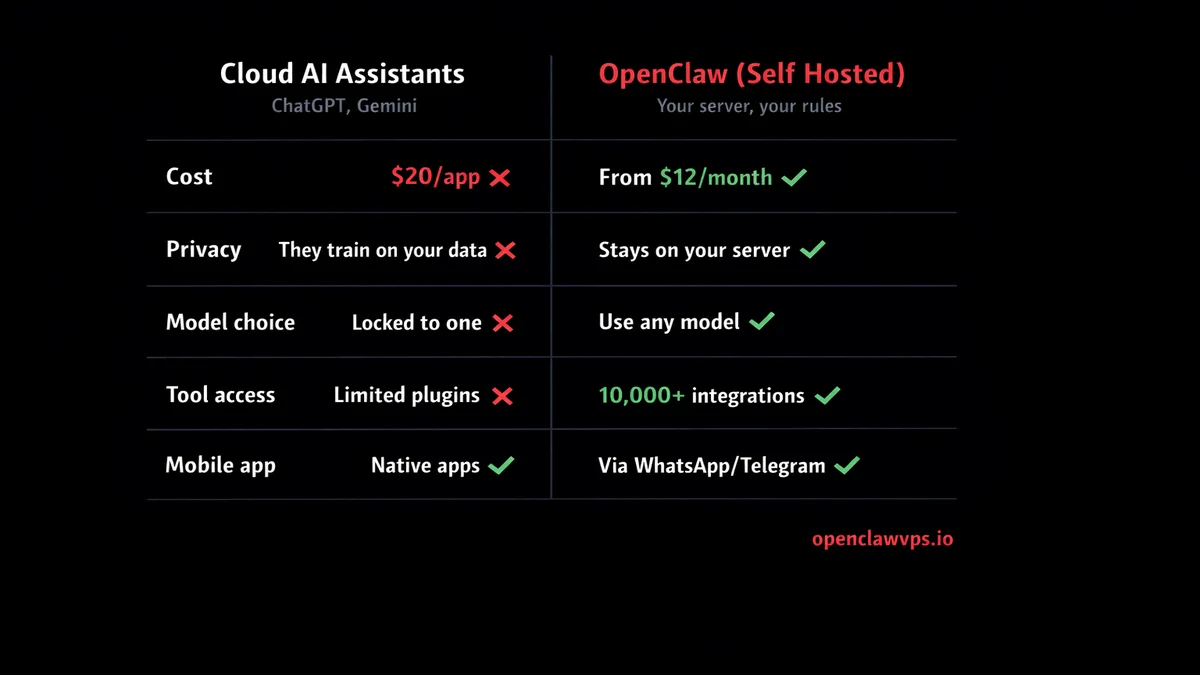
| Feature | OpenClaw | ChatGPT | Gemini |
|---|---|---|---|
| Model choice | Any model (Claude, GPT, DeepSeek, Gemini, Llama) | GPT only | Gemini only |
| Data ownership | Your server, your data | OpenAI servers | Google servers |
| Multiple agents | Unlimited, each with own model + tools | Custom GPTs (limited) | Gems (limited) |
| Tool access | 13,700+ MCP tools, open protocol | Plugin store (curated) | Google Workspace only |
| Messaging apps | WhatsApp, Telegram, Discord, Slack | ChatGPT app only | Gemini app only |
| Cost | From $12/mo (includes AI credits) | $20/mo (Plus) or $200/mo (Pro) | $20/mo (Advanced) |
The closest commercial equivalent would be paying for ChatGPT Team, adding a bunch of GPTs, and still not getting database access or real file control. And you'd be locked into OpenAI's models with no option to use anything else. For a complete comparison of OpenClaw against other AI assistant platforms, check out the full breakdown.
What an OpenClaw AI assistant can actually do
These aren't hypothetical. I pulled them from my own chat history this week.
-
Reschedule from bed. Tuesday morning I woke up late. Texted my personal agent on WhatsApp: "What's on my calendar today and is there anything I can move?" It came back with four meetings, flagged the one that had been rescheduled twice already, and drafted a "let's push this to Thursday" message. I approved it from bed. Still in pajamas.
-
Client reply without opening email. Later that day I got a WhatsApp voice note from a client. Two minutes of rambling about a feature request. I forwarded it to my work agent and said "summarize this and draft a reply saying we can do it in the next sprint." It transcribed the voice note, pulled out the three actual requests buried in the ramble, wrote a clean reply, and sent the email on my behalf. I didn't open my laptop once.
-
Expense receipt from a photo. Wednesday I snapped a photo of a restaurant receipt and sent it to my personal agent on Telegram. It read the total, the date, the vendor name, and logged it into my Google Sheet where I track expenses. Before OpenClaw I was doing this manually once a month in a painful 2-hour session. Now it takes 5 seconds per receipt and the spreadsheet stays current.
-
Weekend trip planner. Friday I told my personal agent "I want to go somewhere warm next weekend, budget under 300 euros, flying from Milan." It searched flights, cross-checked my calendar to make sure I had nothing on Saturday, and came back with three options including hotel links and total cost. I picked Lisbon, and it added the flights and hotel to my calendar automatically.
Checked 4 meetings, flagged conflicts, drafted a reschedule message
2 min vs 15 minTranscribed a voice note, extracted 3 requests, sent the email
1 min vs 20 minRead a photo, logged vendor + total + date into Google Sheets
5 sec vs 3 minSearched flights, checked calendar, booked Lisbon for under 300 EUR
3 min vs 45 minNone of this is magic. Each example is just an AI assistant with the right tools connected to it, living inside an app I already use. The reason ChatGPT or Gemini can't do most of these is simple: they don't have access to your calendar, your files, your search tools, or your messaging apps. They're stuck inside a browser tab waiting for you to copy-paste things in.
What other people are building with their AI assistants
My setup is developer-heavy. Yours doesn't have to be. Here's what I've seen people do that surprised me.
The 2 AM brain dump. A Substack writer built an AI assistant on Telegram that she messages whenever a thought hits. "Idea for a newsletter series about building businesses with AI." The assistant doesn't just save it. It categorizes the idea, expands on it, drafts an outline, and files everything into Notion. She captured 24 ideas in her first week that would have been forgotten by morning.
The freelancer who never misses a lead. A web designer connected his AI assistant to his contact form. When someone fills it out at midnight, the assistant messages back within seconds, asks about budget and timeline, and books a discovery call if the lead qualifies. He told me his close rate went up because prospects weren't cooling off overnight waiting for a reply.
So here's the one that made me laugh.
The chicken counter. A guy on Reddit connected his Home Assistant to an AI with a camera pointed at his chicken coop. Every 5 minutes it analyzes the feed and counts how many birds are inside. His automation closes the coop door when the count matches his flock size. He built the whole thing to stop losing chickens to foxes at dusk. The OpenClaw + Home Assistant bridge is the same pattern, MCP and a long-lived token instead of Gemini and YAML glue.
The email archaeologist. Someone on Facebook said they cleared 3 years of unread emails in 30 minutes. Their AI assistant categorized everything, drafted replies for the ones that still mattered, and flagged invoices that were hiding in the mess. I haven't verified the 30-minute claim but I believe the frustration that led to building it.
Small business owners who sleep now. Coaches, consultants, and service businesses are the fastest-growing group using AI assistants. A coaching client sends a message at 11 PM asking about your next program. Instead of losing that lead until morning, your AI assistant answers the question, shares pricing, and books a discovery call. One survey found small business owners lose 21 hours per week to repetitive admin. An AI assistant on WhatsApp or Telegram cuts into that number fast. Getting the WhatsApp side wired up takes about five minutes.
The concert coder. A developer on social media claimed he built a macOS app from a concert by texting his AI assistant on Telegram. I'm skeptical about the quality of what came out, but the fact that he could iterate on code while standing in a crowd? That's the kind of thing that's only possible when your AI assistant lives in your messaging app instead of a browser tab.
The landlord's maintenance bot. A property manager set up an AI assistant on WhatsApp for tenants. Tenants send photos of broken things, the assistant triages the issue by urgency, gives a time estimate, and schedules a contractor from a list. Emergency? It calls the plumber directly. Leaky faucet? Queued for next week.
Captures ideas via Telegram, auto-categorizes and drafts outlines in Notion
Replies to contact form submissions at midnight, books discovery calls
Camera + AI counts birds in coop, auto-closes door when all are inside
Cleared 3 years of unread email in 30 min. Categorized, replied, flagged invoices
Tenants send photos on WhatsApp, AI triages by urgency and schedules contractors
Most of these people aren't developers. They used managed hosting or no-code tools to get their AI assistant running. The pattern is the same every time: pick one annoying repetitive task, connect an AI assistant to it, get hours back. The thirteen consumer use cases I keep seeing survive a real workflow are the easiest place to look for the one that fits your week.
Ready to build something like this? Start with one agent and one task. OpenClaw VPS handles the infrastructure so you can focus on what your assistant does.
Cloud AI assistants vs self-hosted: the honest trade-offs
☁️ Cloud wins
Self-hosted wins 🖥️
I'm not going to pretend self-hosting is better in every way. It's not.
Cloud wins at:
Zero setup. You sign up, you chat. No server, no configuration, no debugging. ChatGPT and Gemini are always online, always updated. For casual questions where you don't care about privacy or tool access, they're hard to beat. The mobile apps are polished. The voice features work.
Self-hosted wins at:
Everything that touches real data. Privacy, model choice, unlimited tool access, multiple agents and no monthly message caps. My AI assistant reads my database, pushes to my repos, and drafts messages in my actual chat apps. Try getting ChatGPT to query your PostgreSQL instance. You can't.
The uncomfortable part:
If you self-host on your own, you're the sysadmin. Servers go down. SSL certificates expire. Models release new versions that break things. I spent 45 minutes last month debugging a memory leak in one of my tools. That's time I wouldn't spend with a cloud subscription.
OpenclawVPS removes most of that pain. They handle the server, the updates, the monitoring. You still pick your models and configure your agents, but the infrastructure is their problem. It's the middle ground between full self-hosting and being locked into a cloud product.
Also, cloud providers store your data on their servers. Your conversations with ChatGPT live on OpenAI's infrastructure. With OpenClaw, your data stays on your box. For personal stuff, maybe you don't care. For client work, you absolutely should.
There's a middle ground that I think gets overlooked. You don't have to go fully self-hosted or fully cloud. I still use Claude.ai for quick throwaway questions when I'm on my phone and don't feel like opening Telegram. The difference is that anything touching real data, client info, or needing tool access goes through my OpenClaw AI assistant. Cloud handles the disposable stuff.
My split: OpenClaw for work. Cloud for "what year did that movie come out."
When OpenClaw isn't the right AI assistant
Honesty time.
If you ask an AI assistant one question a week, ChatGPT's free tier is fine. OpenClaw is for people who use AI constantly and need it connected to their actual workflow. Paying for that? Overkill.
If you need voice-first interaction, Alexa and Siri are still better at ambient voice commands. OpenClaw is text-based through messaging channels. You can pipe voice-to-text into it, but it's not native.
If you want a slick mobile app, OpenClaw doesn't have one yet. You interact through WhatsApp, Telegram, or Discord. Which, honestly, works fine for me because I'm already in those apps. But it's not a dedicated experience with custom UI elements and conversation branching. (You can also run the full gateway on an Android phone if you want a portable server.)
If you want image generation, voice conversations, or video analysis, cloud services are ahead right now. OpenClaw can route to models that support vision and image generation, but the experience is more manual. You send an image, the model analyzes it, you get text back. No real-time voice chat loop. Not yet.
Start building your AI assistant
Sign up. Pick your AI model. Send a message.
That's it. You'll have a working AI assistant in less time than it took to read this article. From there, add models, agents, skills and tools as you need them. My 4-agent setup didn't happen on day one. It grew over a few weeks as I figured out what I actually needed.
If you don't want to deal with any infrastructure yourself, OpenClaw VPS gives you a managed instance with everything ready. Pick a plan, choose your model, and start chatting. Every plan includes free AI credits and a 7-day money-back guarantee.
Six months ago I was splitting my AI usage across two apps and paying more for less. Now I message one AI assistant on Telegram and it handles code reviews, schedules, research and database queries without switching apps. I haven't opened ChatGPT Plus in weeks.


