TL;DR: I run OpenClaw daily with 4 agents and I'm not pretending to be neutral. But I've tested every major alternative, and some of them are just better at specific things. ZeroClaw (Rust, 3.4MB, secure by default) is the best overall alternative. Nanobot (Python, 4,000 lines, MCP support) is the most feature-complete lightweight option. NanoClaw has the best security isolation. PicoClaw runs on a $10 board. Open WebUI has the biggest community but no messaging support. Full scores below.
I write for openclawvps.io, I run 4 OpenClaw agents as my AI assistant daily, and I'm about to tell you there are openclaw alternatives worth considering. That should tell you something.
Here's what pushed me to test alternatives: 42,900 OpenClaw instances are publicly exposed with no authentication. API keys sitting in plaintext. Shell access wide open. Palo Alto called it a security nightmare, and they weren't wrong. I've locked my own setup down, but the defaults are rough.
So I spent three weeks testing every alternative that Reddit, Hacker News, and the *Claw community keep recommending. Scored each one on 5 criteria that matter for day-to-day use. Not spec sheets. Not marketing pages. Just what I found running them.
How I scored these
Five criteria, each scored 1 to 5. Higher is better. Maximum possible score is 25. Every project on this list is free and open source, so cost isn't a differentiator and I left it out.
Privacy and self-hosting rates how well the platform keeps your data on your own hardware. A 5 means fully self-hosted with strong defaults. A 1 means cloud-only.
Setup time measures how long from zero to first message. A 5 means under 5 minutes with one command. A 1 means hours of configuration.
Tool access rates the plugin, skill, and MCP ecosystem. Can the assistant do things beyond chat?
Mobile messaging asks whether you can text it from Telegram or WhatsApp. A 5 means native multi-channel support. A 1 means browser only.
Model flexibility rates LLM provider support. Can you swap between Claude, GPT, local models? A 5 means any provider, hot-swap, local models through Ollama.
Nobody gets a perfect 25. Not even OpenClaw.
OpenClaw, the baseline
Before scoring the alternatives, I need to be honest about where OpenClaw stands.
- Privacy: 4/5. Fully self-hosted, data stays local. Loses a point because default config exposes the instance publicly. You have to manually lock it down, and too many people don't.
- Setup: 3/5. Not hard if you're comfortable with a terminal. But workspace files, agent configs, gateway routing, there's a learning curve. I've written 6 guides about it for a reason.
- Tools: 5/5. Skills, MCP servers, ClawHub marketplace with 3,200+ skills. This is where OpenClaw pulls ahead of everyone.
- Mobile: 5/5. Native Telegram and WhatsApp support. Text your AI from your phone. Nobody else matched this when I started testing.
- Models: 5/5. Any OpenAI-compatible API, Anthropic, local models through Ollama. Hot-swap mid-conversation.
OpenClaw scores high because it does a lot. For a full breakdown of the platform and how it works, see OpenClaw explained. The question is whether you need all of it, and whether the security trade-offs are worth it for you.
ZeroClaw, the Rust rewrite
ZeroClaw is what happens when someone looks at OpenClaw's 430,000 lines of TypeScript and says "I can do this in Rust with a 3.4MB binary." And then actually does it.
- Privacy: 5/5. Binds to localhost only. Nothing exposed unless you explicitly open it. Deny-by-default allowlists for channels and users. Credentials locked in a vault, never visible to tools. Six validation gates on shell execution. This is the security model OpenClaw should have shipped with.
- Setup: 3/5. Pre-built binaries available, but many users compile from source, which requires the Rust toolchain and about 5-6 minutes on a modern machine. Config file based. Not hard, but not one-click either.
- Tools: 3/5. 30+ built-in tools, MCP support via JSON-RPC, and a skills system using SKILL.toml files. The ecosystem is growing but much smaller than OpenClaw's 3,200+ skills. A WASM skill engine is planned.
- Mobile: 5/5. 15+ channels. Telegram, WhatsApp, Discord, Slack, Signal, Matrix, iMessage, Email, IRC, and more. This was a surprise. ZeroClaw actually supports more messaging channels than OpenClaw.
- Models: 4/5. 22+ providers including Ollama for local models. OpenAI, Anthropic, OpenRouter, Groq, Mistral. Loses a point because vision model support requires manual config overrides.
What Reddit says: The r/agi thread about ZeroClaw hit 30+ comments. The zeroclaw migrate openclaw command gets mentioned a lot. It pulls your memory and config over with a dry-run preview.
One user runs it on a $10 board. Another called OpenClaw's Node runtime "390MB of make it make sense."
My take: ZeroClaw is the strongest openclaw alternative on this list. The security model is flat-out better. The hybrid memory system (SQLite vector search + FTS5 in a single file) works without any external database.
The web dashboard at localhost:3000 shows real-time status, streaming logs, and diagnostics. The zeroclaw migrate openclaw command pulls your config and memory over with a dry-run preview.
The catch is ecosystem. OpenClaw has 13,700+ skills on ClawHub. ZeroClaw has a growing but small plugin library. If you depend on specific skills, check whether they exist before migrating.
The other caveat: memory search breaks when bots have 50+ memory files, and there's a 20 actions/hour rate limit that hits faster than you'd expect.
Pick ZeroClaw if you care about security first and can live with a smaller plugin ecosystem.
Want OpenClaw's features without the security headaches? OpenClaw VPS hardens the defaults, adds authentication, and keeps your instance locked down. Plans start at $12/month.
Nanobot, the Python alternative
Nanobot came out of the Data Intelligence Lab at the University of Hong Kong in February 2026 and hit 32,800 GitHub stars fast. The pitch: everything OpenClaw does, in 4,000 lines of readable Python instead of 430,000 lines of TypeScript.
- Privacy: 4/5. Self-hosted, local graph-based memory. No external database needed. Recent security hardening (v0.1.3) fixed a session poisoning vulnerability in the WhatsApp bridge and added context poisoning prevention. Still a younger project with a smaller security track record.
- Setup: 4/5.
pip install nanobot-aiand thennanobot onboard. The onboarding wizard walks you through config. Under 10 minutes to a working setup. This is easier than OpenClaw. - Tools: 3/5. Full MCP support (both client and server). ClawHub skill integration for installing public skills. Sub-agents that run background tasks in tmux sessions. But the ecosystem is smaller, and fewer pre-built skills exist compared to OpenClaw.
- Mobile: 4/5. Telegram, WhatsApp, Discord, Slack, Email, plus Feishu, DingTalk, QQ. Solid multi-platform coverage. Loses a point because it has fewer channels than ZeroClaw's 15+.
- Models: 5/5. Nanobot's strong suit. 12+ cloud providers plus local model support through Ollama, vLLM, llamacpp, and 6 other inference frameworks. Best local model support on this list, period. Also covers China-market providers like Moonshot and DashScope.
What Reddit says: The quote that stuck with me from a Hacker News thread is that using Nanobot vs OpenClaw "is like vibe coding vs engineering." The 4,000-line codebase is readable enough that you can actually audit it yourself.
My take: Nanobot is the alternative most people reading this site should try first. The setup is the easiest of any self-hosted option.
The MCP support means you can use the same MCP servers you've configured for OpenClaw. And the graph-based memory learns from conversations over weeks and months.
Where it falls short: the skill ecosystem is young, and the project describes itself as an "assistant/secretary" rather than a coding tool. If you use OpenClaw primarily for code execution and shell access, Nanobot is lighter in that area.
Pick Nanobot if you want the simplest setup with solid messaging and don't need a massive skill library.
NanoClaw, the security container
NanoClaw takes a different approach. Instead of rewriting OpenClaw, it wraps the Claude Agent SDK and isolates every chat group in its own container. Your Telegram group gets its own filesystem, its own memory, its own sandbox. If one conversation gets compromised, the others stay clean.
- Privacy: 5/5. Container isolation per chat group. Docker Sandboxes with hypervisor-level isolation on Mac. Each group gets a mounted filesystem only it can access. This is the strongest security model in the comparison, maybe stronger than ZeroClaw's because the isolation is per-conversation, not just per-instance.
- Setup: 2/5. You need Claude Code CLI installed, then fork the repo and run
/setup. The AI-native approach (ask Claude to configure things) is clever but slow. Expect 15-30 minutes. No traditional config file to edit. - Tools: 3/5. MCP support through Claude Agent SDK. Skills delivered as git branches (unusual approach). The
/customizecommand lets you modify behavior by talking to Claude Code. Smaller ecosystem than OpenClaw. - Mobile: 4/5. WhatsApp (via Baileys), Telegram (via grammY), Slack, Discord, Gmail. Good coverage for the main platforms.
- Models: 2/5. Primarily Claude via Anthropic API. You can proxy Ollama or other providers through OpenAI-compatible endpoints, but it's not native multi-provider like the others. If you want to bounce between Claude and GPT-4 easily, NanoClaw isn't the best fit.
What Reddit says: The Agent Swarms feature gets the most attention. Spin up teams of specialized agents that collaborate in your chat. One user called it "wild for something this small." The container isolation model got praise from security-focused commenters.
My take: NanoClaw is the right choice if security isolation is your top priority and you primarily use Claude. The per-group container model is unlike anything else here. But the Claude-first design limits model flexibility, and getting it running (forking a repo, running Claude Code commands) will confuse non-technical users.
Pick NanoClaw if you want per-conversation security isolation and mostly use Claude.
PicoClaw, the one that runs on anything
PicoClaw is a single Go binary that uses less than 10MB of RAM and boots in one second. Built by Sipeed (a hardware company), it was designed to run on their $10 RISC-V boards. It hit 24,500 GitHub stars in its first few weeks.
- Privacy: 4/5. Single binary with minimal dependencies means a tiny attack surface. No complex runtime to exploit. But less documented security features compared to ZeroClaw or NanoClaw.
- Setup: 5/5. Download the binary. Configure your API key. Run it. No Docker, no Rust toolchain, no Python virtual environment. The fastest setup on this list. One Reddit user runs it on an old Android phone inside Termux.
- Tools: 1/5. This is where PicoClaw trades off. Minimal plugin system. No MCP support documented. No skill marketplace. Shell execution and web search built in, but if you want the extensibility that makes OpenClaw powerful, PicoClaw doesn't have it yet.
- Mobile: 3/5. Telegram and Discord confirmed. Fewer channels than the others, and documentation on additional integrations is sparse.
- Models: 2/5. Claude API compatible. Can use other providers via compatible endpoints. But no native multi-provider switching, and local model support through Ollama isn't well documented.
What Reddit says: A user on r/clawdbot runs PicoClaw in Termux on an old Android phone with Chromium for web scraping. (If you want the full OpenClaw gateway on a phone instead, the Android setup guide covers that.) The consensus is that it's easier to get going than ZeroClaw but less feature-rich. 95% of the codebase was reportedly written by AI agents, which is either impressive or concerning depending on your perspective.
My take: PicoClaw is a toy until you need it to be more. That sounds dismissive, but I mean it as a compliment. It does one thing well: run an AI assistant with almost zero resources. If you have a Raspberry Pi collecting dust, PicoClaw turns it into a Telegram bot in minutes. For the full OpenClaw stack on a Pi 5 instead, the practitioner walkthrough is here.
But if you need skills, MCP servers, or multi-provider model switching, PicoClaw isn't there yet. The ecosystem is too young.
Pick PicoClaw if you want the absolute simplest, lightest AI assistant and don't need extensibility.
Open WebUI, the polished interface
Open WebUI has 127,000 GitHub stars and the most contributors of any project on this list. It's also the most different. Where every other alternative here is an agent platform (messaging, tools, automation), Open WebUI is a chat interface.
- Privacy: 4/5. Self-hosted with built-in authentication, role-based access control, multi-user support. No exposed instance problem because auth is on by default. Loses a point because it's a web app, so data lives in a browser session and SQLite database rather than a contained per-user sandbox.
- Setup: 4/5. Single Docker command. Ollama integration works immediately. The web-based setup wizard handles initial config. Faster than OpenClaw to a working state.
- Tools: 2/5. MCP support added recently. Plugin system exists but the ecosystem is smaller than OpenClaw's. No skill marketplace. You get chat and RAG (document-based Q&A), not autonomous agents running tasks.
- Mobile: 1/5. Web-only. The responsive design works on phones but you're opening a browser, not sending a Telegram message. There's an open GitHub issue requesting messaging integration but it hasn't shipped.
- Models: 4/5. Strong multi-provider support. Ollama for local models. OpenAI, Anthropic, and compatible endpoints. Runtime model switching in the UI. Slightly less flexible than OpenClaw or Nanobot on provider breadth.
What Reddit says: Open WebUI gets recommended constantly for teams and shared environments. The auth system and multi-user support make it the go-to for anyone handling client data.
But nobody on the messaging-focused threads mentions it. Because it doesn't do messaging.
My take: Open WebUI is the best chat interface on this list, bar none. If you want a self-hosted ChatGPT replacement for your team with proper authentication, this is it. But it's not really an openclaw alternative in the agent sense. No Telegram. No WhatsApp. No cron jobs. No autonomous task execution. It's a different tool for a different job.
Pick Open WebUI if you want a team-friendly chat UI with auth and don't need messaging or automation.
All openclaw alternatives scored
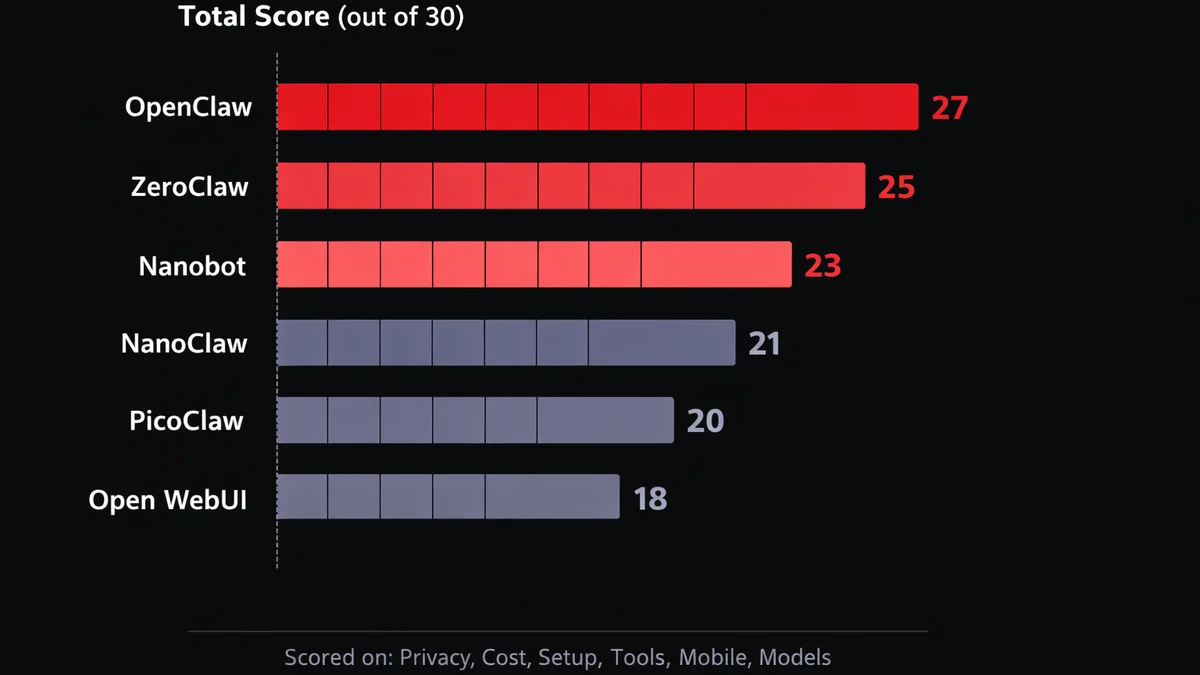
Total scores (out of 25)
| Platform | Privacy | Setup | Tools | Mobile | Models | Total |
|---|---|---|---|---|---|---|
| OpenClaw | 4 | 3 | 5 | 5 | 5 | 22 |
| ZeroClaw | 5 | 3 | 3 | 5 | 4 | 20 |
| Nanobot | 4 | 4 | 3 | 4 | 5 | 20 |
| NanoClaw | 5 | 2 | 3 | 4 | 2 | 16 |
| PicoClaw | 4 | 5 | 1 | 3 | 2 | 15 |
| Open WebUI | 4 | 4 | 2 | 1 | 4 | 15 |
| Criteria | OpenClaw | ZeroClaw | Nanobot | NanoClaw | PicoClaw | Open WebUI |
|---|---|---|---|---|---|---|
| Privacy | 4 | 5 | 4 | 5 | 4 | 4 |
| Setup | 3 | 3 | 4 | 2 | 5 | 4 |
| Tools | 5 | 3 | 3 | 3 | 1 | 2 |
| Mobile | 5 | 5 | 4 | 4 | 3 | 1 |
| Models | 5 | 4 | 5 | 2 | 2 | 4 |
| Total | 22 | 20 | 20 | 16 | 15 | 15 |
OpenClaw still scores highest. That's partly because the criteria include tools and mobile messaging, both areas where OpenClaw has years of ecosystem building behind it.
If you remove tools and mobile and just look at privacy, setup, and models, ZeroClaw ties OpenClaw. Nanobot comes close.
The scores are one person's ranking of openclaw alternatives. Your priorities might weight things differently. Someone who doesn't care about Telegram at all would score Open WebUI much higher.
Which alternative fits you
Rust binary, localhost only, encrypted credentials, deny-by-default allowlists
Single binary, 10MB RAM, one second boot. Download and run
4,000 lines. Audit the entire codebase in an afternoon
Every chat group gets its own container and filesystem
127K stars, multi-user RBAC, the most polished UI
Telegram, cron jobs, 3,200+ skills. VPS handles hardening
Rust binary, localhost only, encrypted credentials, deny-by-default allowlists.
Single binary, 10MB RAM, one second boot. Download and run.
4,000 lines. Audit the entire codebase in an afternoon.
Every chat group gets its own container.
127K stars, multi-user RBAC, the most polished UI.
And if you can't pick: start with Nanobot if Python feels comfortable, ZeroClaw if you want the tightest security, or just stay on OpenClaw with OpenClaw VPS handling the rough edges. You'll know within a week which one fits.
One more worth watching: Hermes Agent by Nous Research. It's not a fork or a wrapper — it's a separate agent platform with self-improving skills and persistent memory across sessions. Smaller ecosystem than OpenClaw, but a different philosophy entirely.


