TL;DR: Install Termux from F-Droid (not the Play Store), set up proot-distro Ubuntu inside it, then run the standard OpenClaw install. Set up wakelocks so Android doesn't kill it. Works on any phone with 4GB+ RAM. If you want something simpler, the AnyClaw app bundles everything into one install. Cloud APIs respond at normal speed. Local models are painfully slow on phone hardware.
I run OpenClaw on a phone I bought for $50. Not as a novelty. It handles my AI assistant setup when I'm away from my desk, processes messages through Telegram, and runs background tasks on a schedule.
One person in the community runs it on a $25 Moto G from Walmart. No issues.
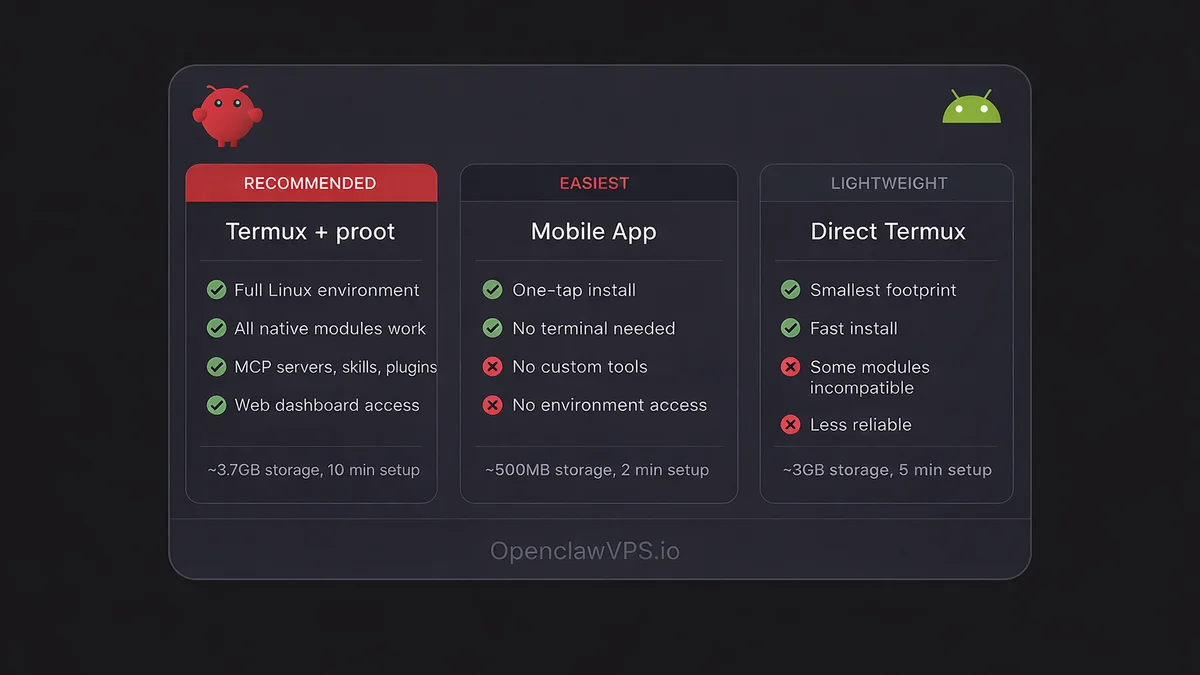
Three ways to get openclaw android running, ranked from most to least flexible.
Method 1: Termux + proot-distro (the real setup)
This is what I use. Full OpenClaw gateway on your phone, same as running it on a VPS. If you searched for openclaw termux and landed here, this is the install flow that actually works on a current Android phone.
Get Termux from F-Droid
Do not install Termux from the Google Play Store. That version has been abandoned since 2020 and ships packages too old for OpenClaw. The F-Droid version gets regular updates and includes Node.js 22+.
- Install F-Droid from f-droid.org
- Open F-Droid, search "Termux"
- Install Termux and Termux:API (you'll need the API package for wakelocks)
Why proot-distro instead of raw Termux
Termux runs on Android's Bionic C library instead of the standard glibc. That causes compatibility issues with many Node.js native modules. The os.networkInterfaces() call, which OpenClaw uses during startup, returns unexpected results or fails on Bionic. Some npm packages with native C++ bindings also won't compile against Bionic headers.
proot-distro gives you a real Ubuntu environment inside Termux with glibc, apt, and the full Linux userspace. Native modules compile and run like they would on a VPS. The overhead is minimal because proot translates syscalls, it doesn't run a full VM.
Set up Ubuntu inside Termux
Open Termux and run:
pkg update && pkg install proot-distro
proot-distro install ubuntu
proot-distro login ubuntu
Now you're in a real Ubuntu shell. Install Node.js 22:
curl -fsSL https://deb.nodesource.com/setup_22.x | bash -
apt install -y nodejs
Install and run OpenClaw
Still inside the proot Ubuntu shell:
npm install -g openclaw@latest
openclaw onboard
The openclaw onboard command walks you through picking your first AI model, setting an API key, and creating your first agent. Takes about two minutes. Searches for "open claw termux" with a space and "openclaw termux" without one both land on the same install flow; there's only one project behind both spellings.
Start the gateway:
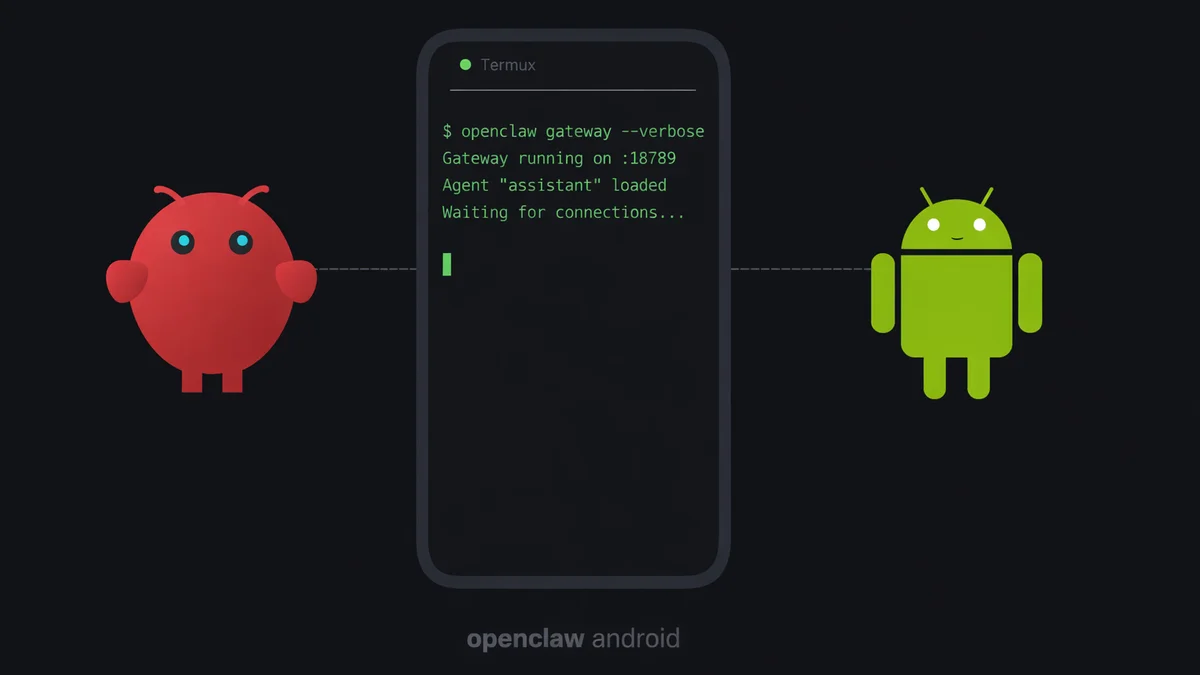
openclaw gateway --verboseThe --verbose flag prints connection logs to the terminal. Useful on a phone because you can see if the gateway is actually receiving requests or if Android killed the process silently.
Once the gateway is running, open http://127.0.0.1:18789 in your phone's browser to access the web dashboard. You can manage agents, add skills, and configure models from there.
Keep it alive (critical)
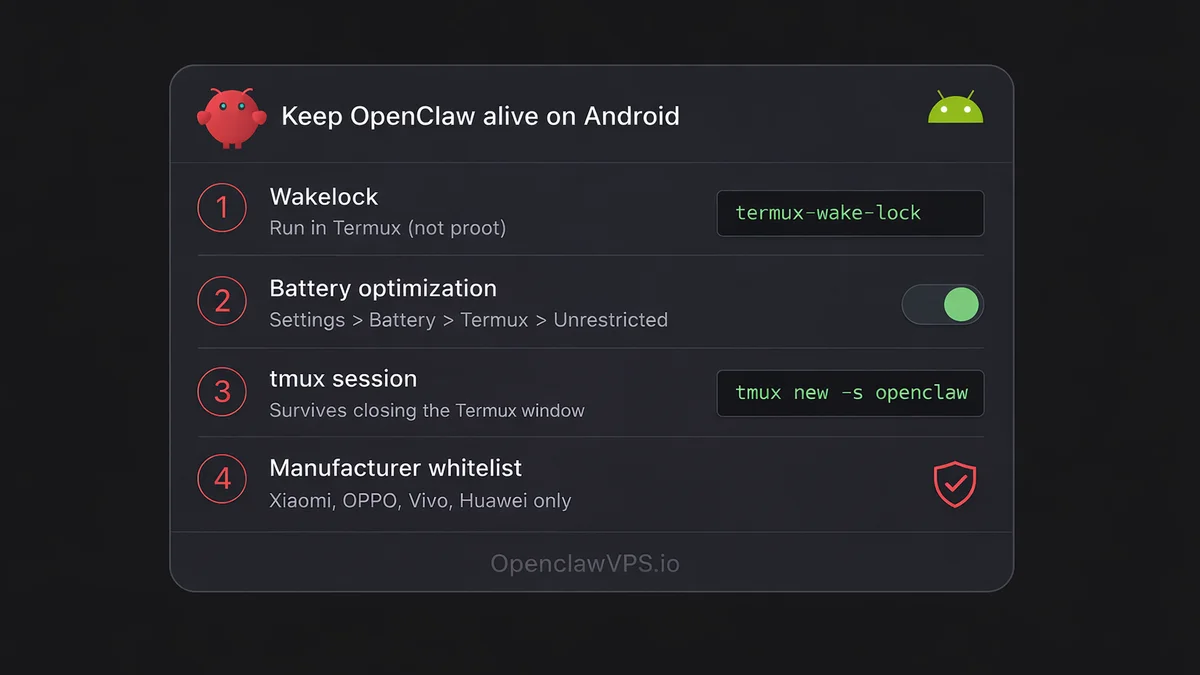
Android will kill OpenClaw within minutes if you don't set this up.
Wakelock: Prevents Android from sleeping the Termux process.
termux-wake-lockRun this in Termux (not inside the proot shell). You need to go back to the Termux layer for this. Open a new Termux session or exit proot first.
Battery optimization: Go to Settings > Battery > App battery usage > Termux, and set it to "Unrestricted." On some phones this is under Settings > Apps > Termux > Battery.
tmux: Lets the gateway survive if you accidentally close the Termux window.
# Inside proot Ubuntu:
apt install tmux
tmux new -s openclaw
openclaw gateway --verbose
Detach with Ctrl+B then D. Reattach later with tmux attach -t openclaw.
Xiaomi, OPPO, Vivo, Huawei phones: These have aggressive manufacturer battery managers that override Android's standard settings. You need to find the manufacturer-specific battery management app (MIUI Battery Saver, ColorOS Battery Management, etc.) and whitelist Termux there too. Without this step, the gateway dies within an hour.
Phantom Process Killer (Android 12+)
Android 12 and 13 added a Phantom Process Killer that targets any child process the system didn't launch itself. Standard wakelock and battery-optimization tweaks don't stop it. The fix is a one-line ADB command that raises the phantom-process limit before the OS reaps Termux's children.
Here's what's happening under the hood. The Phantom Process Killer is an OS-level reaper that watches for processes whose parent isn't Zygote (the Android process launcher). tmux's children, including the openclaw gateway --verbose process running inside your tmux session, all look phantom to the OS.
After 5 to 60 minutes the system kills them silently. The gateway disappears from http://127.0.0.1:18789, and when you reattach tmux the session is still there but the gateway prompt is gone.
The fix is a one-line ADB command from a desktop with adb installed. Enable Developer Options + USB debugging on the phone, plug it into a desktop, and run:
adb shell settings put global max_phantom_processes 2147483647That raises the phantom-process ceiling to the int32 max so Android stops culling. It's an OS-level setting, not a Termux setting, so it survives Termux reinstalls.
It does reset when you factory-reset the phone, so re-run after a wipe. Sagar Tamang's persistence writeup from February 2026 walks through the same workaround if you want the longer rationale; it's the canonical reference for this gotcha on Android 12-13.
Method 2: AnyClaw app (the easy way)
AnyClaw bundles OpenClaw, Node.js, a Linux environment, and native Rust binaries into a single Android app. No Termux, no terminal commands.
Install AnyClaw from the Google Play Store (listed as "andClaw" in some regions) or from the official AnyClaw website. Open it. Configure your API key. Done.
The trade-off: less control. You can't customize the Node.js environment, install MCP servers, or tweak low-level settings the way you can with Termux. For basic chat and agent use, it works. For anything involving custom tooling, use Termux.
Method 3: direct Termux without proot (lightweight)
This is the lean path. Skip proot-distro's ~700MB Ubuntu image, install Node.js straight into Termux, and lean on a named bypass module plus AidanPark's glibc-only installer for the parts that would otherwise crash.
pkg update && pkg install nodejs-lts
npm install -g openclaw@latest --ignore-scripts
The --ignore-scripts flag skips post-install compilation steps. Without it, node-llama-cpp tries to build from source via cmake, which takes 30+ minutes on a phone and usually fails on ARM toolchains. Leave the flag on unless you need local model inference.
This method works for some people. For others, compatibility issues from the Bionic C library make it unreliable. If you get errors about os.networkInterfaces() or sqlite3 native bindings, switch to Method 1 with proot-distro, or use one of the two named fixes below.
Bionic Bypass: the named fix for os.networkInterfaces() crashes
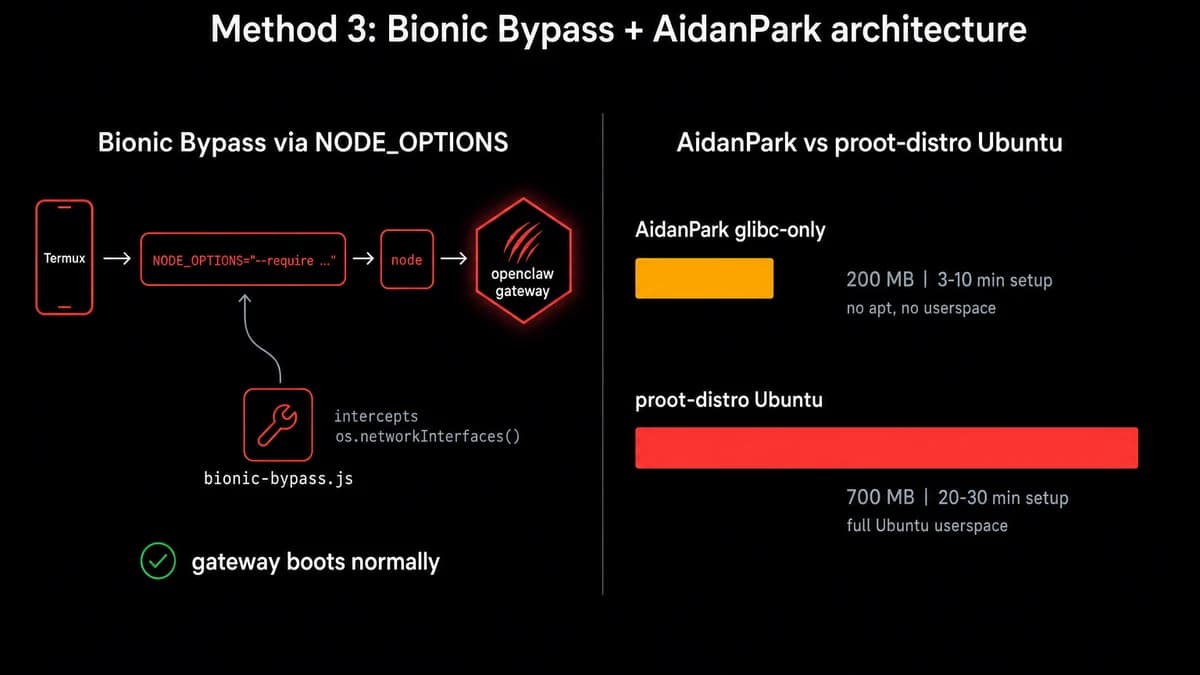
The reason raw Termux fails at gateway startup is almost always one specific call. Node's os.networkInterfaces() returns garbage on Bionic libc because the kernel surface Termux exposes doesn't match what glibc would. The Bionic Bypass module is a small JavaScript patch that monkey-patches the call to return a loopback fallback so the gateway boots normally.
Load it via NODE_OPTIONS before you run the gateway:
NODE_OPTIONS="--require ~/.openclawd/bionic-bypass.js" openclaw gateway --verboseThe bypass file ships inside the mithun50/openclaw-termux project and is bundled into AidanPark's installer, so most lightweight installers drop it into ~/.openclawd/ for you. If yours didn't, copy the patch from either repo and re-run with the env var. Five of the sixteen Android-OpenClaw guides I scanned name this exact fix; it's the de facto standard for Method 3 setups in 2026.
AidanPark's glibc-only single-command path
If you don't want to assemble the pieces by hand, AidanPark's installer does it in one command. The project (1.5k stars, v0.4.0 on March 30 2026) drops proot entirely and uses Termux's own glibc dynamic linker (ld.so) to load native modules.
Storage footprint lands around 200MB versus 700MB for the proot path, and setup runs 3 to 10 minutes versus 20 to 30 for proot-distro Ubuntu.
The trade-off is real. AidanPark gives you the gateway and the dynamic linker, not full apt or a real userspace. That's fine if you just want OpenClaw running and routing requests. It's not enough if you want to compile native MCP plugins, or if you're installing arbitrary MCP servers that drop their own apt dependencies. For those, fall back to Method 1.
Phone-specific tuning
SOUL.md for shorter responses
On a phone screen, long AI responses are painful to scroll through. OpenClaw lets you drop a SOUL.md file in your agent's directory to control how it responds. For mobile use, add something like:
Keep responses under 3 sentences unless asked for detail.
Use short paragraphs. No bullet lists longer than 5 items.
When given a choice between brief and thorough, pick brief.
This cuts token usage too, which matters if you're paying per API call.
Tasker automation
DoneClaw published a guide on connecting OpenClaw to Tasker. The idea: trigger OpenClaw actions based on Android events. Your phone receives a calendar notification, Tasker fires a webhook to the local gateway, and your AI agent drafts a prep summary for the meeting.
Works with any automation app that can send HTTP requests. Tasker is the most common, but Automate and MacroDroid do the same thing.
What actually works on a phone
Cloud APIs: fast. OpenAI, Anthropic, Gemini, any provider you'd use on a desktop. The phone just sends requests and receives responses. No difference in speed. This is how I run mine.
One reality check on the Gemini side: the free tier gives you about 60 requests per minute and around 1,000 per day. Fine for personal use, easy to burn through if you wire a Telegram bot to a busy group chat.
Local models: slow. Android phones do CPU-only inference. No GPU offloading for llama.cpp. A query that takes 2 seconds on a desktop GPU takes 30+ seconds on a Snapdragon 8 Gen 2. On cheaper chips, forget it.
If you still want to try, install Ollama inside proot Ubuntu and point OpenClaw at localhost:11434. Stick with small models: phi3:mini (2.3GB) or gemma2:2b (1.6GB). Anything bigger and you'll be waiting a minute per response.
RAM: 4GB minimum, 8GB recommended. OpenClaw and Node.js take about 300-500MB. That leaves room for Android and a few background apps. If you try running local models, 12GB+ is the real minimum. The full hardware requirements writeup covers when a Pi or VPS beats a phone for the same gateway role.
Storage: 3GB for OpenClaw and Node modules, plus the ~700MB proot-distro Ubuntu image if you're using Method 1. Add 4-70GB if you're downloading GGUF model files. Use termux-setup-storage to access your SD card if internal storage is tight.
Battery: Expect 5-10% drain per hour with active use. Idle with the gateway running and wakelock on, it's closer to 2-3% per hour. A phone with 5000mAh lasts a full day as a dedicated OpenClaw server if you're mostly routing to cloud APIs.
The gotchas
ARM64 compatibility gaps. sqlite3 and @discordjs/opus don't ship prebuilt binaries for linux-arm64. Building from source fails on ARM NEON intrinsics. This is why Method 1 (proot-distro) is the recommended path. Use memory-core (OpenClaw's default memory plugin) instead of plugins that depend on sqlite3 native bindings.
/tmp is read-only. OpenClaw's CLI hardcodes /tmp/openclaw for logs, but /tmp is read-only on Termux. It falls back to $TMPDIR automatically on newer versions. If you're on an older version and see write errors, set TMPDIR manually:
export TMPDIR=$HOME/tmp && mkdir -p $TMPDIRUpstream issue #11587 was closed as not-planned in February 2026, so the $TMPDIR workaround above is the canonical fix going forward rather than a temporary patch waiting on a release.
Memory accumulation. Long-running Node.js processes on phones use more memory over time. I restart my gateway once a week. A cron job handles it:
apt install cron
crontab -e
# Add: 0 4 * * 1 tmux send-keys -t openclaw C-c && sleep 2 && tmux send-keys -t openclaw "openclaw gateway --verbose" Enter
The Companion App is not the gateway. OpenClaw has an official Android Companion App on the Play Store. It connects your phone's camera, mic, and sensors to a gateway running somewhere else. It does not run the gateway itself. If you want OpenClaw running on the phone, you need Termux or the AnyClaw app.
Phone-as-node returns empty commands. Issue #15944 (closed not-planned in February 2026) confirms that a Termux node identifies its PATH correctly but reports an empty commands: [] array back to the remote gateway. Even with the Bionic Bypass module loaded, remote command execution stays disabled on the Android side.
Workaround: use the phone as the gateway host, not as a worker node attached to a gateway running elsewhere. There's no fix coming upstream.
Connect your messaging
Once the gateway is running, you can reach it from Telegram or WhatsApp on the same phone or any other device. The setup is identical to a VPS install. Point your bot token at the gateway's address and port.
If you're comparing this setup to other platforms, PicoClaw is worth a look for ultra-low-resource phones. It's a single Go binary that uses under 10MB of RAM.
If you'd rather skip Termux entirely, OpenClaw VPS gives you a managed instance that's always online — no phone, no battery management, no restarts required.


