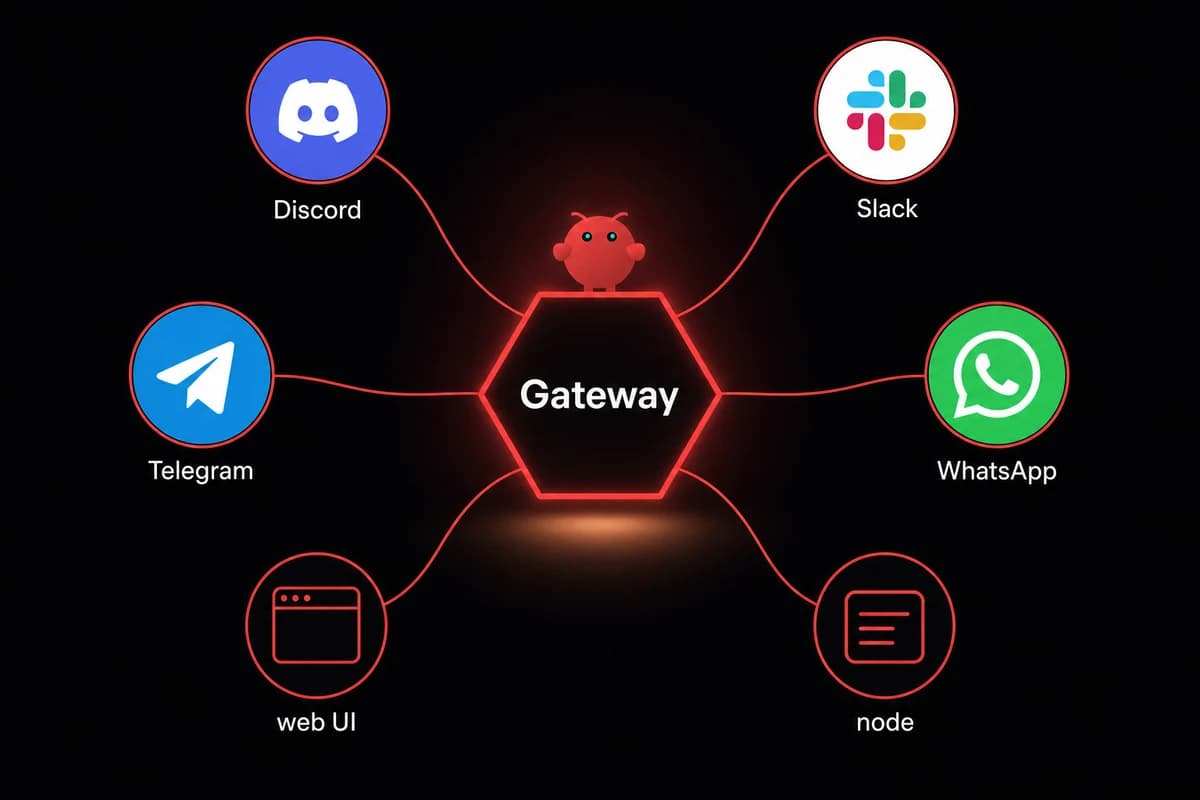
TL;DR: The OpenClaw Gateway is a WebSocket service that runs on port 18789 and routes traffic between your agent, your channels (Telegram, Slack, WhatsApp), and your nodes. By default it binds to 127.0.0.1 and needs no auth. Switch to a non-loopback bind and it requires a token. That is the whole shape of it.
"Gateway" in OpenClaw is one specific thing: the WebSocket server that ships with the agent. It listens on 127.0.0.1:18789 by default, accepts connections from local clients (the Mac app, the web UI, the CLI), and proxies requests to your channels and nodes.
Channels are the consumer-facing endpoints. Telegram, Slack, WhatsApp, Discord. Nodes are workers the agent reaches over an authenticated tunnel.
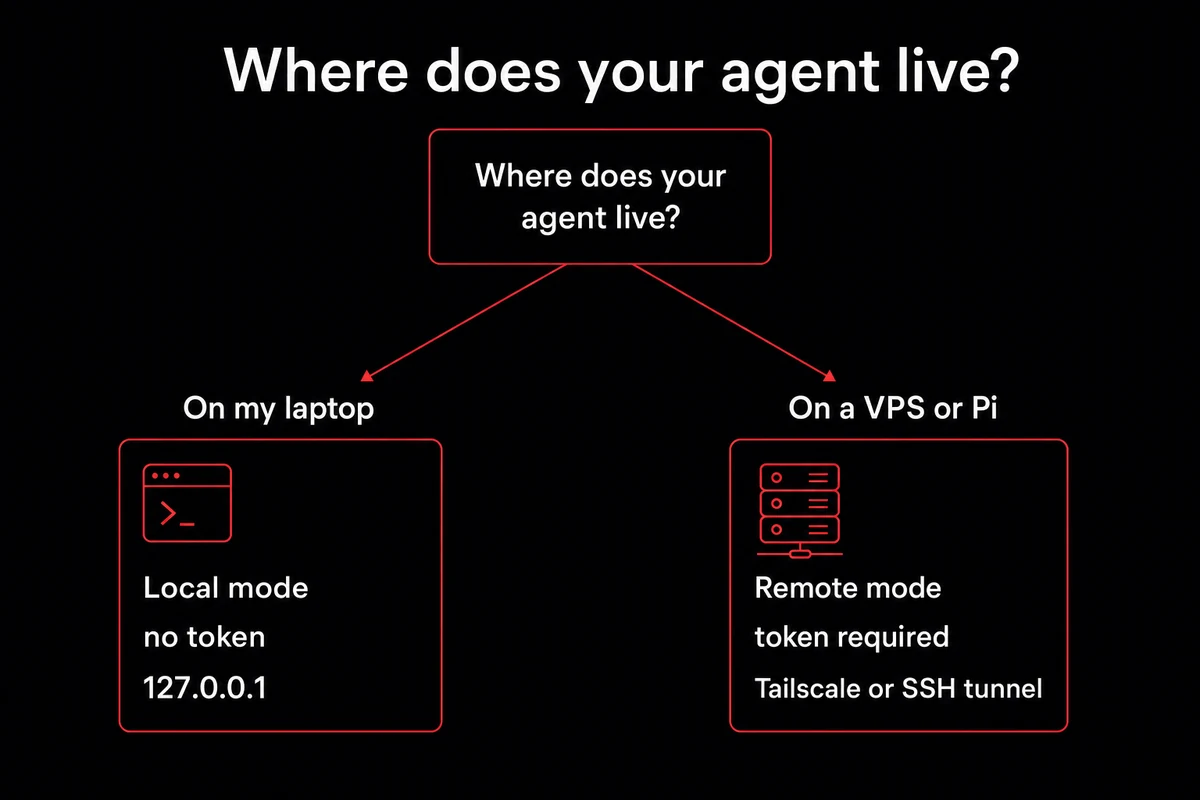
There are two modes. Local mode binds to loopback and accepts unauthenticated connections from the same machine. Remote mode binds to a non-loopback interface and refuses connections without a token (gateway.auth.token in ~/.openclaw/openclaw.json, or OPENCLAW_GATEWAY_TOKEN in the environment). Switching modes is a config edit, not a separate binary.
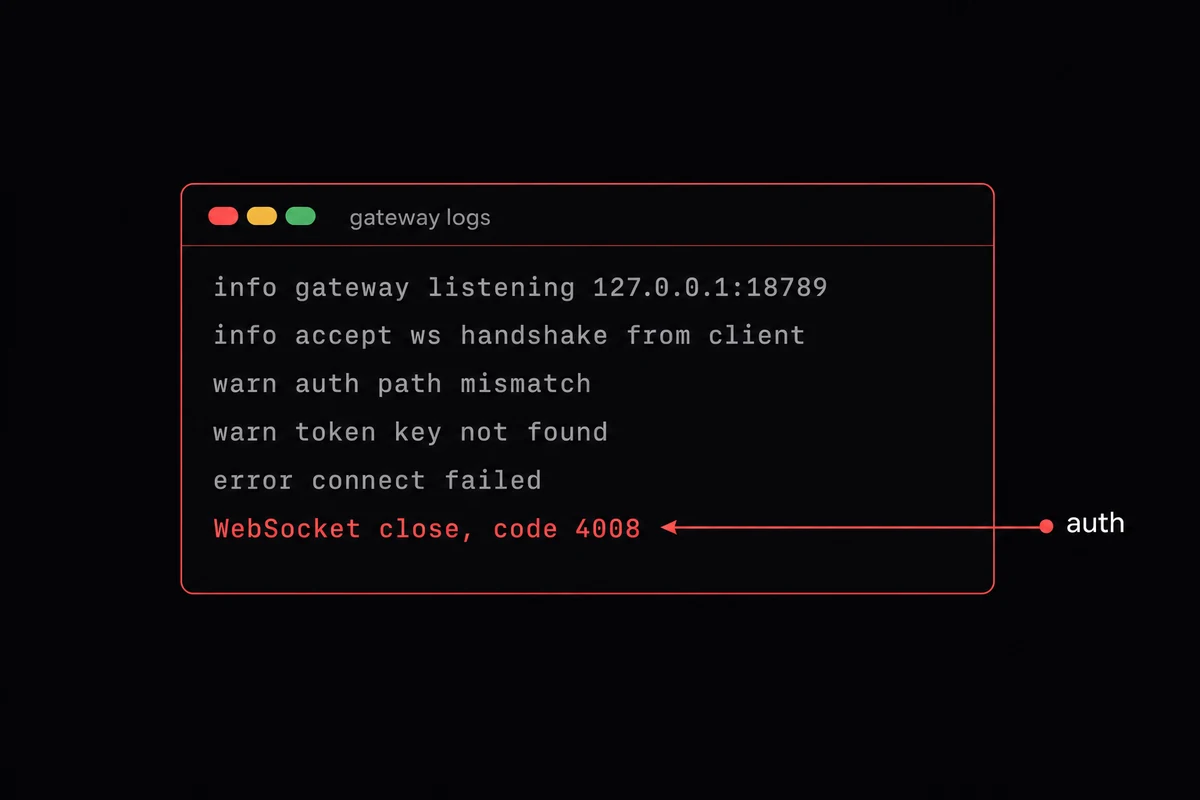
The first time I tried to reach my agent from a Telegram message away from the desk, the gateway logs said "connect failed, code 4008" and the web UI was offline. I had set gateway.auth.token. The companion app reads gateway.remote.token. Different key, same human, two hours.
What the OpenClaw Gateway is (and what it isn't)
The OpenClaw Gateway is the WebSocket server that ships inside the OpenClaw agent, listening on OpenClaw Gateway port 18789 with a loopback bind of 127.0.0.1 by default. It is the routing layer between your agent process, your channels (Telegram, Slack, WhatsApp, Discord), and any nodes you have attached.
A second meaning of "gateway" floats around the SERP as of mid-2026. One editorial competitor uses it as a synonym for the whole product, which is not what the docs do. Gateway with a capital G is the component; OpenClaw is what OpenClaw itself is: the agent, the install, the CLI. A separate community plugin called openclaw-a2a-gateway ships the Agent-to-Agent protocol, different repo entirely.
Four moving parts: the auth layer (no-op on loopback, token check on remote), the session manager (keeps connections alive across reconnects and tracks scopes), the tool router (how the agent reaches ClawHub skills, MCP servers, and local commands), and the node proxy (tunnels requests to any worker you have paired).
The shorthand most operators use: the gateway is what your WhatsApp channel talks to when a message lands, and what your web UI is staring at when the little dot in the corner is green.
Local mode: what runs out of the box
Install OpenClaw on a Mac or a Linux box and the gateway is already running before you notice. Local mode means 127.0.0.1:18789, no token, running as a background service via systemd on Linux or launchd on macOS. Probe timeouts default to 10,000 ms; per-command discovery sits at 2,000 ms.
The OpenClaw Gateway commands: start, stop, restart, status
The OpenClaw Gateway commands you will run most often are start, stop, restart, status. openclaw gateway restart is the cycle. stop and start are useful when you want to pause the gateway to inspect a port or free 18789.
status is the read: on a healthy box you see "systemd enabled" and a running PID with the port and bind printed underneath. If the WebSocket is hung but the process is alive, status will say green and the logs will say otherwise.
When to drop into foreground + verbose
For debugging, the openclaw gateway setup workflow is: openclaw gateway stop to free port 18789, then run the gateway in the foreground with --verbose flagged on. Live logs in your terminal, full WebSocket handshake noise visible. Ctrl+C ends the foreground process; openclaw gateway start puts the systemd-managed mode back.
I burned a Sunday tailing the rotated log file when the obvious move was to run in foreground for five minutes.
Bonjour discovery (_openclaw-gw._tcp) is also on by default for finding gateways on the LAN.
Remote mode: when the laptop isn't where the agent lives
Remote mode is what you get when you change gateway.bind from 127.0.0.1 to a non-loopback address. The gateway then refuses every connection that does not present a valid token at the socket layer. It is the shape you need when the agent runs somewhere other than the machine in front of you, talking to a phone, a tunnel, or a remote CLI.
There is a thread on Hacker News where a parent describes standing in line at Disneyland and shipping a patch from their phone, talking to an agent named Patch over the Telegram channel backed by Tailscale and tmux. Laptop at home, agent on a VPS, gateway reachable from somewhere that is not your couch.
Switching modes is one config change. Edit ~/.openclaw/openclaw.json, set gateway.bind to a non-loopback address, set gateway.auth.token, and restart. The token requirement is enforced at the socket, not at a config-validation pass.
| Aspect | Local mode (default) | Remote mode |
|---|---|---|
| Bind address | 127.0.0.1:18789 | 0.0.0.0 or tailnet IP, port your choice |
| Auth | None required | Token required at the socket |
| Intended client | Mac app, web UI, CLI on same box | Companion app, remote CLI, phone via tunnel |
| Exposure path | None, loopback only | Tailscale Serve, SSH tunnel, or Cloudflare Tunnel |
| Token key read | n/a | gateway.auth.token for programmatic, gateway.remote.token for the companion app |
The token trap: gateway.auth.token vs gateway.remote.token
This is the beat nothing in the SERP leads on, and it cost me the two hours I mentioned at the top. The fix is short: if your app says "gateway token missing" but the token is set, generate a fresh one with openclaw doctor --generate-gateway-token and write it under both keys, or pick the one that matches your client.
Tailscale Serve and SSH tunnel, the two real exposure paths
tailscale serve in front of the gateway gives you a tailnet-private URL with TLS already terminated. Everything talking to the gateway has to be on the tailnet, which for a personal agent is fine and for a production webhook usually is not.
ssh -N -L 18789:127.0.0.1:18789 user@your-vps works if SSH works: the bind stays loopback, your local machine forwards a port. For webhook-driven channels that need a public callback URL, Cloudflare Tunnel in front of the gateway is the common pattern.
Security defaults, and what to change before you expose it
Loopback by default is the safe shipping posture. Until you change the bind, the only thing that can talk to 18789 is a process on the same machine. That covers ninety percent of "I just installed OpenClaw and want to try things" use. The harder parts are the ones you have to opt into: token rotation cadence, filesystem permissions, TLS placement, and the failure mode every operator hits at some point, code 4008 in the gateway logs.
| Default | What it gives you | Tighten before you expose |
|---|---|---|
Bind 127.0.0.1 | No internet exposure | Set gateway.bind to a tailnet IP, not 0.0.0.0, unless you actually need a public bind |
| No auth on loopback | No token to leak locally | Generate gateway.auth.token and set gateway.remote.token for the app |
~/.openclaw perms vary | Whatever your umask gave you | chmod 700 ~/.openclaw, then chmod 600 on config files |
Speaks ws:// | Plaintext on the wire | Terminate wss:// at a reverse proxy (Caddy, nginx, Cloudflare) |
| DM pairing default | Shared inboxes only respond to paired senders | Add an allowFrom allowlist before going public |
| Standard log verbosity | Readable status output | Drop into --verbose foreground when debugging |
Code 4008 in the logs: auth path mismatch
The single most common failure signature is a WebSocket close with code 4008 and connect failed in the reason. It almost always means the handshake reached the gateway but the auth path disagreed with what the client sent.
Token under the wrong key. Token missing. Token set but the connection bypassed auth because of a stale config that did not reload. If you see 4008, check both gateway.auth.token and gateway.remote.token, restart, and try again. The broader hardening checklist covers process limits, audit logs, and key management.
Run the OpenClaw Gateway on a managed VPS
Running the OpenClaw Gateway on a managed VPS means putting the gateway on a small cloud host (2 vCPU, 4 GB RAM, 20 GB SSD for personal scale; 8+ vCPU, 16+ GB RAM, 200 GB NVMe for enterprise per the broader hardware requirements) so the WebSocket service is reachable around the clock from any tunnel or token-paired client. The bind, the token, and the daemonized service stay the same as a laptop install; the host stops moving.
The laptop-gateway openclaw gateway setup breaks the Disneyland use case in obvious ways. The lid closes, the IP changes when you join new wifi, the battery dies on the road.
The fix most operators land on is putting the gateway on something that does not move: a small Linux box at home, a Pi 5 on a shelf, a VPS in Falkenstein.
A small VPS handles a personal agent talking to two or three channels without breathing hard.
An always-on host is also where the security defaults start mattering for real. A VPS gateway has more surface area than a laptop: SSH access, package updates, log rotation, backups. The work shifts from "the agent is just running" to "I am operating a small piece of infrastructure," which is exactly what a managed host removes.
A laptop that decides when your agent is online is the wrong host for this. OpenclawVPS provisions a dedicated VPS with OpenClaw, RustDesk-in-browser, and the gateway already running, in about 47 seconds. EU regions, BYO-API-key supported. Plans start at $19/month.
What to run when the gateway misbehaves
The diagnostic loop on a misbehaving gateway is short. openclaw gateway status tells you whether the service is alive. openclaw gateway probe pokes the WebSocket with a default 10-second timeout and a 2-second per-command discovery. openclaw gateway health is the JSON-shaped read; humans use it when status looks green and probe is hanging.
The diagnostic trio: status, probe, health
I run them in that order. Status first because it is the cheapest. Probe second because a probe failure when status is green almost always means an auth mismatch. Health third because once the first two are green, anything still broken is at the channel or node layer. openclaw doctor checks the config and can regenerate a token; openclaw logs -f catches everything else.
Reading the two failure signatures
Two signatures show up in the GitHub issue tracker. The first is the code-4008 pattern: the WebSocket closes immediately after the handshake and the log line says connect failed. Auth path mismatch, almost always.
The second is harder to spot. A client authenticates with connectParams.auth.token but has no paired device, and the gateway strips all scopes to []. The client connects, calls read-only endpoints, and silently fails on anything that needs operator.write. Fix: pair a device. Nothing crashes, which is what makes it hard.
Debugging the gateway over SSH at 11pm gets old fast. With OpenclawVPS, the gateway is already provisioned, already on the right port, and already reachable. RustDesk-in-browser when you do need to look at the box. 3-day money-back if it does not click.
How I run the OpenClaw Gateway 24/7
The gateway wants to live on something that does not sleep, does not change IP, and is reachable from a token rather than a power button. OpenclawVPS provisions one with OpenClaw and the gateway preinstalled in about 47 seconds. EU regions in Falkenstein, Nuremberg, and Helsinki, RustDesk-in-browser for desktop sessions, and BYO-API-key support if you would rather route through your own Claude or OpenRouter account.


